Time blocking is one of the simplest ways to turn your priorities into actual time.
Instead of beginning the day with a long list of tasks and hoping you eventually get to the important ones, you reserve specific periods on your calendar for the work you intend to complete.
The principle is straightforward:
Decide what matters, estimate how long it will take, and give it a place on your calendar.
But time blocking also has an obvious failure mode.
Many people fill nearly every available minute of the day, leaving no room for work to run long, meetings to move, urgent requests to appear, or their energy to fluctuate. Others create a thoughtful plan on one calendar, only to have meetings added through another calendar they forgot to account for.
The result is not a more productive calendar. It is a calendar that is already behind schedule by 10:30 a.m.
The solution is not to abandon time blocking. It is to create a system that combines structure with flexibility—and to use an AI scheduling assistant like Everest to help maintain that system as your schedule changes.
What is time blocking?
Time blocking is the practice of dividing your day into periods reserved for specific activities or categories of work.
A time-blocked calendar might look like this:
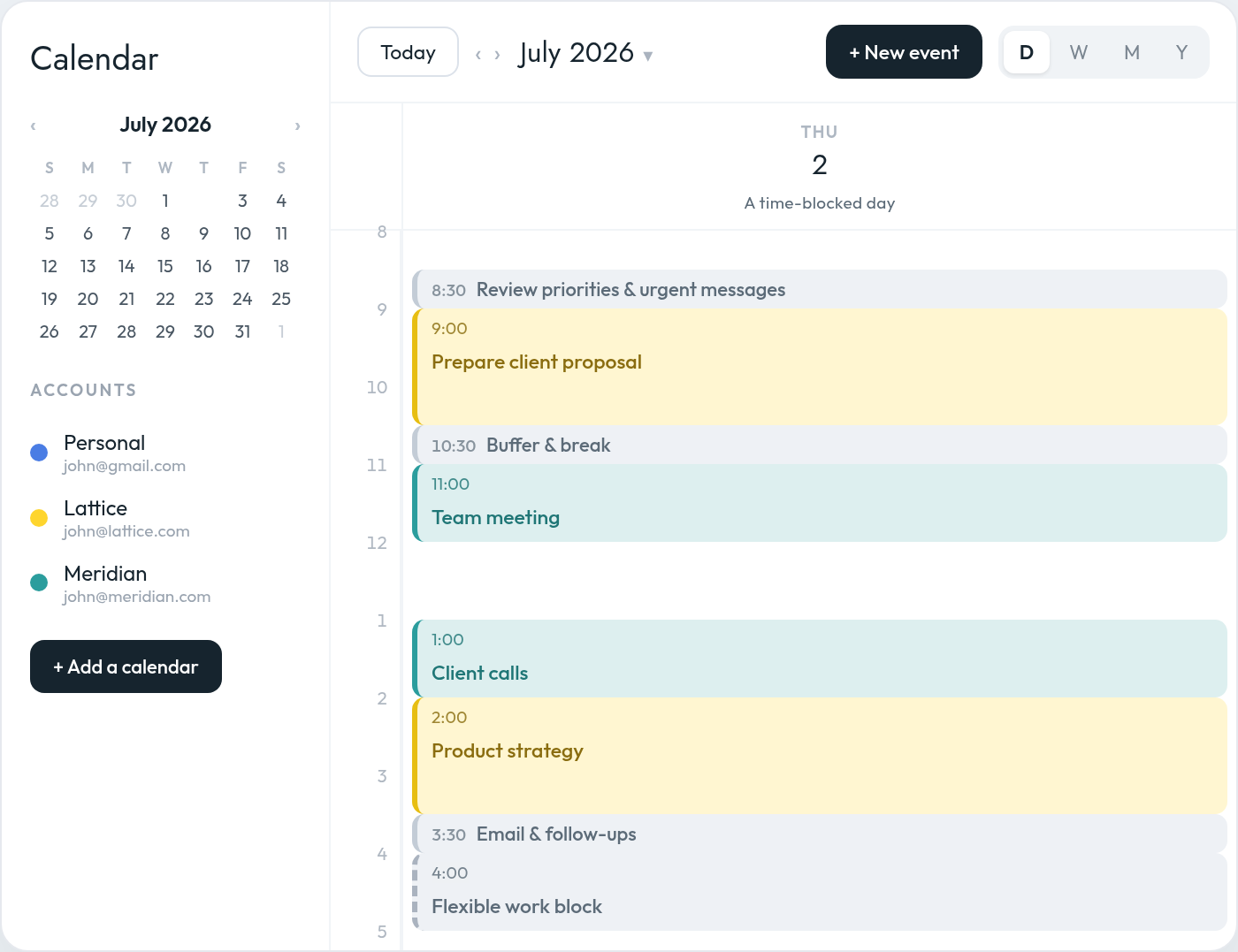
Unlike a task list, a time-blocked calendar forces you to confront the fact that your time is limited.
You may have 20 items on your task list, but only five hours of unscheduled time. Time blocking makes that constraint visible before the day begins.
It also reduces the number of decisions you need to make during the day. Rather than repeatedly asking yourself what to work on next, you have already made that decision.
The difficulty is that your day rarely stays exactly as you planned it.
Meetings are added. Clients ask for time. A task takes longer than expected. Travel is required. A focus block on one calendar is unknowingly booked over because the person scheduling the meeting can only see another.
Effective time blocking is therefore not just about creating a plan. It is about protecting and continuously adapting that plan.
An AI scheduling assistant can help by applying your preferences consistently, checking your availability across calendars, protecting focus time, creating recurring work blocks, adding buffers, and adjusting your schedule when circumstances change.
Why overly detailed time blocking fails
A perfectly optimized calendar can look impressive in the morning and become useless by lunchtime.
There are several reasons for this.
We underestimate how long work will take
People have a tendency to underestimate the time required to complete future tasks. We imagine an optimistic version of how the work will unfold and overlook delays, interruptions, research, revisions, and follow-up work.
A presentation you expect to finish in one hour may require two. A supposedly quick email may lead to a discussion or another decision. A 30-minute meeting may create 20 minutes of notes and follow-ups.
When every block is based on the best-case scenario, the entire day becomes fragile.
Work does not happen in isolation
Your calendar is affected by other people.
A client may ask for an urgent revision. A colleague may need help. A call may begin late. A child may need to be picked up. A supposedly free afternoon may suddenly contain two meetings.
A calendar that assumes nothing unexpected will happen is not a realistic plan. It is an idealized one.
Your availability may be split across multiple calendars
Many busy professionals do not operate from a single calendar.
A consultant may have a personal calendar, a company calendar, and separate calendars for several clients. A founder may manage multiple businesses. A fractional executive may be invited to meetings through several different Google Workspace or Microsoft accounts. If several companies or clients compete for the same hours, calendar theming for founders shows how to give each one a protected place in the week.
The problem is not simply that these calendars are difficult to review. It is that the people requesting your time may not see your complete availability.
A focus block may exist on your personal calendar while a client sees that same time as open on your work calendar. A family commitment may not appear in the workspace where a colleague is scheduling a meeting. Two clients may independently book the same time through different accounts.
A time-blocking system cannot work reliably if it considers only one version of your schedule.
An AI calendar assistant like Everest can treat all your connected calendars as part of one availability model, even when the events remain on separate accounts. It can also apply different precedence rules depending on how you want each calendar to affect your availability.
For example, you might tell it:
“Treat events on my personal calendar as non-blocking, so availability on my work calendars takes precedence.”
That means your personal events can remain visible to you without automatically preventing work meetings from being scheduled during those times.
External scheduling requests can gradually consume your plan
You may begin the week with several well-protected focus blocks. But each external scheduling request creates pressure to surrender one of them.
Someone asks whether you are free Tuesday morning. Another person proposes Wednesday afternoon. A client wants “just 30 minutes” during the only open period between two larger projects.
Individually, each request appears reasonable. Collectively, they can dismantle the structure of your week.
The challenge is that the person asking for time does not see what that open space is intended for. To them, an empty calendar slot looks available. To you, it may be the only time reserved for completing your most important work.
An AI scheduling assistant like Everest can evaluate the request against your complete schedule before proposing times. It can avoid your focus blocks, respect your preferred meeting windows, apply precedence rules across calendars, and negotiate alternatives without requiring you to manually compare calendars.
Switching tasks takes mental effort
Moving directly from a demanding project into a meeting, and then immediately into another piece of focused work, does not mean your attention transitions instantly.
Part of your attention can remain attached to the previous task, particularly when you switch away before reaching a natural stopping point. This makes it more difficult to fully engage with what comes next.
That is one reason back-to-back blocks often feel more exhausting than they appear on the calendar.
A full calendar leaves no room for recovery
You cannot control every interruption around you. But you can avoid designing a calendar that makes every interruption catastrophic.
A useful time-blocking system needs enough margin to absorb changes without forcing you to rebuild the entire day every time a meeting runs 15 minutes long.
The goal is not to account for every minute
The purpose of time blocking is not to predict your day perfectly.
It is to make deliberate choices about how you want to use your time while preserving enough flexibility to respond to reality.
A useful time-blocked calendar should answer four questions:
- What is the most important work I need to move forward?
- When am I most likely to do that work well?
- What commitments exist across all my calendars?
- Where is the flexibility if the day changes?
The strongest calendars combine structure, visibility, and slack.
Structure protects your priorities.
Visibility prevents conflicts across calendars.
Slack protects the structure when reality changes.
How to time-block your day without overplanning it
1. Start with a complete view of your availability
Before creating focus blocks, make sure you can see the commitments that already exist across every calendar you use.
This may include:
- Your primary work calendar
- A personal calendar
- Client calendars
- Calendars from other companies or workspaces
Without a unified view, you may create a technically perfect plan that is built on incomplete information.
This is especially important for consultants, founders, executives, and agency leaders who regularly switch between organizations.
An AI calendar assistant like Everest can help by treating all your calendars as part of a single availability model. Instead of manually comparing several calendar tabs, you can ask:
“Check all my calendars before offering any meeting times.”
You could also set a standing rule such as:
“Treat events on my personal calendar as non-blocking, so availability on my work calendars takes precedence.”
The assistant can then apply different scheduling priorities across your calendars while still checking them together before proposing times.
This is especially useful when some calendars should block your availability and others should only provide context.
2. Begin with outcomes, not tasks
Before adding blocks to your calendar, decide what would make the day successful.
Choose one to three meaningful outcomes rather than beginning with every task you could possibly complete.
For example:
- Finish and send the client proposal
- Decide on the new pricing structure
- Prepare for tomorrow’s board meeting
These are outcomes. They describe progress you want to create.
By contrast, “check email,” “update slides,” “message Sarah,” and “review notes” are activities. They may be necessary, but they should not determine the architecture of your entire day.
Once the important outcomes are clear, give them calendar space first.
An AI scheduling assistant like Everest can help translate those outcomes into protected time. You might say:
“My top priority tomorrow is finishing the client proposal. Find a two-hour focus block before 1:00 p.m. across all my calendars.”
Or:
“I need three hours this week to prepare for the board meeting. Split it into one 90-minute research block and one 90-minute writing block.”
The final priorities remain yours, but the assistant can find realistic places for them in your schedule.
3. Block important work before filling in small work
The most valuable work is often the easiest to postpone because it rarely feels as urgent as an incoming message or meeting request.
Place priority work on the calendar before assigning time to email, administration, and routine follow-ups.
A useful order is:
- Fixed commitments
- High-priority focused work
- Meetings and collaboration
- Administrative work
- Flexible and unallocated time
Your calendar should reflect your priorities, not simply the order in which requests arrived.
An AI scheduling assistant like Everest can also help defend these priorities when people ask to meet.
You could tell it:
“Protect my focus blocks unless a meeting is marked urgent.”
Or:
“Do not offer external meetings during my morning focus time. Suggest afternoon availability instead.”
Rather than offering every theoretically open slot, the assistant can treat your priority blocks as protected and negotiate around them.
4. Estimate from experience, not optimism
When deciding how long a task deserves, ask:
How long has similar work taken me in the past?
Do not estimate based only on how long you believe the task should take.
If writing a detailed proposal typically takes two and a half hours, do not give it a 60-minute block because you hope to work faster today.
You can also separate the work into stages:
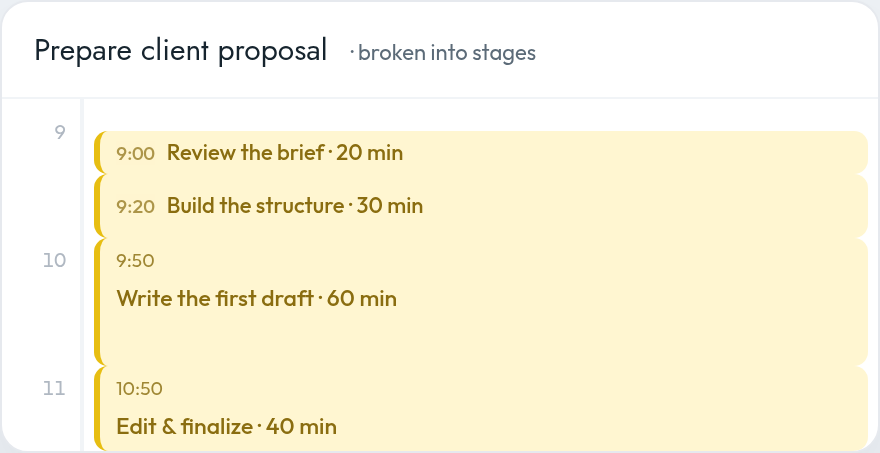
Breaking larger work into stages makes estimates more concrete and gives you natural stopping points.
An AI scheduling assistant can make this easier by asking clarifying questions before placing the work.
For example:
“How long does it normally take you to prepare this type of proposal?”
If you are unsure, you might ask:
“Schedule 90 minutes for the first draft and leave another flexible hour later in the week in case I need more time.”
Over time, an AI calendar assistant may also help you recognize recurring estimation patterns. If you consistently move or extend the same type of block, it can recommend allocating more time in the future.
5. Leave part of the day deliberately unplanned
One of the most effective ways to make a time-blocked calendar realistic is to avoid blocking all of it.
Depending on the unpredictability of your work, consider planning only around 60% to 80% of your available working time.
That does not mean the remaining time will be wasted. It means you are acknowledging that the day will contain transitions, overruns, unexpected work, and basic human needs.
Someone with a highly predictable individual-contributor role may be able to plan most of the day.
A founder, consultant, or executive responsible for multiple teams and clients may need considerably more open space.
The more people who can change your priorities, the more margin your calendar needs.
An AI scheduling assistant like Everest can help you enforce this constraint.
You might say:
“Do not schedule more than six hours of meetings and planned work on any weekday.”
Or:
“Keep at least one hour unplanned every afternoon for urgent requests and overflow.”
Instead of continuing to fill every opening, the assistant can recognize when a day has reached your preferred capacity and begin offering availability on another date.
An empty space on a calendar does not always mean that more work should be added to it.
6. Add buffers where disruption is most likely
Most people do not naturally think about buffers when building their calendars.
They schedule the meeting itself, but not the preparation before it, the recovery afterward, or the travel required to attend it.
This is where an AI scheduling assistant can play an especially strong role.
Suppose you have an important 90-minute strategy meeting. Even if the meeting finishes on time, you may not be ready to begin deep analytical work one minute later.
You may need time to:
- Write down decisions
- Send follow-ups
- Process what was discussed
- Take a break
- Switch mental context
- Prepare for the next activity
You could ask your AI scheduling assistant:
“Add a 30-minute buffer after every meeting that lasts 90 minutes or longer.”
Or:
“After important client meetings, block 20 minutes for notes and follow-ups.”
Location should also affect the plan.
If the meeting is on-site, the calendar should account for travel time before and after it. A 2:00 p.m. meeting that ends at 3:30 p.m. may actually occupy the period from 1:30 to 4:00 once transportation is included.
You could create a standing instruction such as:
“For every on-site meeting on my calendar, add a 30-minute travel buffer before and after it.”
You might also make that rule location-specific:
“For meetings at our downtown office, add 45 minutes of travel time each way. For meetings within my neighborhood, add 15 minutes.”
An AI calendar assistant like Everest can automatically apply those rules whenever a relevant event appears on your calendar.
Buffers are especially useful:
- After important or emotionally demanding meetings
- Between meetings and focused work
- After long concentration blocks
- Before hard deadlines
- Between calls with different clients
- Around travel or on-site appointments
- At the end of a meeting-heavy afternoon
If nothing runs late, the time is still useful. You can start the next priority early, complete a small task, or recover before the next demanding activity.
7. Group similar tasks together
Every switch between writing, meetings, email, analysis, and administrative work creates friction.
Where possible, group similar activities into shared blocks:
- Client calls
- Internal meetings
- Email and messages
- Reviews and approvals
- Writing
- Financial administration
- Recruiting conversations
This is often called task batching.
Email is a simple example.
Nearly everyone needs time to process email, but many people never explicitly reserve time for it. Instead, they check the inbox repeatedly throughout the day and allow it to interrupt other work.
An AI scheduling assistant could ask:
“How much time do you typically spend processing email each day?”
If the answer is one hour, it might recommend two recurring 30-minute blocks:
- One in the morning
- One near the end of the day
You could simply instruct it:
“Block 30 minutes for email at 9:00 every morning and another 30 minutes at the end of my workday.”
Or, for a more flexible approach:
“Find two 30-minute windows for email each day—one before noon and one after 4:00 p.m.—without moving my priority blocks.”
The assistant can place those blocks around existing commitments and adjust them when the day changes.
The same approach could be applied to:
- Slack or Microsoft Teams
- Expense reports
- Candidate reviews
- CRM updates
- Client follow-ups
- Document approvals
- Scheduling administration
For example:
“Group all candidate interviews on Tuesday and Thursday afternoons.”
“Reserve one hour every Friday for expenses and CRM updates.”
“Keep my internal meetings together whenever possible instead of spreading them across the week.”
The value is not merely that an AI scheduling assistant can create a calendar event. It can identify recurring work that currently has no dedicated place on your calendar and help you create a more intentional structure for it.
8. Match the block to your energy
Not every hour of the day has equal value.
Pay attention to when you tend to think most clearly, when your energy drops, and when you are better suited to collaborative or administrative work. Reserving your sharpest hours for deep work and pushing coordination to the rest is the essence of balancing a maker’s and a manager’s schedule.
Then align your calendar accordingly.
You might reserve your highest-energy period for:
- Writing
- Strategy
- Analysis
- Problem-solving
- Product decisions
- Creative work
Lower-energy periods may be better for:
- Routine follow-ups
- Expense reports
- Scheduling
- Document organization
- Status updates
An AI scheduling assistant like Everest can help translate these preferences into recurring rules.
You might tell it:
“Protect my mornings for focused work.”
“Avoid scheduling external meetings before 10:30 a.m.”
“Put administrative work after lunch whenever possible.”
“Keep Friday afternoons flexible.”
“Do not schedule a focus block immediately after a long client workshop.”
The goal of an AI scheduling assistant is to hold those preferences for you when proposing times, creating blocks, and responding to external scheduling requests.
This matters because knowing your preferred working rhythm is only the first step. The harder part is enforcing it every day.
9. Use broader blocks when the work is unpredictable
Not every block needs to contain a precisely defined task.
For complicated or fast-moving roles, category-based blocks may be more realistic:
- Client work
- Product
- Team support
- Business development
- Focus time
- Administrative work
A consultant might reserve Tuesday morning for a particular client without deciding in advance exactly which deliverable will require attention.
A CEO might reserve Friday afternoon for strategy rather than assigning a specific strategic question weeks ahead.
Broader blocks preserve intention without creating false precision.
An AI scheduling assistant like Everest can help refine those blocks closer to the time.
For example, a Tuesday morning “Client A” block might initially remain broad. On Monday afternoon, you could ask:
“Review my upcoming Client A deadlines and assign the most urgent work to tomorrow morning’s Client A block.”
Or:
“Turn Friday’s strategy block into two specific sessions based on the decisions I need to make next week.”
This allows the weekly plan to stay flexible while the daily plan becomes more specific as new information appears.
10. Distinguish hard blocks from flexible blocks
Not every calendar entry should have the same level of commitment.
It can help to think of blocks in three categories.
Hard blocks
These cannot easily move: external meetings, appointments, travel, and
deadlines.
Priority blocks
These protect important work but may move if necessary.
Flexible blocks
These absorb overflow, lower-priority work, and unexpected demands.
For example:
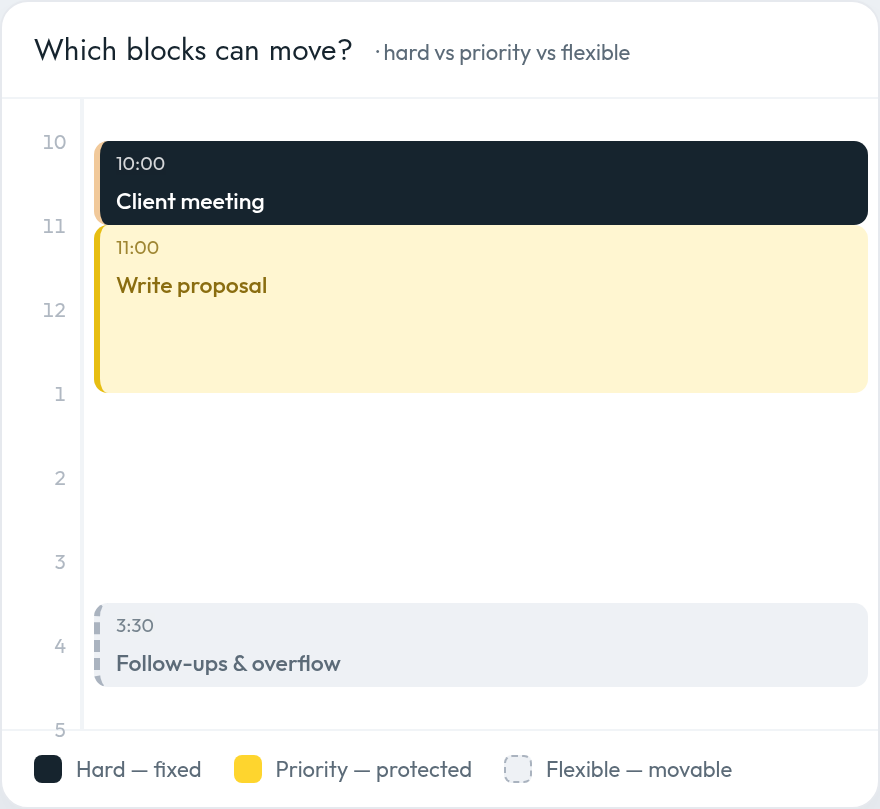
This distinction prevents you from treating your original plan as sacred. You know which pieces must remain fixed and which can be adjusted.
It also gives an AI scheduling assistant clearer instructions.
You might say:
“Never move events marked hard.”
“You may move flexible blocks freely, but ask me before moving a priority block.”
“When a new scheduling request arrives, use open time first, then flexible blocks, and only move focus time as a last resort.”
Without this hierarchy, every calendar entry appears equally movable—or equally immovable.
11. Protect focus time from external scheduling requests
Creating a focus block is only useful if it remains protected.
This becomes difficult when other people are trying to schedule time with you, particularly across several email threads, scheduling links, and workspaces.
An external requester should not need to understand your entire productivity system. But your scheduling assistant should.
When someone asks to meet, an AI scheduling assistant like Everest can consider:
- Commitments across all your calendars
- Calendar-precedence rules
- Existing focus blocks
- Your preferred meeting hours
- Your energy patterns
- Required travel time
- Buffers around important meetings
- Time-zone differences
- The urgency of the request
- Whether flexible blocks can safely move
You can provide explicit instructions such as:
“When someone asks to meet, check every connected calendar and protect all focus blocks.”
“Offer no more than three meeting options, prioritizing Tuesday and Thursday afternoons.”
“Do not schedule external calls on Wednesday unless the request is urgent.”
“When someone requests time during a focus block, offer the nearest available alternative rather than moving the block.”
You can also decide which calendars should take precedence:
“Treat my personal calendar as non-blocking and prioritize availability on my work calendars.”
An AI scheduling assistant can then propose times that work without requiring you to manually compare several calendars or dismantle the structure of your week.
This changes the role of the calendar from a passive record of meetings into an active system for protecting your time.
12. Plan at the weekly level before planning each day
Daily time blocking becomes easier when you already understand the shape of the week — the focus of our guide to planning your week and managing your calendar.
During your weekly planning session, identify:
- The week’s most important outcomes
- Fixed meetings and deadlines
- Commitments across every calendar
- Which calendars should take precedence
- The best windows for focused work
- Heavy and light days
- Areas of likely disruption
- Time that should remain protected
- External meetings that still need to be scheduled
You do not need to plan every hour of the coming week.
Reserve the large blocks first. Then refine each day as it approaches and more information becomes available.
This creates a rolling planning system:
- Plan the broad structure weekly
- Confirm the next day each afternoon or evening
- Adjust the current day when reality changes
An AI scheduling assistant like Everest can support each stage.
At the beginning of the week, you might ask:
“Review all my calendars and find three two-hour focus blocks for my most important work.”
The day before, you could ask:
“Review tomorrow’s schedule, add any missing buffers, and make sure I still have at least two hours of focus time.”
During the day, you might say:
“My last meeting ran 45 minutes late. Reorganize the rest of the afternoon without moving my 4:00 p.m. client call.”
The assistant can then move flexible work, shorten lower-priority blocks, or carry nonessential tasks into another day.
A realistic time-blocked day
Consider a consultant managing several clients across multiple calendars.
Compare an overly planned day with a more resilient version of the same day:
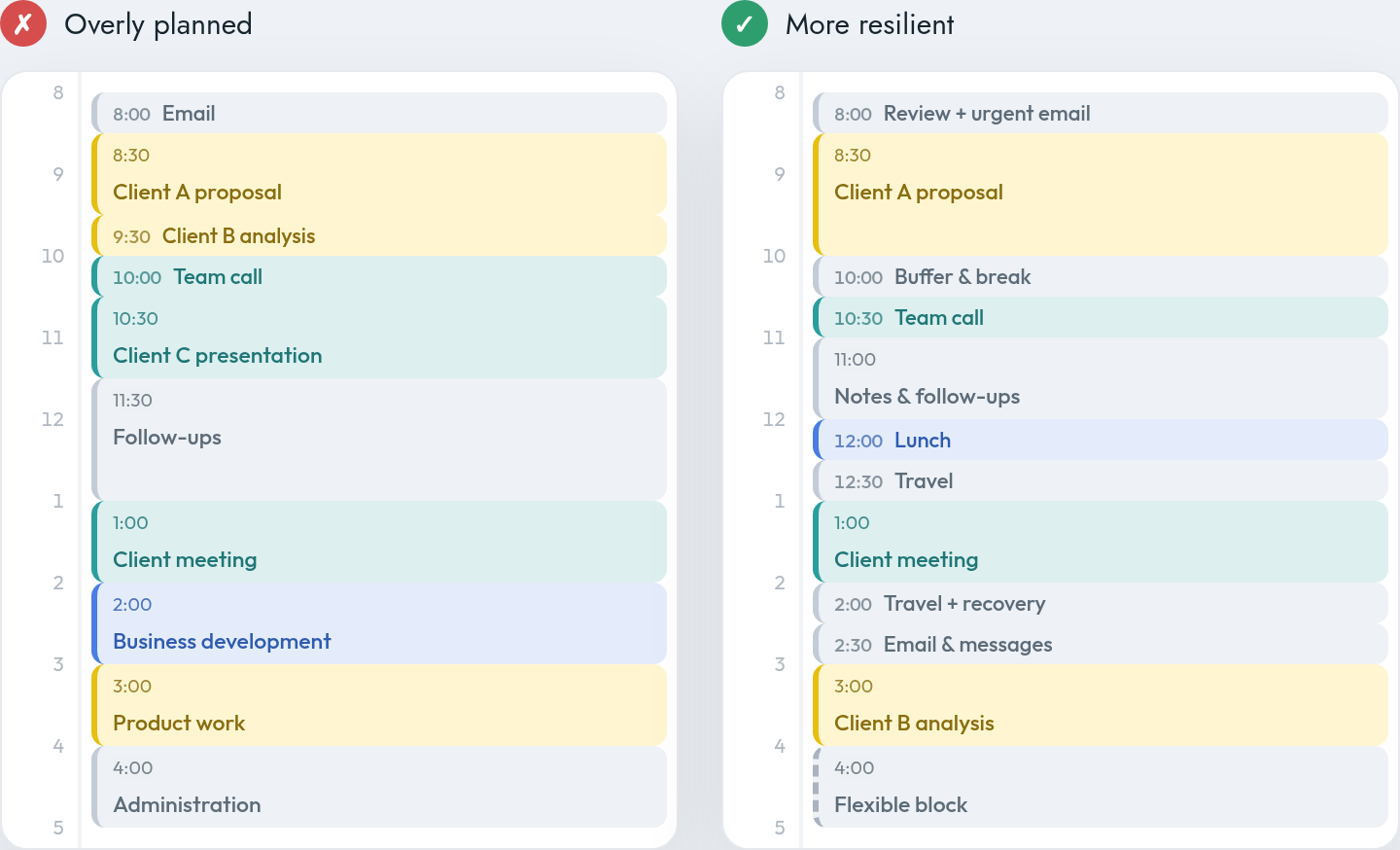
In the overly planned version, every minute has a job — but there is no allowance for a late meeting, an urgent client message, context switching, or travel.
There may also be a personal event on another calendar. Depending on the user’s preferences, that event might need to block the time—or it might be deliberately treated as non-blocking so that work commitments take precedence.
An AI scheduling assistant like Everest could help create and maintain this structure by:
- Checking every connected calendar
- Applying the user’s calendar-precedence rules
- Protecting the morning focus block
- Adding travel time around the on-site meeting
- Reserving a recovery buffer afterward
- Creating recurring email-processing windows
- Offering external meeting times that do not consume protected work periods
- Replanning the afternoon if the meeting runs late
Instead of making each adjustment manually, the consultant would want to express the week in plain language, along the lines of:
“Treat my personal calendar as non-blocking, so my work calendars take precedence.”
“Protect 8:30 to 10:30 every morning for focused work.”
“Add 30 minutes of travel time before and after every on-site meeting.”
“Schedule email twice a day in 30-minute blocks.”
“Keep one flexible hour available every afternoon.”
“When a client asks to meet, offer afternoon availability before using a morning focus block.”
The second calendar contains fewer commitments, but it is more likely to produce meaningful progress.
That is the paradox of effective time blocking: planning less of the day can help you accomplish more of what matters.
What to do when the plan falls apart
No planning system prevents unexpected events.
The skill is not following the original calendar perfectly. The skill is replanning deliberately.
When your schedule changes, do not spend the rest of the day trying to catch up with a plan that no longer exists.
Instead:
- Stop and look at the remaining time.
- Review commitments across every calendar.
- Apply the correct precedence rules.
- Identify which events are still fixed.
- Choose the most important unfinished outcome.
- Move, shorten, or remove lower-priority blocks.
- Rebuild the calendar from the present moment forward.
This is a natural use case for an AI scheduling assistant.
If a meeting runs 45 minutes late, you could say:
“Replan the rest of my day. Keep all hard commitments, preserve the proposal block if possible, and move anything flexible to tomorrow.”
Your AI scheduling assistant can assess the remaining availability across your calendars, apply your scheduling rules, shorten an email block, move a flexible task, and protect the most important remaining focus period.
It can make those changes based on priorities you have already established rather than forcing you to manually rearrange several calendars while under pressure.
Some work should be rescheduled. Some should be delegated. Some may no longer need to happen at all.
A useful calendar is a decision-making tool, not a record of everything you once hoped to accomplish.
Signs that you are overplanning your calendar
Your time-blocking system may be too rigid if:
- You regularly fall behind before midday
- Every block begins immediately after another one
- Tasks frequently require twice the time allocated
- You have nowhere to place urgent work
- You skip breaks to stay on schedule
- One delayed meeting disrupts the entire day
- You constantly move unfinished blocks into tomorrow
- Focus blocks are repeatedly replaced by external meetings
- Your calendars use inconsistent availability rules
- Events on lower-priority calendars unnecessarily block work time
- Travel time is missing from on-site appointments
- Your calendar feels more stressful than your task list
- You interpret every change as a failure
Time blocking should create clarity. It should not make you feel guilty every time reality differs from your forecast.
A simple time-blocking template
Step 1: Combine your availability
Review the commitments across every work, client, and personal calendar you use.
Ask your AI scheduling assistant:
“Check all my connected calendars before creating or proposing new events.”
Then define the precedence rules:
“Treat events on my personal calendar as non-blocking, so availability on my work calendars takes precedence.”
Step 2: Choose your daily outcomes
Write down the one to three results that would make the day successful.
Then ask:
“Find realistic focus blocks for these priorities without creating conflicts.”
Step 3: Add fixed commitments
Place meetings, appointments, deadlines, and travel on the calendar.
You can instruct your assistant:
“Automatically add travel time around every on-site meeting.”
Step 4: Protect focused work
Reserve one or two meaningful blocks for your most important outcomes.
For example:
“Protect two hours every morning for focused work and do not offer that time for external meetings.”
Step 5: Batch recurring work
Create defined windows for email, messages, follow-ups, and routine administration.
For example:
“Schedule two 30-minute email blocks each weekday—one in the morning and one at the end of the day.”
Step 6: Add buffers
Place margin around demanding work, important meetings, transitions, and travel.
For example:
“Add a 30-minute recovery buffer after meetings lasting 90 minutes or longer.”
Step 7: Leave open capacity
Keep at least one flexible area for overruns and unexpected priorities.
For example:
“Leave one hour unplanned each afternoon.”
Step 8: Define what can move
Distinguish hard commitments from priority and flexible blocks.
For example:
“You may move flexible blocks automatically, but ask before moving priority work.”
Step 9: Protect the plan from new requests
When people ask to meet, offer times that preserve your most valuable work whenever possible.
For example:
“Schedule external meetings on Tuesday and Thursday afternoons before considering any other time.”
Step 10: Review and adjust
At the end of the day, examine what took longer than expected and use that information to improve tomorrow’s plan.
You might ask:
“Review which blocks were moved or extended today and suggest a more realistic plan for tomorrow.”
An AI scheduling assistant should make the calendar more human, not more crowded
The promise of an AI scheduling assistant is not that every free minute can be automatically filled.
It is the opposite.
An AI scheduling assistant like Everest can help create a calendar that more accurately reflects how people actually work.
It can reserve time for email. It can notice that a 90-minute meeting deserves a buffer. It can add travel time to an on-site appointment. It can protect focus blocks when someone requests a meeting. It can compare availability across multiple calendars, apply precedence rules, and rebuild the plan when the day changes.
More importantly, you can express those preferences in ordinary language:
“Treat my personal calendar as non-blocking.”
“Protect my mornings for focused work.”
“Keep one hour free each afternoon.”
“Add travel time around on-site meetings.”
“Schedule email twice a day.”
“Do not let external meeting requests replace my priority blocks.”
“Replan the rest of my day without moving my client calls.”
These are small scheduling decisions, but they happen constantly. Managing them manually requires attention that could be spent on more meaningful work.
The goal is not to automate your judgment or surrender control of your day.
It is to have an AI calendar assistant that understands your priorities, preferences, calendar hierarchy, and constraints well enough to help you protect them.
Your calendar should guide the day, not control it
Time blocking is most effective when it helps you make intentional decisions before urgency takes over.
The objective is not to create a flawless minute-by-minute forecast. It is to ensure that important work has a realistic chance of happening.
That requires seeing your full availability, defining which calendars take precedence, protecting focus time, estimating honestly, grouping similar work, accounting for travel, and leaving sufficient room for the unpredictable.
This is the direction Everest is built toward: turning those principles into rules you state once, in plain language, rather than re-applying them by hand every week.
A good calendar gives your priorities structure.
A great calendar actively helps you preserve them.