When you manage one company, your calendar has one center of gravity.
When you manage three companies, advise several clients, or divide your time between operating, consulting, investing, and business development, every day can feel like a succession of context switches.
At 9:00, you are reviewing the product roadmap for one company. At 10:00, you are discussing pipeline with a consulting client. At 11:00, you are interviewing a candidate for another venture. By the afternoon, you may have attended six meetings without spending enough uninterrupted time inside any one business to move it meaningfully forward.
The problem is not necessarily that you have too much work. It is that your attention is being divided into pieces too small to use well.
Calendar theming is a way to reduce that fragmentation. Instead of allowing every company, client, and type of work to compete for every open hour, you assign recurring themes to particular days or parts of the week.
The theme becomes the default answer to a simple question:
What kind of work belongs here?
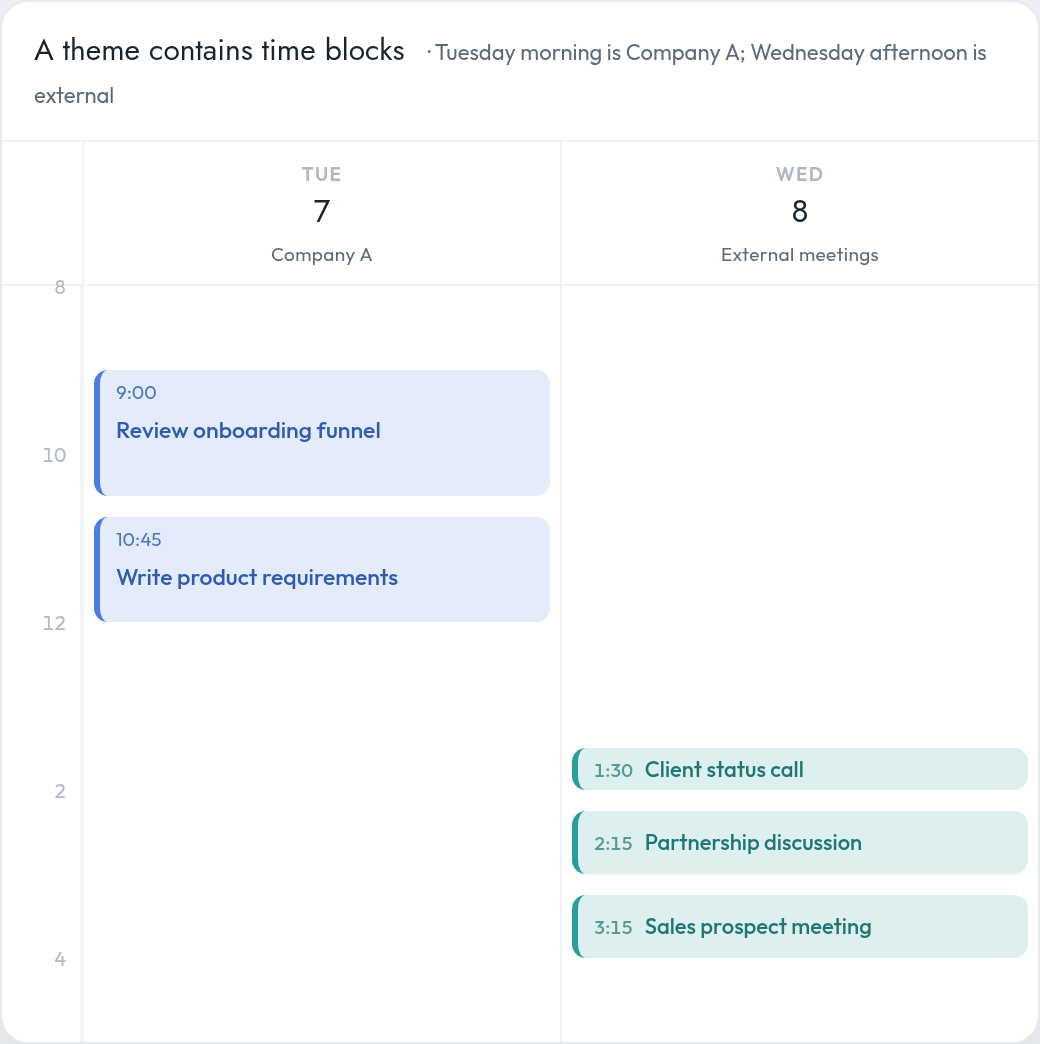
For a founder managing multiple businesses, Tuesday might belong primarily to Company A. Wednesday afternoon might be reserved for client meetings. Thursday morning might be dedicated to product and strategy across all ventures.
The goal is not to create a rigid calendar that reality can never disturb. It is to establish a clear operating rhythm so that you spend less time deciding what to work on, switch contexts less frequently, and give important work enough uninterrupted space to progress.
What is calendar theming?
Calendar theming means assigning a recurring focus to a day, half-day, or smaller repeating block of time.
A theme is broader than an individual task. You are not deciding that you will write a specific proposal from 9:00 to 10:30. You are deciding that Tuesday morning is reserved for focused client delivery, or that Thursday is primarily devoted to one of your companies.
Once the theme is established, individual tasks can be scheduled within it.
For example:
Calendar theming, time-blocking, and task batching are related, but they solve different problems:
| Technique | What it decides | Example |
|---|---|---|
| Calendar theming | What category of work belongs in a period | Wednesday is for client delivery |
| Time-blocking | When a specific activity will happen | Prepare Client A’s strategy from 9:00–10:30 |
| Task batching | Which similar activities should be grouped | Hold all client calls during one meeting window |
| Time-boxing | How long you will allow a task to consume | Spend 45 minutes reviewing the proposal, then stop |
These methods work best together. The theme gives the day direction. Time-blocking turns that direction into a schedule. Batching reduces unnecessary switching, while time-boxing prevents individual tasks from expanding indefinitely.
For a broader system covering weekly reviews, prioritization, time-blocking, energy management, meetings, and calendar buffers, see our guide to planning your week and managing your calendar.
Why theming is especially useful when you manage multiple companies
Calendar theming can help almost anyone, but it becomes particularly valuable when your responsibilities span several independent organizations.
Without themes, your calendar tends to be organized according to other people’s availability. A client finds an open slot on Tuesday morning. A manager from another business schedules over Wednesday afternoon. A sales prospect takes the only remaining opening on Thursday.
Each meeting may be reasonable in isolation. Collectively, however, they leave you with a week that has no coherent structure.
1. It reduces context switching
Sophie Leroy’s research on “attention residue” found that people do not always transfer their full attention when moving from one unfinished task to another. Part of their attention remains attached to the previous task, making it harder to perform well on the next one.
For a multi-company founder, the context switch is often larger than changing tasks. You may be changing:
- Teams
- Products
- Customers
- Financial models
- Communication styles
- Strategic priorities
- Levels of authority
Moving from a product problem at one company directly into a sales discussion for another requires your mind to reload an entirely different operating environment.
Theming cannot eliminate every switch, but it can reduce how often they happen. Three consecutive hours for one company usually produce more usable attention than three one-hour blocks scattered across three different businesses.
2. It protects maker time from manager work
Founders often work simultaneously as makers and managers.
As managers, they attend meetings, make decisions, coordinate people, review work, and respond to problems. As makers, they write, design, analyze, build, research, or think through difficult strategic questions.
Paul Graham describes these as two fundamentally different schedules. A manager’s day can be divided into hourly appointments, while makers often need much larger blocks of uninterrupted time. A single meeting in the middle of a focus period can divide it into pieces too small for demanding work.
Theming allows you to separate these modes.
You might designate:
- Monday afternoon for internal management
- Tuesday morning for product thinking
- Wednesday afternoon for external meetings
- Thursday morning for writing and strategy
That is often more effective than alternating between maker and manager mode every hour.
3. It reduces recurring scheduling decisions
Managing several calendars creates a constant stream of small decisions:
- Can this client meet on Tuesday?
- Where should the product review go?
- Which company gets Thursday morning?
- Can I fit a sales call between two internal meetings?
- When should I work on the proposal?
A themed calendar creates defaults.
Instead of reconsidering the entire week whenever a meeting request arrives, you can apply standing rules:
- Client calls go on Wednesday and Friday afternoons.
- Company A meetings go on Monday.
- Company B receives Thursday.
- Focused strategy work happens before noon.
- Internal one-on-ones are grouped into the same window.
The theme does not make every decision for you. It substantially narrows the decision.
Three ways to theme a multi-company calendar
There is no universal model. The best structure depends on whether your work is primarily divided by company, by function, or by working mode.
Model 1: Theme by company or client
In this model, each company or major client receives a dedicated day or half-day.
A fractional executive might use:
| Day | Primary theme |
|---|---|
| Monday | Client A |
| Tuesday | Client B |
| Wednesday | Client C |
| Thursday | Business development and new clients |
| Friday | Administration, review, and planning |
This is the cleanest approach when each engagement requires deep immersion and has relatively predictable demands.
It also makes availability easier to communicate. Client A knows that Monday is generally its primary day. Client B knows that important working sessions should usually happen on Tuesday.
The risk is that companies rarely cooperate perfectly with the schedule. Emergencies, customer meetings, launches, and executive availability can force work across thematic boundaries. For that reason, it is often better to theme half-days rather than assigning every company an entire day.
Model 2: Theme by function
Instead of dedicating days to individual businesses, you group similar types of work across all of them.
For example:
| Day | Primary theme |
|---|---|
| Monday | Operations and team management |
| Tuesday | Product and delivery |
| Wednesday | Sales, marketing, and partnerships |
| Thursday | Product and deep work |
| Friday | People, finance, and weekly planning |
Functional theming works well when the same mental mode applies across several ventures. Reviewing growth strategy for two businesses in succession may require less cognitive adjustment than jumping from growth strategy in one business to a technical product review in another.
Its main disadvantage is that you may touch several companies on the same day. You reduce functional switching, but not necessarily company switching.
Model 3: Theme by working mode
A third option is to organize the week around the kind of attention the work requires.
For example:
| Period | Working mode |
|---|---|
| Monday morning | Weekly planning and strategic decisions |
| Monday afternoon | Internal meetings |
| Tuesday | Deep work and production |
| Wednesday | External meetings and client calls |
| Thursday | Deep work and production |
| Friday morning | One-on-ones and relationship management |
| Friday afternoon | Administration and weekly review |
This model is particularly useful for founders whose responsibilities are too unpredictable to assign cleanly by company.
It acknowledges that writing a strategy document for Company A and analyzing acquisition data for Company B may fit comfortably within the same deep-work day. Both require sustained concentration and benefit from the same environmental conditions.
Vertical and horizontal themes
Not every theme has to consume an entire day.
A useful distinction is between vertical themes and horizontal themes.
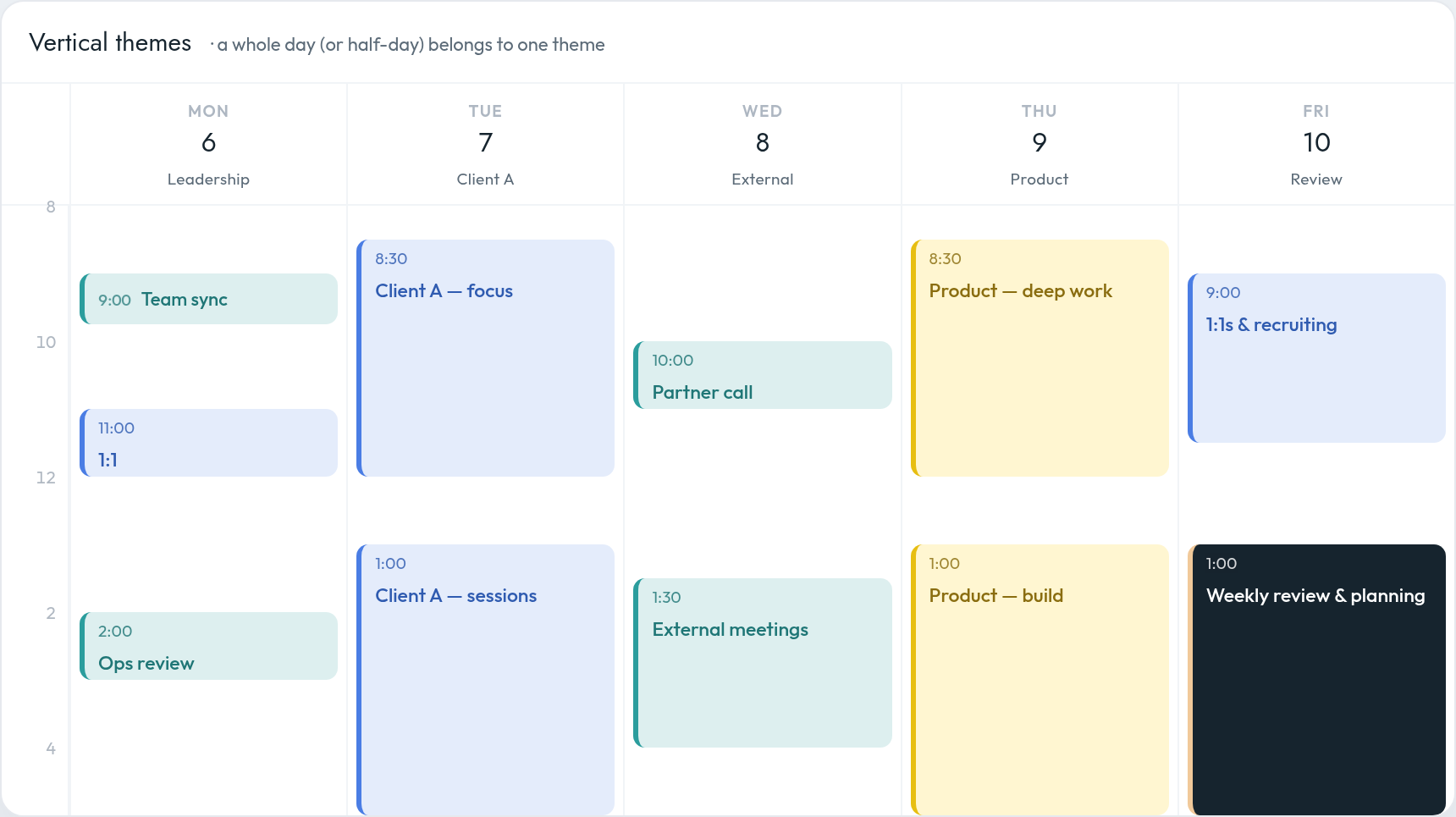
A vertical theme occupies a substantial portion of one day:
- Tuesday is Client A day.
- Thursday is product day.
- Friday afternoon is weekly review time.
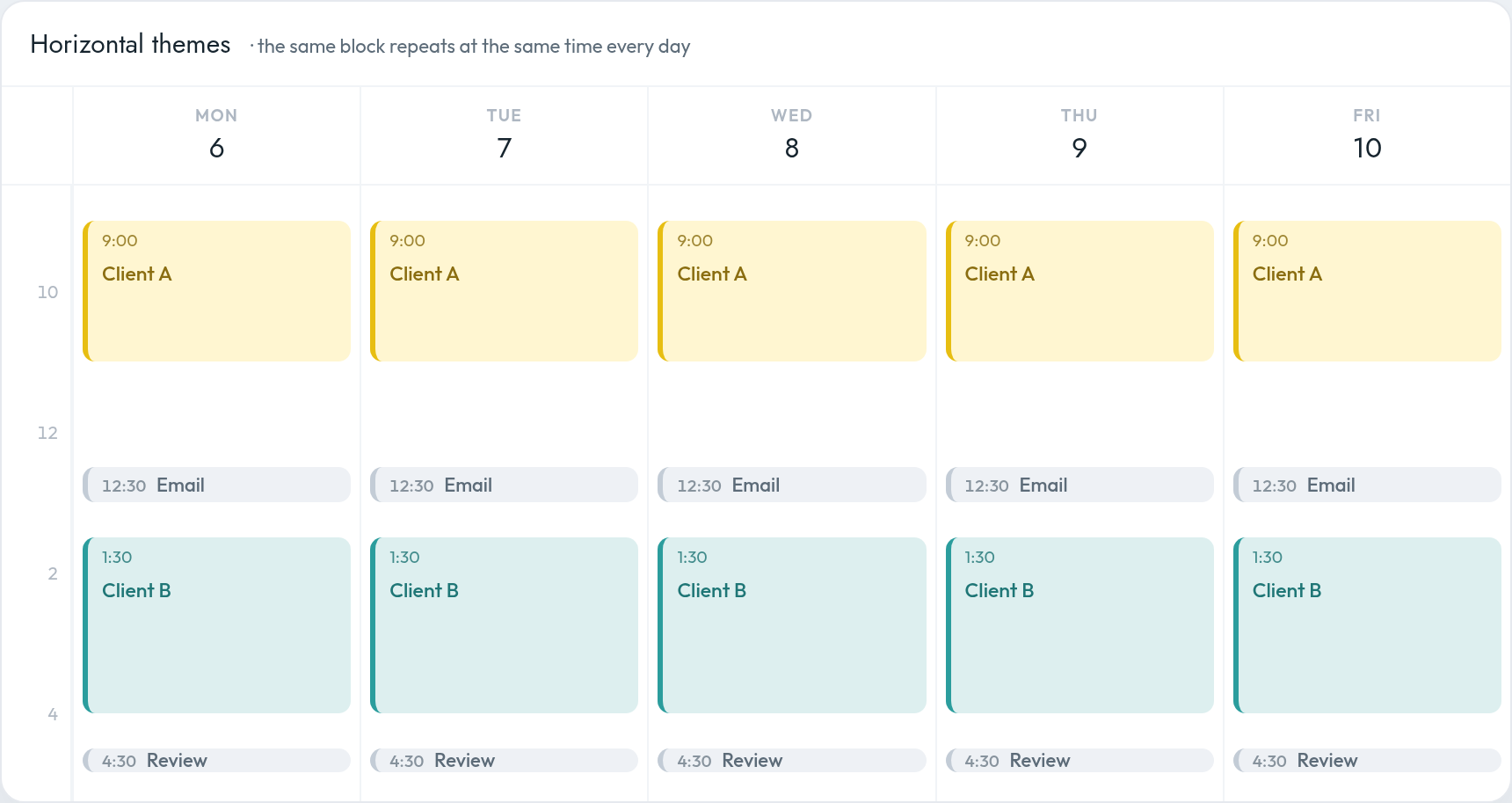
A horizontal theme repeats at the same time across multiple days:
- Every morning from 9:00 to 11:00 is protected focus time.
- Every afternoon from 1:30 to 4:00 is available for meetings.
- Email is processed at 12:30 and 4:30.
- The last 20 minutes of each day are reserved for reviewing and adjusting the calendar.
For a busy founder, the most practical system is often a hybrid:
- Theme half-days by company or function.
- Protect the same deep-work window each morning.
- Group meetings into recurring afternoon windows.
- Reserve Friday afternoon for review and planning.
An example themed week for a multi-company founder
Suppose a founder operates one primary company, advises two other businesses, and continues to handle fundraising, partnerships, and personal administration.
A realistic week might look like this:
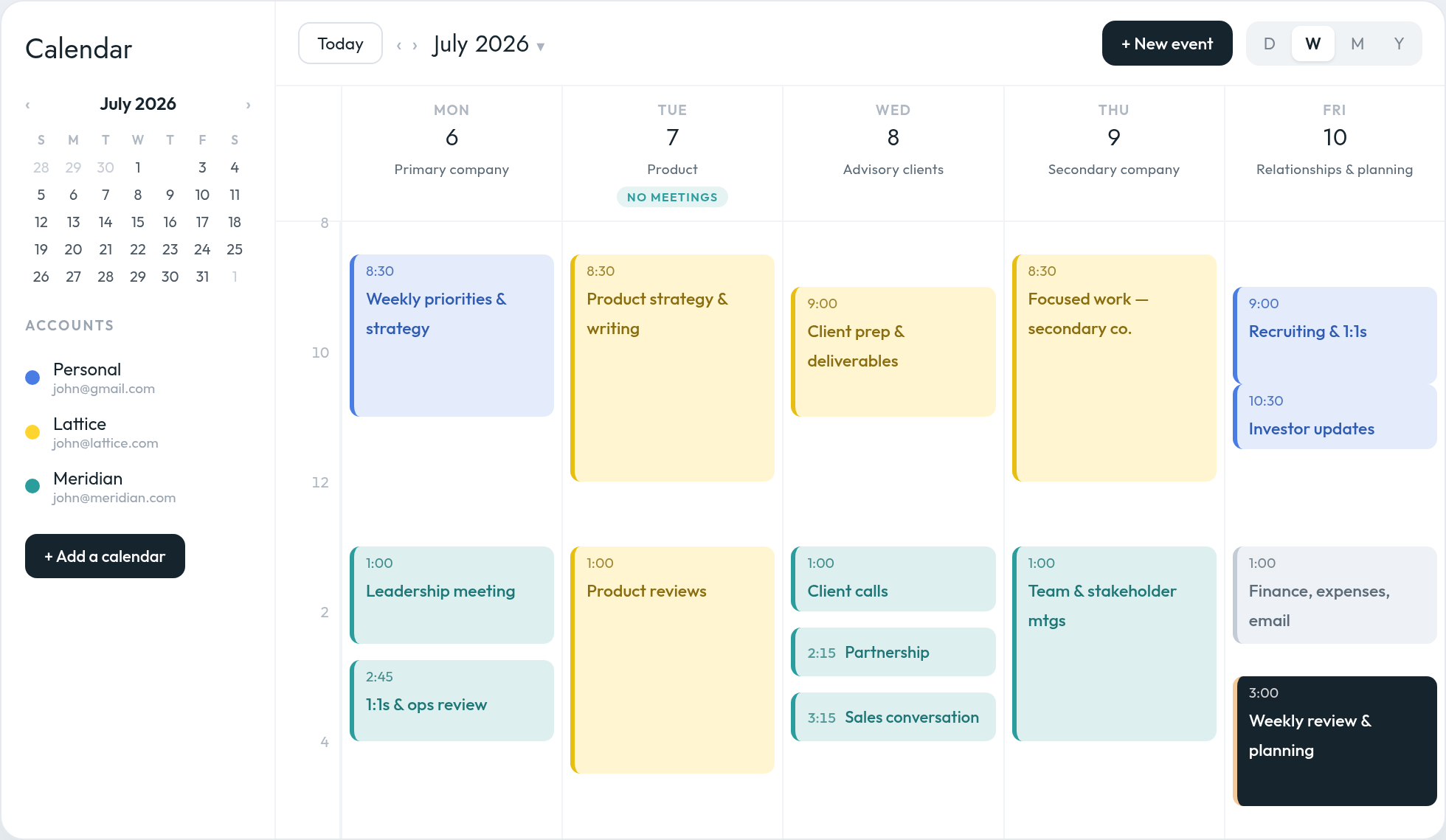
Monday: Primary company and leadership
Morning: Weekly priorities, strategic decisions,
focused work
Afternoon: Leadership meeting, one-on-ones, operational
reviews
Monday establishes direction for the primary company before the week becomes reactive.
Tuesday: Product and deep work
Morning: Product strategy, writing, analysis
Afternoon: Product reviews and working sessions
Meeting policy: No external meetings
This creates at least one day on which demanding work is not broken apart by unrelated appointments.
Wednesday: Advisory clients and external meetings
Morning: Client preparation and deliverables
Afternoon: Client calls, partnership meetings, sales
conversations
External obligations are clustered rather than distributed across the entire week.
Thursday: Secondary company or venture
Morning: Focused work for the secondary
business
Afternoon: Team and stakeholder meetings for that
business
The founder can spend several consecutive hours operating inside the same company context.
Friday: Relationships, administration, and planning
Morning: Recruiting, one-on-ones, investor
updates
Early afternoon: Finance, expenses, email, loose
ends
Late afternoon: Weekly review and next-week
planning
The week ends by closing open loops and designing the next one.
This is not a template that must be followed exactly. Its purpose is to show what a coherent week looks like. Each day has a recognizable center of gravity, but still contains enough space to handle reality.
How to build your own themed calendar
Step 1: List your major contexts
Start by naming the environments between which you regularly switch.
These might include:
- Primary company
- Secondary company
- Client A
- Client B
- Product
- Sales and partnerships
- Team management
- Content and thought leadership
- Finance and administration
- Personal and family responsibilities
Do not begin by assigning time. First identify the contexts that consume it.
Step 2: Review your last three weeks
Look at your recent calendar and ask:
- Which meetings could have been grouped?
- Which company interrupted the others most frequently?
- Where did isolated meetings destroy otherwise usable focus periods?
- Which work repeatedly got postponed because it had no protected space?
- Which responsibilities require deep immersion?
- Which responsibilities are mostly calls or short decisions?
Your existing calendar reveals the operating system you are already using, even when that system was created accidentally.
Step 3: Choose the main organizing dimension
Decide whether your calendar should primarily be themed by:
- Company or client
- Business function
- Working mode
- A hybrid of the three
Avoid creating so many themes that the system becomes another source of complexity. Most people need only three to five major themes.
Step 4: Place the least flexible commitments first
Some commitments cannot easily move:
- Leadership meetings
- Customer calls
- School pickup
- Investor meetings
- Team meetings across time zones
- Client working sessions
Place those first and design themes around the constraints that are genuinely fixed. When some of those commitments sit in another country, it helps to see both clocks while you place them — how to show multiple time zones in Google Calendar covers the setup.
Do not confuse habitual timing with fixed timing. A meeting that has occurred every Tuesday for a year may still be movable.
Step 5: Protect your highest-value focus periods
For most people, the calendar should protect demanding work before it accommodates low-value flexibility.
Reserve your strongest cognitive hours for activities such as:
- Strategic thinking
- Writing
- Product decisions
- Financial modeling
- Important client deliverables
- Complex problem-solving
Then place meetings, email, approvals, and routine administration around those periods.
Step 6: Create meeting windows
A themed week becomes difficult to maintain when other people can schedule meetings anywhere.
Establish narrow meeting windows such as:
- Monday, 1:30–4:30
- Wednesday, 1:00–5:00
- Friday, 9:30–12:00
You do not need to eliminate meetings. You need to reduce how widely they are distributed.
An AI scheduling assistant like Everest can help enforce these preferences by offering times inside your preferred windows, protecting meeting-free blocks, selecting the appropriate calendar, and preserving buffers between appointments.
For example, you could give your AI scheduling assistant standing instructions such as:
Schedule client meetings on Wednesday or Friday afternoons whenever possible. Protect Tuesday and Thursday mornings for focused work. Add a 15-minute buffer between external meetings.
This turns calendar theming from a plan you must manually defend into a scheduling policy that can be applied consistently.
Step 7: Leave meaningful slack
A themed calendar should not be a calendar in which every minute has been pre-assigned.
Founders deal with overruns, urgent decisions, customer problems, delayed meetings, and opportunities that cannot be anticipated on Friday afternoon.
A useful default is to leave:
- Transition buffers between meetings
- At least one open block most days
- Several uncommitted hours during the week
- A recurring period for re-planning
Slack is not wasted capacity. It is what prevents one unexpected event from collapsing the rest of the schedule.
Common calendar-theming mistakes
Making every day too pure
A themed day does not mean you are forbidden from touching another company.
A better interpretation is that the theme receives priority. Aim for 60–80% alignment, not perfection.
Creating too many themes
If every two-hour period has a different label, you have rebuilt a fragmented calendar with better color coding.
Themes should reduce the number of contexts, not merely name them.
Theming the calendar without controlling availability
A beautifully themed private calendar will not survive if clients and colleagues can book any empty space they see.
Your scheduling links, availability settings, and AI scheduling assistant should reflect the same rules as your calendar.
Assigning themes without assigning outcomes
“Company A day” is not a plan by itself.
During your weekly review, identify the specific outcome that should move forward inside each theme:
- Complete the positioning document
- Review the product roadmap
- Prepare the board update
- Finish the client’s acquisition plan
The theme determines where the work belongs. The weekly plan determines what must be accomplished.
Refusing to re-theme a changing week
The plan will sometimes break by Monday afternoon.
When that happens, do not abandon the entire system. Re-theme the remaining days.
If Thursday’s product day must be consumed by an urgent client situation, move the most important product block to Friday morning or the following Tuesday. Calendar theming is a decision-making tool, not a rulebook.
A simple starting point
You do not need to redesign your entire week immediately.
Start with three rules:
- Protect two recurring half-days for deep work.
- Place most external meetings into two or three recurring windows.
- Give each major company or client at least one predictable block during the week.
Run the experiment for three weeks. Then review:
- Did you complete more meaningful work?
- Did fewer meetings divide your focus periods?
- Did clients and teams adapt to the cadence?
- Which theme repeatedly overflowed?
- Which theme did not need as much time as expected?
Adjust based on evidence from your own calendar.
Your calendar should reveal your priorities
For founders managing multiple companies or clients, the calendar is more than a record of appointments. It is the mechanism through which attention is allocated.
Without a deliberate structure, the loudest company, most persistent client, or easiest-to-schedule meeting gradually receives the most time.
Calendar theming reverses that dynamic.
It gives each important area of work a place before the week begins. It creates longer periods of coherent attention. It separates focus work from meeting-heavy work. And it provides a scheduling framework that your team, your clients, and an AI scheduling assistant can understand and help maintain.
The objective is not to make every Tuesday identical or prevent urgent work from crossing a thematic boundary.
The objective is to stop rebuilding your week from scratch every morning.
Choose the few contexts that matter most. Give each one a reliable place. Protect the hours in which you do your best work. Then revise the schedule as reality changes.
Your calendar does not need to predict the week perfectly.
It needs to express what you intend to prioritize.