# Everest
> Everest is an AI scheduling assistant. Connect your Google and Outlook
> calendars, CC everest@everest.ag on any email thread, and it proposes times,
> handles the back-and-forth, and books the meeting on the right calendar —
> across every calendar you run, never double-booking. No inbox access
> required. Tagline: "Your calendars, handled."
Everest is built for people who run more than one calendar — independent
consultants, fractional executives, agency owners, and anyone holding a work
calendar next to a personal one. Production site: https://everest.ag/
---
# Planning your week & managing your calendar: a research-grounded field guide
*August 4, 2026 · Charles Brun · Playbook · Everest Blog*
> The research on weekly planning, prioritization, time-blocking, and energy — from Allen, Covey, Newport, and Pink — distilled into a calendar system you can actually adopt.
## The core philosophy
The research from David Allen, Stephen Covey, Cal Newport, Daniel Pink, Paul Graham, and the peer-reviewed literature on attention and timing converges on seven principles.
1. **Plan the week before it starts.** A fixed weekly review (60–90 min, ideally Friday) is the single highest-leverage habit — Allen calls it the “critical success factor.”
2. **Choose a handful of “big rocks” first.** Schedule your 2–3 most important outcomes *before* the calendar fills with urgent trivia (Covey).
3. **Separate deciding *what* from deciding *when*.** Prioritization picks the work; time-blocking assigns it to hours.
4. **Match the task to your energy, not the clock.** Peak cognition for deep work; the afternoon trough for admin (Pink).
5. **Protect maker time; batch the fragmenting work.** Meetings and email shatter deep work (Graham; Leroy). Cluster them.
6. **Never book 100% of your time.** The planning fallacy guarantees overruns; plan \~60%, leave 40% buffer (ALPEN).
7. **Re-plan constantly — that’s the point.** “Plans are worthless, but planning is everything” (Eisenhower).
> Decide your few big rocks on Friday, block them into your peak hours first, batch the shallow work into the trough, leave 40% slack, and rewrite the plan the moment reality diverges. The whole report in one sentence.
## The weekly planning ritual — when and how
### The evidence for a dedicated weekly review
**David Allen — the GTD Weekly Review.** In *Getting Things Done* (2001; rev. 2015), Allen calls the Weekly Review the habit that keeps the whole system trustworthy “so your mind can let go.” The official checklist runs in three phases: **Get Clear** (process inbox and head to zero), **Get Current** (review next actions, calendar, waiting-fors, and every active project), and **Get Creative** (review and add “someday/maybe” ideas). The full review runs 1–3 hours; veterans compress it to 60–90 minutes.
**Cal Newport — multi-scale planning.** Newport plans across three horizons: **quarterly** goals → a **weekly** plan translating them into concrete steps → **daily** time blocks. The weekly plan is the “why” behind each day’s blocks.
**Michael Hyatt — the Weekly Preview.** Review last week (log 3–5 wins + an after-action review), then pick a **Weekly Big 3**. His cascade — Quarterly Big 3 → Weekly Big 3 → Daily Big 3 — mirrors Newport’s.
**Stephen Covey — plan weekly, big rocks first.** In *7 Habits* (Habit 3) and *First Things First*, Covey argues the week is the right unit: identify key roles, set 2–3 goals per role weighted toward Quadrant II (important, not urgent), and schedule them *first*.
### When: Friday beats Sunday (mostly)
The stronger case favors **Friday afternoon**: the week is fresh in memory, Friday energy is already poorly suited to deep work, and closing the loop protects the weekend. Sunday’s “fresh-start” advantage comes at the cost of recovery time. Newport splits it: plan at the start, review at the end. A robust default — full ritual Friday, 10-minute Monday reorientation.
> **Merged weekly-review checklist** **1.** Clear inbox and head to zero (GTD). **2.** Review last week; log 3–5 wins + one lesson (Hyatt). **3.** Reconnect to quarterly goals and roles (Newport/Covey). **4.** Choose the Weekly Big 3, biased to important-not-urgent (Covey/Hyatt). **5.** Block the rocks into the calendar first. **6.** Preview the week for conflicts.
## Prioritization — how to choose what matters
These frameworks answer *what* to work on. Pick one or two that fit the decision; they compose.
| Framework | What it is | Best for | How to apply | Source |
|---------------------------|---------------------------------|---------------------------------|---------------------------------------|-----------------------------------------|
| **Eisenhower Matrix** | Urgent × Important 2×2 | Triaging a mixed list | Do · Schedule · Delegate · Delete | Quote from Eisenhower (1954); grid by Covey (1989) |
| **Big Rocks / Quadrant II** | Schedule top priorities first | Weekly planning | Roles → 2–3 goals each → block first | Covey, *7 Habits* |
| **MITs** | 1–3 must-do tasks daily | Daily momentum | Choose the night before; do first | Babauta, Zen Habits |
| **1-3-5 Rule** | 1 big + 3 medium + 5 small/day | Realistic daily lists | Slot tasks the evening before | Cavoulacos, The Muse |
| **Ivy Lee Method** | 6 ranked tasks, in order | Single-tasking focus | List 6 → do \#1 to done → carry rest | Ivy Lee, c. 1918 |
| **Buffett 25-5** | Top 5 goals; avoid the other 20 | Ruthless focus | List 25 → circle 5 → avoid rest | Popularized by James Clear |
| **RICE** | (Reach × Impact × Confidence) ÷ Effort | Roadmaps, varied reach | Score each, rank | McBride, Intercom |
| **ICE** | (Impact + Confidence + Ease) ÷ 3 | Growth experiments | Rate 1–10, average | Sean Ellis |
| **Pareto (80/20)** | 80% of results from 20% of causes | Focusing effort | Find the vital 20%, cut the rest | Pareto / Juran |
| **Eat the Frog** | Do the hardest task first | Beating procrastination | Pick the frog the night before; eat first | Brian Tracy (2001) |
| **Impact-Effort Matrix** | 2×2 value vs. effort | Ranking a backlog | Plot; do high-value/low-effort first | PM/lean tool |
### How to actually choose
Start with **Eisenhower** to strip out the delegable and deletable. The trap most entrepreneurs fall into is living in Q1 and Q3 while Q2 — the important-not-urgent work that actually builds the business — never gets scheduled. Covey’s whole point is to move time *into* Q2. Use **MITs / Weekly Big 3** to name the few things that must happen. For competing product bets, **RICE or ICE** give a shared numeric language. **Pareto** is the meta-lens: which 20% drives 80% of value?
> **Myth-flags — do not repeat as fact** **Eisenhower did not invent the matrix** — he borrowed the line in 1954; Covey built the grid. **Ivy Lee’s “$25,000”** traces only to later retellings — say “reportedly.” **Buffett’s 25-5 rule is almost certainly apocryphal** (*Inc.* found no primary source) — use the principle, not the attribution.
## Ranking — ordering tasks once prioritized
Prioritization tells you *which* tasks matter; ranking tells you *what order*.
- **Forcing-rank (Ivy Lee).** A hard cap of six, strictly ordered, forces real priority decisions. Do \#1 to completion before touching \#2.
- **Eat the Frog (Tracy).** Sequence the biggest, hardest task *first*, while resources are freshest. “If you have two frogs, eat the ugliest first.” This is a *sequencing* rule — pair with MITs to pick the frog.
- **Value vs. effort.** Do **quick wins** (high value / low effort) first for momentum, plan **big bets** deliberately, avoid **time sinks.** Caveat: the value axis is opinion-based — validate where you can.
The synthesis: rank by importance, front-load the hardest important task into your peak hours, and clear quick wins when energy is lower.
## Structuring the calendar — time-blocking, theming, batching
| Technique | Fixes to time | Core question | Example |
|-------------------|----------------------------------|------------------------------|-----------------------------------|
| **Time-blocking** | An activity → a block of the day | *When* will I do this? | 9–11am writing; 1–3pm meetings |
| **Time-boxing** | A hard time *limit* on one task | *How long* do I allow this? | “45 minutes, then stop” |
| **Task batching** | Groups *similar* tasks | *What kind* of work am I in? | All email + invoices in one block |
They compose — block 9–11am for deep work, batch three writing tasks inside it, and time-box each to keep momentum. Time-boxing’s defining feature is the **hard stop**, which counters Parkinson’s Law.
### Cal Newport’s time-block plan
Newport’s rule: **give every minute of the workday a job.** Write your working hours down a page (each line = 30 min), assign each block an activity, protect long contiguous blocks for deep work, and batch shallow work into dedicated slots. Leave “extra room next to my time blocks” — the plan is a starting point, not a prediction. For the full method — and how to leave enough slack that the plan survives the day — see [how to time-block your calendar without overplanning your day](/blog/time-block-your-calendar-without-overplanning/). *(His “2× productivity” claim is an estimate, not a study.)*
### Day theming
Running Twitter and Square simultaneously, **Jack Dorsey** themed each day (verified, 2011 Techonomy interview):
| Day | Theme |
|-----------|-----------------------------------|
| Monday | Management / running the company |
| Tuesday | Product |
| Wednesday | Marketing, communications, growth |
| Thursday | Developers & partnerships |
| Friday | Company culture & recruiting |
| Saturday | Off (hiking) |
| Sunday | Reflection, strategy, prep |
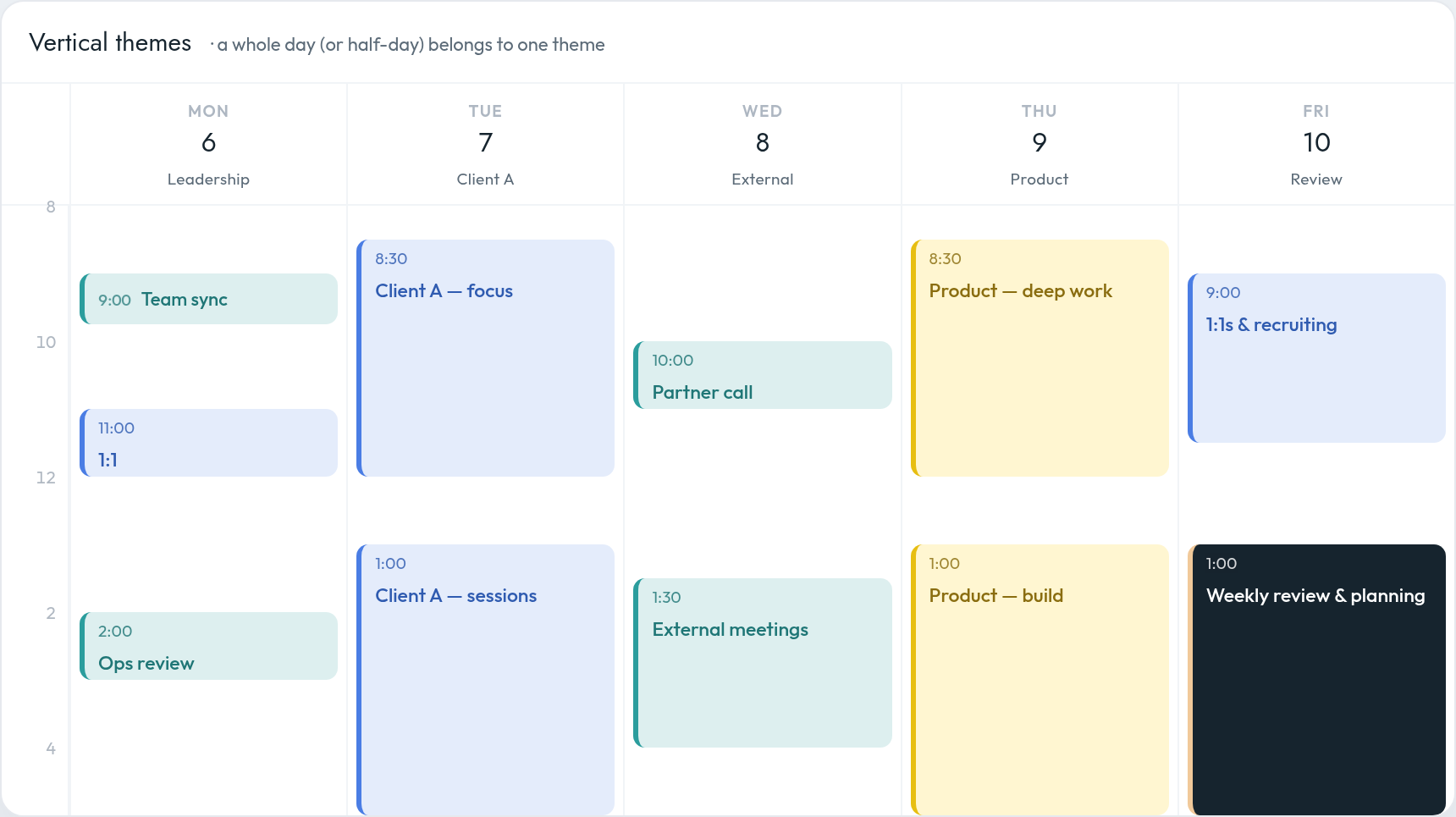
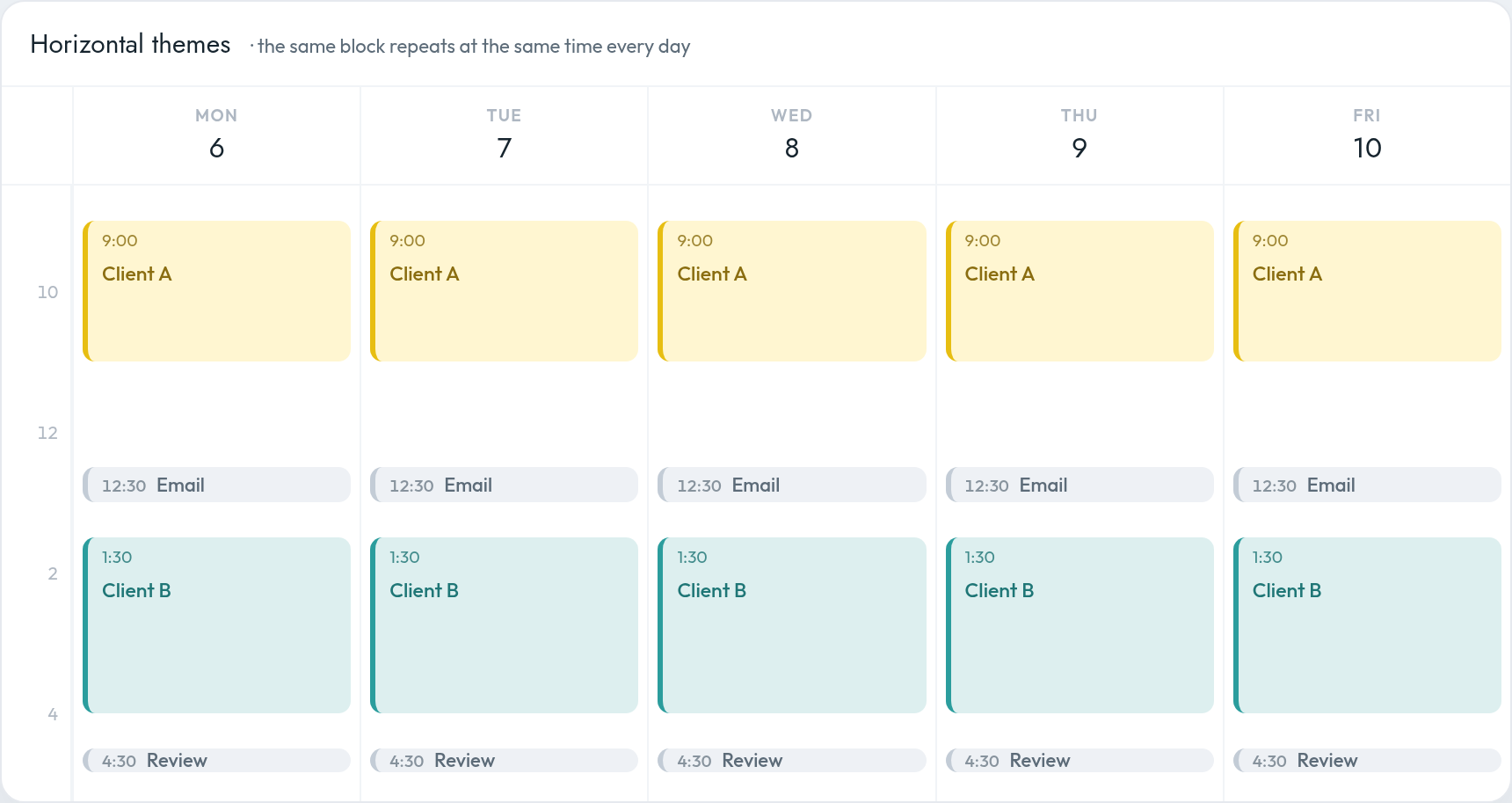
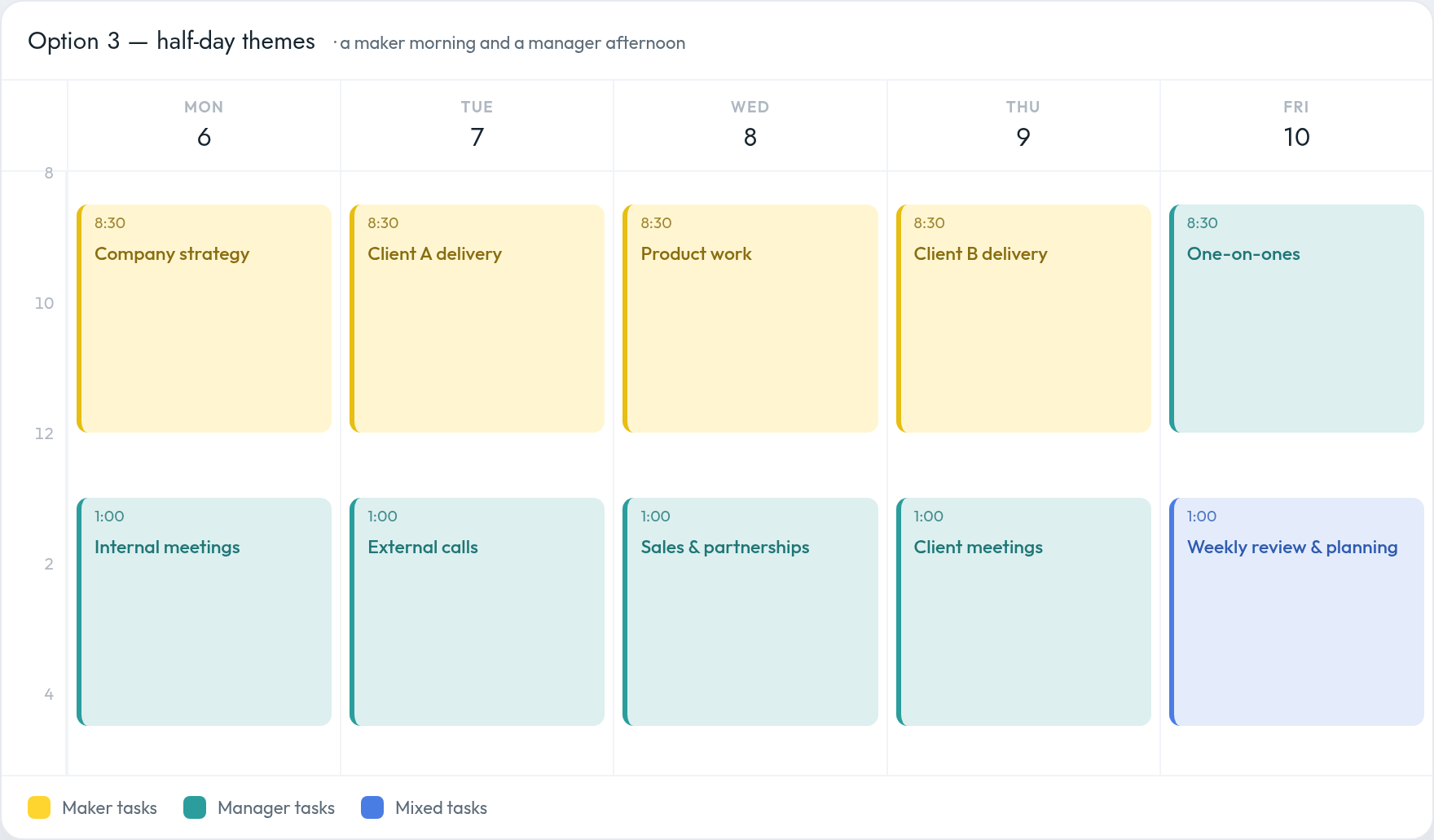
Theming creates a “cadence” the whole company understands and lets him re-anchor after interruptions. **Mike Vardy** formalized this for non-CEOs: *vertical* theming (a whole day) vs. *horizontal* theming (a recurring slot at the same time across days). For a multi-venture founder, theming days or half-days by venture or function is a natural fit. If you run several companies or clients, [calendar theming for founders](/blog/calendar-theming-for-founders/) goes deep on vertical vs. horizontal themes and a full themed week. *(Elon Musk’s “5-minute blocks” is attested reportage, not a verbatim quote — and it’s time-boxing, not theming.)*
### Why batching works — the science of switching
**Sophie Leroy’s “attention residue”** (2009, *OBHDP*): when you switch tasks, part of your attention stays stuck on the prior one — worse when it was left unfinished. This is the strongest peer-reviewed case for batching similar work. **Gloria Mark** (CHI 2005) found workers resumed \~77% of interrupted tasks the same day but passed through 2+ intervening tasks first, taking \~25 min to return. *(Her often-quoted “23 min 15 sec to refocus” comes from interviews, not a paper.)*
## Hardest vs. easiest tasks — where to place them
### The daily energy curve: Peak → Trough → Rebound
Daniel Pink’s *When: The Scientific Secrets of Perfect Timing* (2018) synthesizes the chronobiology into three stages:
| Phase | Timing (most people) | Best work |
|-------------|---------------------------|-----------------------------------------------|
| **Peak** | Morning | Analytic deep work — writing, analysis, focus |
| **Trough** | Early afternoon (\~2–4pm) | Admin “routine garbage” — email, expenses |
| **Rebound** | Late afternoon / evening | Insight & creative work, brainstorming |
**Chronotypes matter.** Roughly three-quarters of people (larks + “third birds”) run Peak → Trough → Rebound; about one in four (owls) run closer to the reverse, with their analytic peak in the evening. Schedule against *your* curve.
> Do the biggest, hardest task first — while your peak resources are fresh. “Eat the Frog,” Brian Tracy (2001). The Twain quote is misattributed.
### Counter-intuitive but supported: create when groggy
**Wieth & Zacks (2011, *Thinking & Reasoning*)** had 428 students solve insight and analytic problems at optimal vs. non-optimal times. **Insight** problem-solving was reliably *better at the non-optimal time*; analytic problems showed no time-of-day effect. Reduced inhibitory control when groggy lets in the tangential associations that fuel “aha” moments — validating Pink’s Rebound advice. Put focused analysis at your peak; save brainstorming for your off-peak window. Admin goes in the trough.
## Work rhythms & breaks
| Technique | Work / break | Origin | Provenance | Best for |
|----------------------|--------------------------------|-----------------------------------|-----------------------------------------------------|--------------------------------|
| **Pomodoro** | 25 / 5 min; long break every 4 | Francesco Cirillo, late 1980s | Well documented | Procrastinators; focus stamina |
| **52/17 Rule** | 52 / 17 min | DeskTime study, 2014 | Proprietary app data, single day, not peer-reviewed | A data-derived rhythm |
| **90-min ultradian** | \~90 / \~20 min | Kleitman’s BRAC; Loehr & Schwartz | Real physiology; waking-work use contested | Deep-work, long blocks |
**Pomodoro.** 25 min work → 5 min break; after four, a 15–30 min break. The fixed interval defeats procrastination by making starting cheap. **52/17.** DeskTime found its top-10% users worked \~52 min then broke \~17 — and crucially the breaks were true disconnection. (Its later re-runs shifted to \~80/17 and \~112/26, so the durable lesson is “intense sprint + genuine detachment,” not the exact ratio.) **90-minute ultradian.** Kleitman’s Basic Rest-Activity Cycle, applied to work by Loehr & Schwartz — three \~90-min focused pulses a day with real renewal between. *(Kerkhof et al. found no reliable 90-min cognitive rhythm; treat it as a heuristic.)*
### Does rest actually improve output?
**Berman, Jonides & Kaplan (2008, *Psychological Science*)**: a \~50-minute nature walk improved performance on a demanding attention task; an urban walk did not. Grounded in Attention Restoration Theory — directed attention is finite and fatiguable, and restorative environments (especially nature) replenish it. The *kind* of break matters: a walk restores focus; scrolling does not.
> **Should you put breaks on the calendar? Yes.** A calendar break is time scheduling tools and colleagues treat as unavailable, so it doesn’t get colonized — and it converts “I’ll rest if I get to it” into a commitment. Don’t push past \~90 minutes without a break. It only pays off as a real disconnect.
## Meetings — scheduling for least disruption
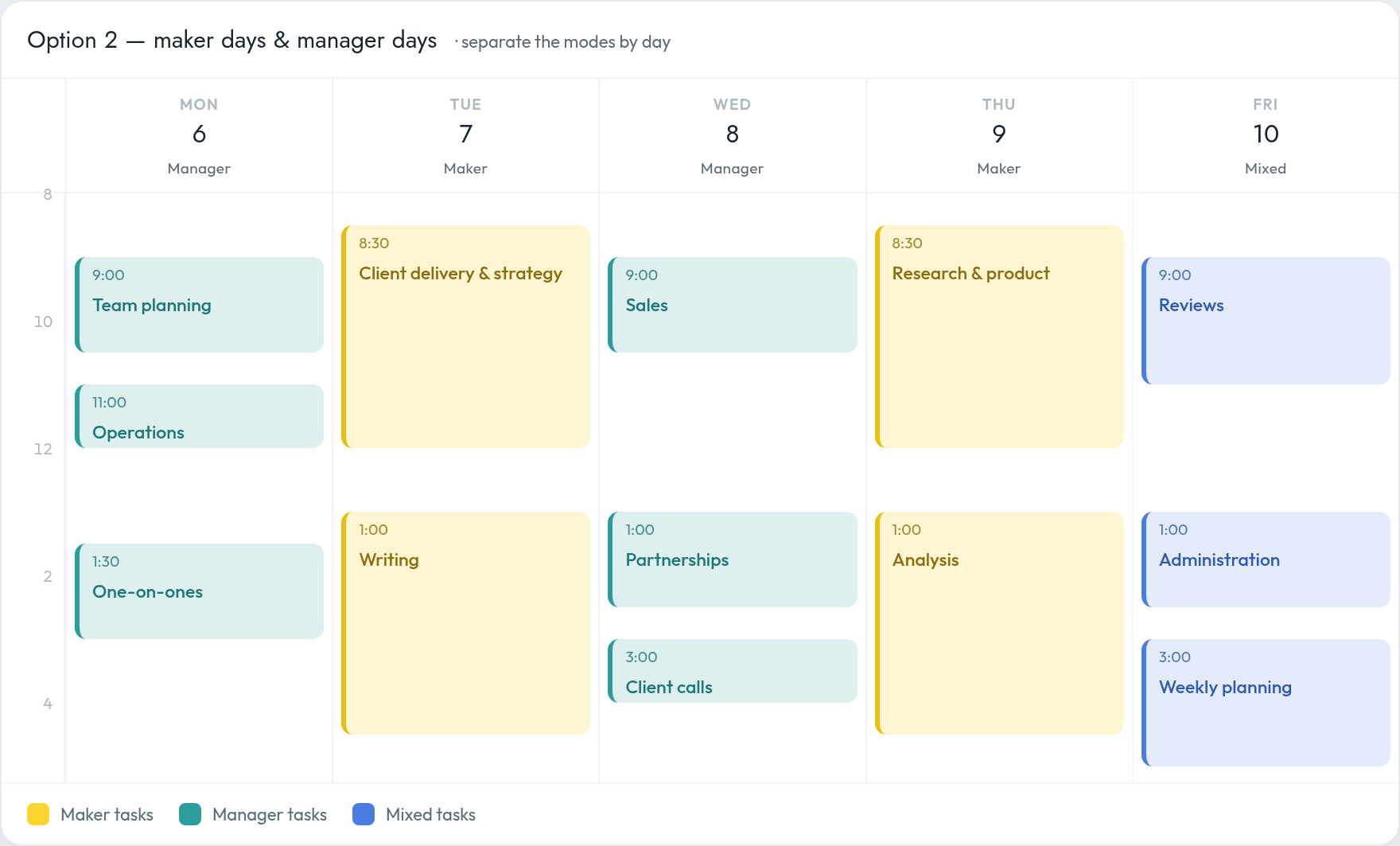
**Paul Graham’s “Maker’s Schedule, Manager’s Schedule”** (2009) is the essential text. Managers change task every hour; makers — programmers, writers, designers — “prefer to use time in units of half a day at least.” We put those two schedules side by side in [maker’s schedule vs. manager’s schedule](/blog/makers-schedule-vs-managers-schedule/).
> “A single meeting can blow a whole afternoon, by breaking it into two pieces each too small to do anything hard in.” Paul Graham, 2009
As both maker and manager, you hold the power to impose meetings — so impose them deliberately. Practical rules:
- **Batch meetings at the edges of the day** (typically afternoons), keeping mornings contiguous for deep work.
- **Institute meeting-free blocks or days.** Verified: Asana’s “No Meeting Wednesdays” (explicitly citing Graham) and Shopify’s 2023 meeting purge (\~12,000 recurring events removed).
- **Best time to meet:** the popular “Tuesday 2:30pm” comes from vendor YouCanBookMe and measures *acceptance*, not productivity — treat as soft. The defensible principle is Graham’s: don’t fragment the morning.
- **Make the other zone visible before you propose.** Across time zones the edges of your day are the middle of someone else’s. Putting a second zone beside the grid turns that from arithmetic into something you read — see [how to show multiple time zones in Google Calendar](/blog/google-calendar-multiple-time-zones/).
## Email & inbox — batch it into windows
**Kushlev & Dunn (2015, *Computers in Human Behavior*).** 124 adults over two weeks: one week limited to checking email **three times a day**, one unlimited. The limited week produced **significantly lower daily stress**, which predicted greater well-being. “People felt less stressed when they checked their email less often.”
**Sophie Leroy — attention residue.** Constantly dipping into email leaves residue on whatever you were doing, degrading both.
> **Recommended practice** Set **2–3 fixed email windows** a day (the Kushlev-Dunn intervention). Reach a natural stopping point on deep work *before* opening the inbox (Leroy). Make notifications opt-in, not default (Mark 2005). Post “office hours” so others know when to expect a reply.
## Structured vs. flexible — how much to block
The central tension, fairly: **pro-structure** (Newport) — an unblocked day defaults to shallow, reactive work; **pro-flexibility** — a fully-packed calendar is brittle, and one deviation topples every later block. The reconciliation: **block deliberately, leave slack, and revise rather than predict.**
### The planning fallacy — why you over-book
Kahneman & Tversky coined the **planning fallacy** (1979; *Thinking, Fast and Slow*, 2011): people underestimate task time even with experience of past overruns, because they take an “inside view” and ignore how long similar tasks actually took. The fix is reference-class forecasting — check the base rate.
### The \~60% rule
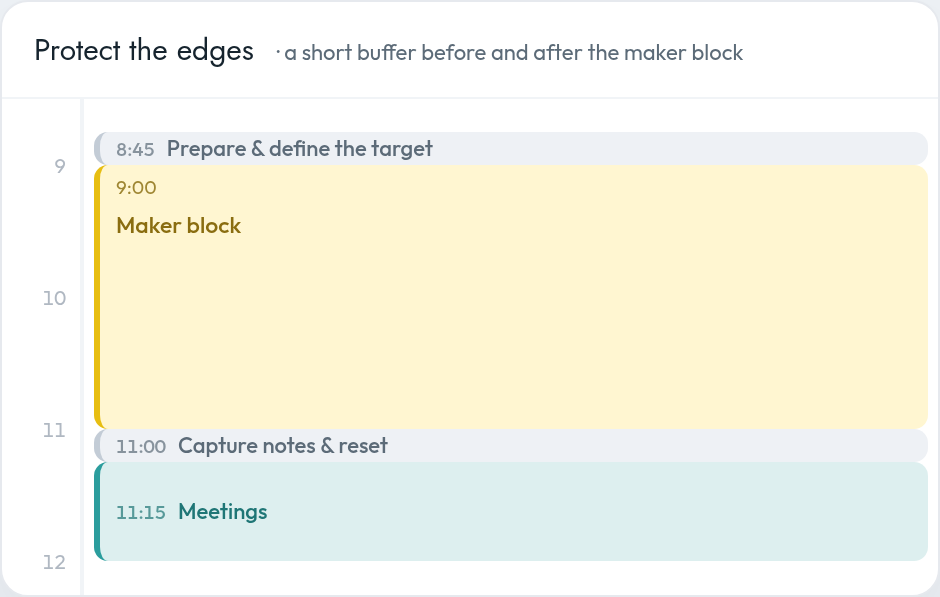
The **ALPEN method** (Prof. Lothar Seiwert): **plan only \~60% of your working time; leave \~40% as buffer.** Combined with the planning fallacy, a 60/40 split gives realistic protection. Add **transition buffers** (5–15 min) between meetings so overrun and attention residue don’t bleed forward.
## Adjusting mid-week — when it goes sideways
The plan *will* break. The skill is re-planning, not predicting.
- **Re-block from now forward (Newport).** When you fall behind, cross out the remaining blocks and write a fresh plan for the rest of the day. The value is *intention*, not forecast accuracy.
- **Daily shutdown ritual (Newport).** \~15–30 min before end of day, review inbox, tasks, and calendar, then close with a fixed cue — “Schedule shutdown, complete.” This counters the Zeigarnik effect (unfinished tasks dominate attention).
- **The 40% buffer absorbs slippage.** With ALPEN-style slack, a derailed morning doesn’t compound into a derailed week.
> “Plans are worthless, but planning is everything.” Dwight D. Eisenhower, 1957. The forecast will be wrong; the act of planning lets you re-plan fast.
## Putting it all together — a system you can adopt
### The weekly system
> **Friday, 60–90 min — weekly review & plan** **1.** Clear inbox and head to zero. **2.** Review last week: 3–5 wins + one lesson. **3.** Reconnect to quarterly goals and roles. **4.** Choose your Weekly Big 3. **5.** Block the Big 3 into next week’s peak hours first. **6.** Theme your days by venture/function. **7.** Leave 40% of the week unblocked.
>
> **Each morning — 5 min** Rewrite the day’s time-block plan; name 1–3 MITs; identify the frog. Each evening — 15 min Shutdown ritual: review, capture, close with a fixed cue.
### An example ideal day (a morning type)
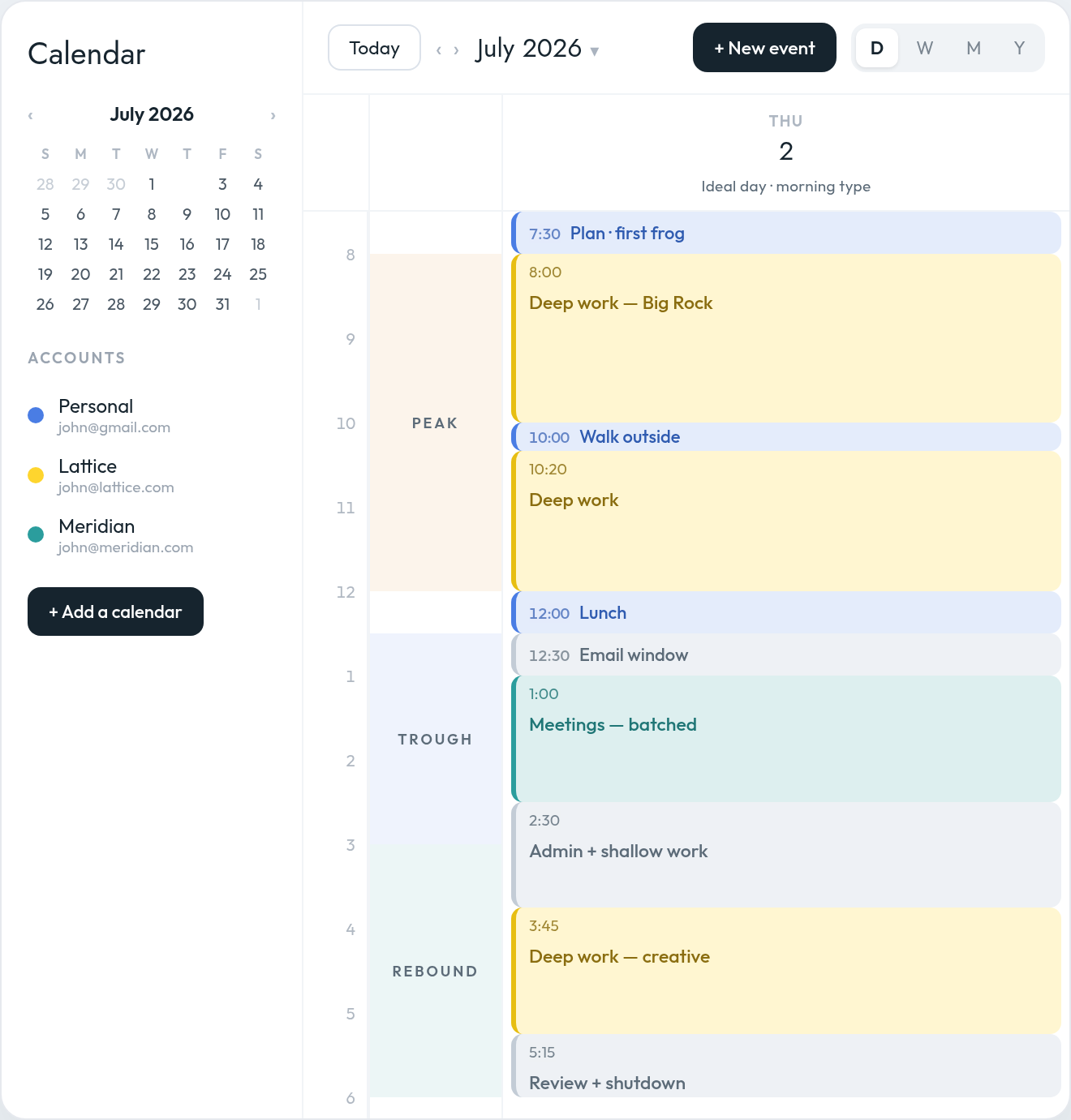
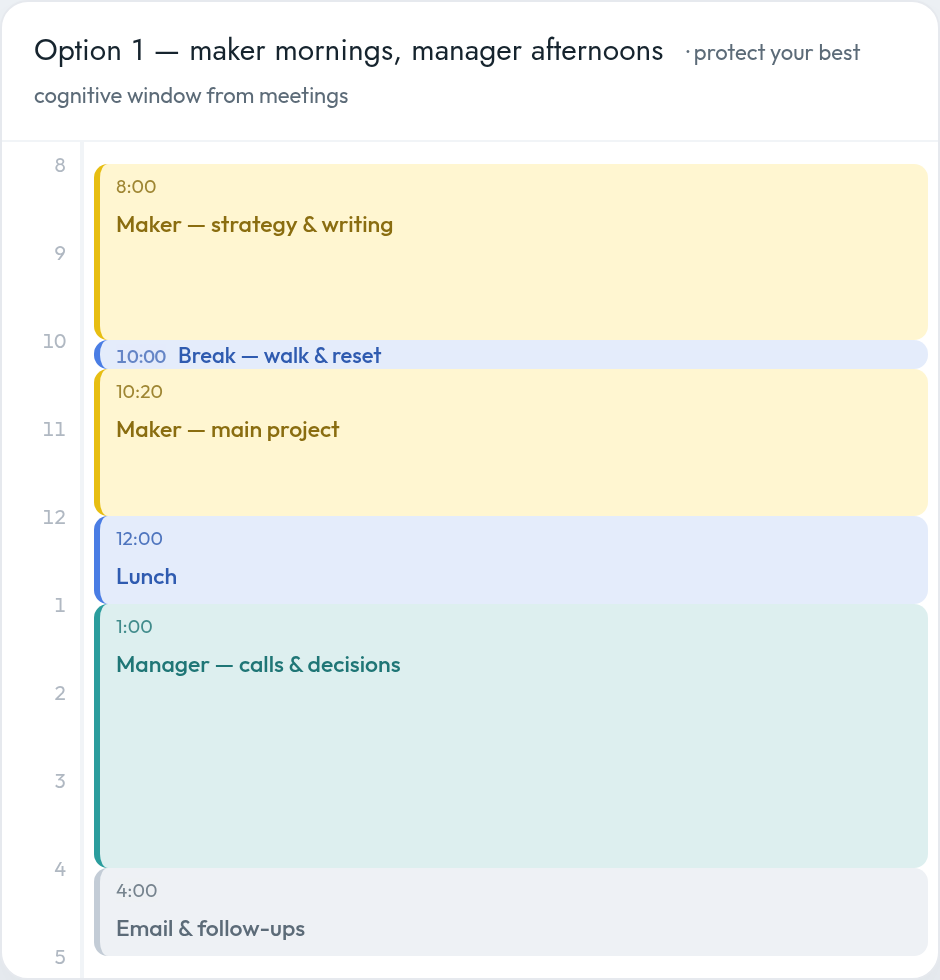
An ideal day for a morning type — deep work in the morning peak, meetings and email batched into the afternoon trough, admin and shutdown in the rebound. The rail on the left maps blocks to the daily energy curve.
| Time | Block | Rationale |
|-------------|---------------------------------------|--------------------------------------------|
| 7:30–8:00 | Plan the day; first bite of the frog | Fresh mind, low friction |
| 8:00–10:00 | **Deep work 1** (the frog / Big Rock) | Peak vigilance (Pink) |
| 10:00–10:20 | Break — walk, ideally outdoors | Attention restoration (Berman/Kaplan) |
| 10:20–12:00 | **Deep work 2** | Second \~90-min pulse (Loehr/Schwartz) |
| 12:00–13:00 | Lunch + real disconnect | — |
| 13:00–13:30 | **Email window 1** | Batched; trough-appropriate (Kushlev-Dunn) |
| 13:30–15:00 | **Meetings** (batched) | Protect the morning (Graham) |
| 15:00–15:15 | Buffer / transition | Absorb overrun (ALPEN) |
| 15:15–16:30 | Admin + shallow work (batched) | Trough = routine garbage (Pink) |
| 16:30–17:00 | **Email window 2** + shutdown | “Shutdown complete” (Newport) |
### An example themed week (multi-venture founder)
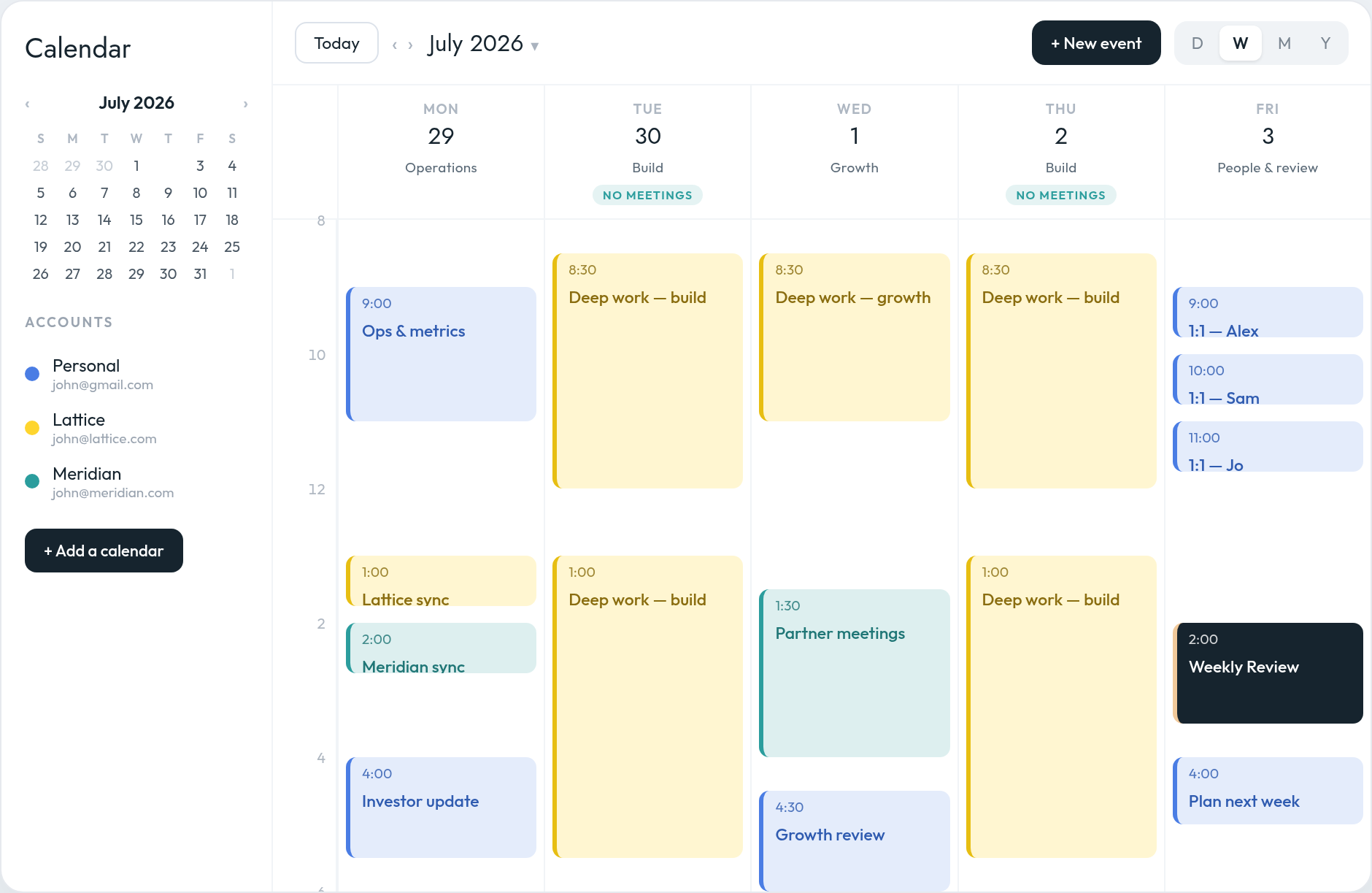
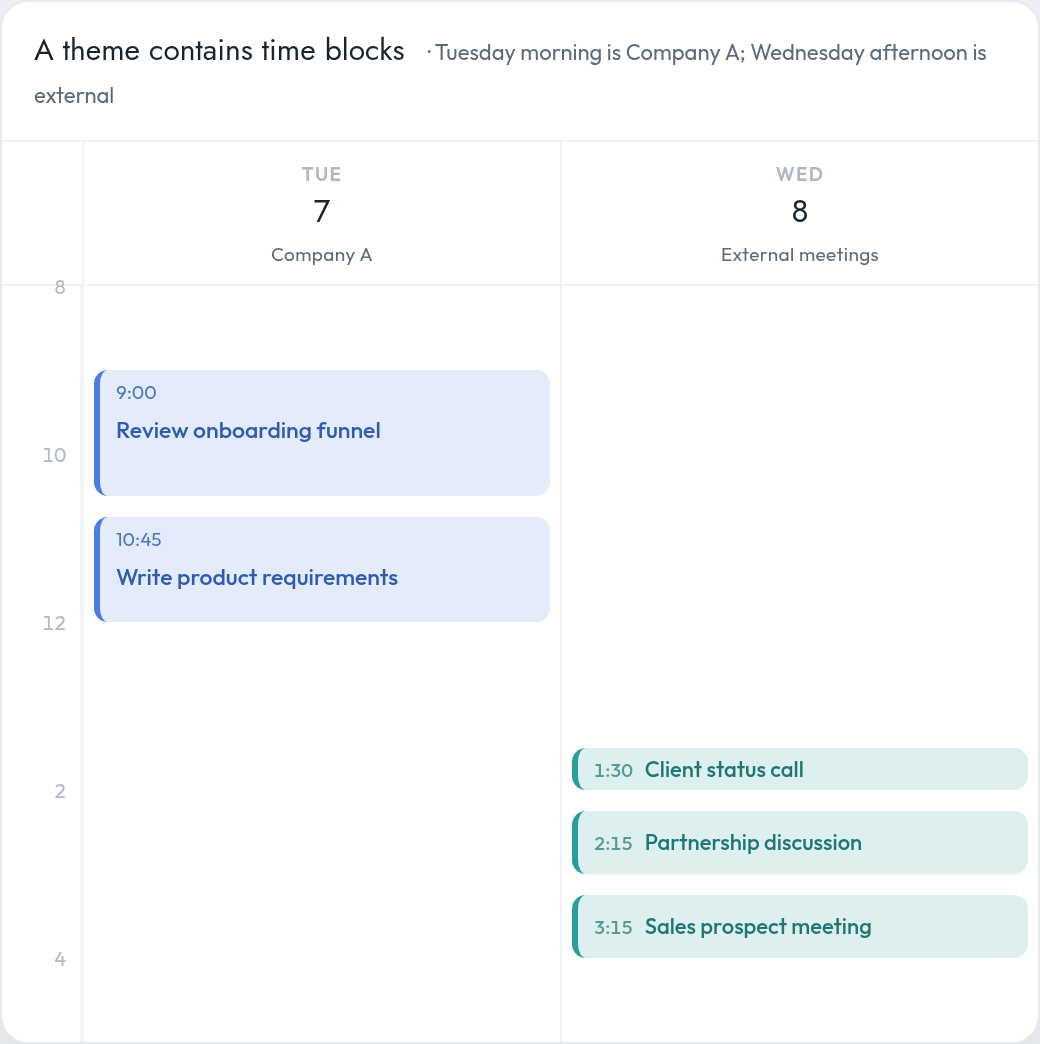
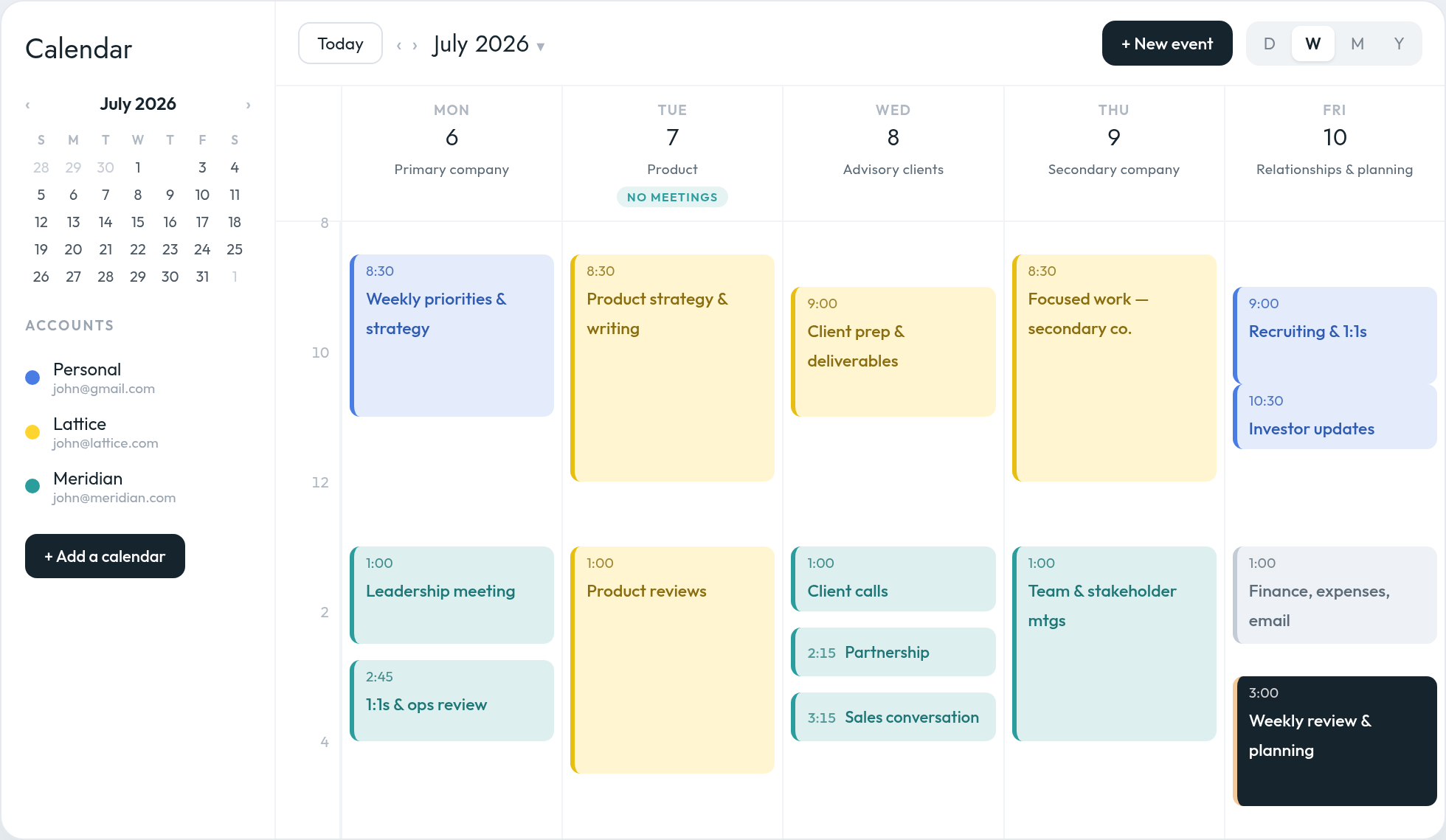
A themed week across three calendars — protected deep-work days (Tue/Thu), meetings batched by venture, and the Weekly Review closing out Friday. One unified view, colour-coded by account.
| Day | Theme | Meeting policy |
|-----------|--------------------------------------|-----------------------------|
| Monday | Company / operations across ventures | Team syncs in the afternoon |
| Tuesday | Product / build (deep work) | **No-meeting day** |
| Wednesday | Growth, marketing, partnerships | External meetings 1:30–4pm |
| Thursday | Product / build (deep work) | **No-meeting day** |
| Friday | People, culture, review & plan | 1:1s AM; Weekly Review PM |
*Owls: shift deep-work blocks toward the evening; put admin in your own morning trough.*
## Sources
### Weekly planning
- David Allen, *Getting Things Done* (2001; rev. 2015) — [GTD Weekly Review checklist](https://gettingthingsdone.com/wp-content/uploads/2014/10/Weekly_Review_Checklist.pdf)
- Cal Newport, *Deep Work* (2016); *The Time-Block Planner* (2020) — [multi-scale planning](https://www.asyncagile.org/blog/multi-scale-planning)
- Michael Hyatt, *Free to Focus* (2019) — [Full Focus Planner](https://fullfocusplanner.com/system/)
- Stephen Covey, *7 Habits* (1989); *First Things First* (1994) — [FranklinCovey Habit 3](https://www.franklincovey.com/courses/the-7-habits/habit-3/)
- [Quartz — the case for planning on Fridays](https://qz.com/emails/quartz-at-work/1850181051/why-you-should-plan-your-week-on-fridays)
### Prioritization
- [Eisenhower’s 1954 WCC address](https://www.presidency.ucsb.edu/documents/address-the-second-assembly-the-world-council-churches-evanston-illinois); [Quote Investigator — urgent/important](https://quoteinvestigator.com/2014/05/09/urgent/)
- Leo Babauta, [Zen Habits — Most Important Task](https://zenhabits.net/purpose-your-day-most-important-task/)
- Alex Cavoulacos, [The Muse — 1-3-5 Rule](https://www.themuse.com/advice/a-better-todo-list-the-135-rule)
- [Todoist — Ivy Lee Method](https://www.todoist.com/productivity-methods/ivy-lee-method); [Inc. — the Buffett 25/5 rule is likely fake](https://www.inc.com/marcel-schwantes/warren-buffetts-brilliant-25/5-rule-was-fake-heres-what-he-really-said-about-achieving-success.html)
- [RICE vs ICE (Intercom / Sean Ellis)](https://www.productlift.dev/blog/rice-vs-ice/); [ICE — Sean Ellis](https://growthmethod.com/ice-framework/)
- [Juran Institute — Pareto Principle](https://www.juran.com/blog/a-guide-to-the-pareto-principle-80-20-rule-pareto-analysis/)
- Brian Tracy, *Eat That Frog!* (2001) — [Brian Tracy](https://www.briantracy.com/blog/time-management/the-truth-about-frogs/); [the Twain misattribution](https://quoteinvestigator.com/2013/04/03/eat-frog/)
### Time-blocking, theming, batching
- Cal Newport — [planning every minute](https://calnewport.com/deep-habits-the-importance-of-planning-every-minute-of-your-work-day/); [The Time-Block Planner](https://www.timeblockplanner.com/)
- [Forbes — Jack Dorsey’s day-theming](https://www.forbes.com/sites/kevinkruse/2015/10/12/jack-dorsey-productivity-secret/); Mike Vardy, [Theme Your Week](https://mikevardy.com/themeyourweek/)
- Sophie Leroy, “Attention residue” (2009), *OBHDP* — [citation](https://ideas.repec.org/a/eee/jobhdp/v109y2009i2p168-181.html)
- Gloria Mark et al., [“No Task Left Behind?” (CHI 2005)](https://ics.uci.edu/~gmark/CHI2005.pdf); [debunking the “23:15” figure](https://blog.oberien.de/2023/11/05/23-minutes-15-seconds.html)
### Energy, timing, breaks
- Daniel Pink, *When* (2018) — [CNBC summary](https://www.cnbc.com/2018/04/30/daniel-pink-how-to-time-your-day-for-peak-performance.html)
- Wieth & Zacks (2011), *Thinking & Reasoning* — [publisher](https://www.tandfonline.com/doi/abs/10.1080/13546783.2011.625663); [BPS Digest](https://www.bps.org.uk/research-digest/youre-most-creative-when-youre-your-groggiest)
- [Pomodoro — Francesco Cirillo](https://www.pomodorotechnique.com/francesco-cirillo/); [DeskTime — the 52/17 rule](https://desktime.com/blog/52-17-updated/)
- Loehr & Schwartz, *The Power of Full Engagement* (2003); [Schwartz, “Relax! You’ll Be More Productive” (NYT, 2013)](https://www.tampabay.com/archive/2013/02/17/relax-you-ll-be-more-productive/); [Kerkhof et al. — no 1.5-h cognitive rhythm](https://pubmed.ncbi.nlm.nih.gov/7669837/)
- [Attention Restoration Theory (Kaplan; Berman et al. 2008)](https://positivepsychology.com/attention-restoration-theory/)
### Meetings, email, flexibility, adjusting
- Paul Graham, [“Maker’s Schedule, Manager’s Schedule” (2009)](https://paulgraham.com/makersschedule.html)
- [Asana — No Meeting Wednesdays](https://asana.com/inside-asana/no-meeting-wednesdays); [Forbes — Shopify’s 2023 meeting purge](https://www.forbes.com/sites/jenamcgregor/2023/01/03/shopify-is-canceling-all-meetings-with-more-than-two-people-from-workers-calendars-and-urging-few-to-be-added-back/); [CNBC — “Tuesday 2:30pm” (soft)](https://www.cnbc.com/2019/04/01/science-says-this-is-the-best-time-and-day-to-schedule-a-meeting-if-you-want-to-be-productive.html)
- Kushlev & Dunn (2015), *Computers in Human Behavior* — [paper (PDF)](https://dunn.psych.ubc.ca/wp-content/uploads/2010/11/kushlev-dunn-email-and-stress-in-press1.pdf); [ScienceDaily](https://www.sciencedaily.com/releases/2014/12/141203142644.htm)
- Kahneman & Tversky, planning fallacy (1979); *Thinking, Fast and Slow* (2011) — [overview](https://en.wikipedia.org/wiki/Planning_fallacy)
- Lothar Seiwert, ALPEN method / 60-40 rule — [Atlassian summary](https://www.atlassian.com/blog/productivity/aplen-time-management-technique)
- Cal Newport, [work shutdown ritual](https://calnewport.com/drastically-reduce-stress-with-a-work-shutdown-ritual/); [Eisenhower — “plans are worthless” (1957)](https://quoteinvestigator.com/2017/11/18/planning/)
### A note on unverified claims
- The following are commonly repeated but *not* independently verifiable, and are flagged in-text: Ivy Lee’s “$25,000” fee; Buffett’s “25-5” pilot story; the “Mark Twain” frog quote; Gloria Mark’s “23 min 15 sec”; the “Tuesday 2:30pm” optimum; Newport’s “2× productivity”; and a clean \~90-minute *cognitive* work rhythm. Real figures are attributed to their claimants, not presented as established fact.
↑ Back to top
---
Published at https://everest.ag/blog/weekly-planning-calendar-guide/ · Everest is an AI scheduling assistant — CC it on any email thread and it books the meeting across every calendar you run. Learn more at https://everest.ag/
---
# Core hours: choosing meeting windows a distributed team can live with
*August 15, 2026 · Charles Brun · Playbook · Everest Blog*
> The four-hour overlap rule everyone repeats has no research behind it. Here is what the evidence actually says, and how to set core hours from your real overlap instead.
Search for how much overlap a distributed team needs and you will be told four hours. Sometimes two
to four, sometimes four to six, always with the confidence of a settled fact.
It is not one. There is no study behind that number. It appears in blog posts that cite other blog
posts, and — this is the part that should end the argument — none of the companies most associated
with distributed work publish a required overlap at all. GitLab's handbook, which documents almost
everything, does not name a figure.
So if you are setting core hours for a team, you are not implementing a known best practice. You are
making a judgement call. It is worth making it from the evidence that does exist.
## What the research actually found
The most useful study here is Chauvin, Choudhury and Fang's *Working Around the Clock*
([Organization Science, 2024](https://researchonline.lse.ac.uk/id/eprint/128758/)). It tracked
12,038 employees across 167 cities inside one multinational, and used daylight-saving transitions as
a natural experiment — when clocks move, the overlap between two colleagues changes while nothing
else about them does.
The headline: **a roughly one-hour increase in time zone separation reduced synchronous
communication by about 11%.**
The interesting part is how small that is. The clock shift removed 19.3% of the average pair's
overlap — 1.1 hours from a mean of 5.7 — but synchronous contact fell by only 11%. The conversations
did not disappear. People moved them outside their own working hours.
Two findings from the same paper are worth sitting with:
- **The cost lands unevenly.** Employees with two hours or less of overlap with their manager did
24.6% of their communication outside business hours, against 11.9% for those with full overlap.
The share was 9% in countries with a 35–39 hour statutory limit on the working week, and 32% in
countries with no legal limit.
- **Asynchronous communication did not rise to compensate.** The effect on async volume was
statistically indistinguishable from zero.
That last one deserves attention, because it cuts against the comfortable story. Distance did not
make this organisation more asynchronous. It made people work in the evening. Async is a practice a
team adopts deliberately; it does not appear on its own when the overlap shrinks.
**The caveats, stated plainly:** this is one US-headquartered multinational in natural resource
extraction, observed over twelve weeks in 2017, in a culture where 85% of communication was
synchronous. It is not a study of remote-first startups. It is, however, a real causal estimate,
which is more than any of the "four hours" advice can claim.
## Set core hours from your actual overlap
The practical implication is not a number to copy. It is a method.
1. **Compute the real overlap for each pair of locations.** Not for the team as a whole — the
whole-team overlap is often zero, and that fact should not stop two of your people talking.
2. **Name the window that survives.** For a London–Bengaluru team, working days genuinely overlap
between about 09:00 and 12:30 UTC. That is your core window: the hours where live conversation is
legitimate without anyone making a sacrifice.
3. **Declare everything outside it async by default.** Not forbidden — async by default, so that
booking outside the window is a decision someone has to justify rather than an accident.
4. **Write down the hours that are nobody's.** A core window implies quiet hours. The teams where
this works are the ones where the quiet hours are as explicit as the core ones.
If the whole-team window is empty, you are not doing it wrong — that is the ordinary result once a
team has three hops. What to do about it is the subject of
[how to schedule meetings across time zones](/blog/schedule-meetings-across-time-zones/).
## What the practitioners actually publish
Since the four-hour rule has no source, it is worth reading what the companies with the longest
distributed track records really say. GitLab's
[all-remote handbook](https://handbook.gitlab.com/handbook/company/culture/all-remote/meetings/)
is the most operational, and its advice is structural rather than numeric:
- Create meetings that overlap between EMEA/APAC, APAC/AMER and AMER/EMEA — pairs, not the whole
company.
- Nominate volunteers to host in the time zones the meeting suits.
- Record group meetings that cross zones so people can participate asynchronously.
- Attach a live agenda doc to every invite, shared at least 24 hours ahead, ideally 72.
- Run 25 and 50-minute meetings rather than 30 and 60.
Doist states that async is the default and that meetings are rare, putting its own async share at
95% — a self-reported figure from a company that sells an async communication product, so treat it
as a statement of practice rather than a benchmark. Zapier has described alternating meeting times
so the same people are not always inconvenienced.
Notice what none of them provide: a minimum overlap. The advice that survives contact with practice
is about pairing, rotating, recording and documenting — not about a threshold.
## The agenda rule does more work than the hours
If you adopt one thing from that list, make it the agenda attached to the invite, shared in advance.
Across time zones it does something it cannot do in a co-located office: it lets someone who cannot
attend contribute before the meeting and read the outcome afterwards, which converts a meeting they
would have lost sleep for into one they can skip. A recurring call with no agenda cannot be skipped
safely, so everyone attends everything, at whatever hour it lands.
This is also the cheapest test of whether a meeting needed to be live. If nobody can write down what
the meeting is for, that is information about the meeting.
## Claims worth not repeating
This subject has an unusually high density of numbers that dissolve when you follow them back.
Each of these is repeated constantly, and each is wrong or unsupported:
| The claim | What it actually is |
| --- | --- |
| "Teams need four hours of overlap" | No study. Blog posts citing blog posts; none of the major all-remote companies publish a figure |
| "Science says the best meeting time is Tuesday 2:30 p.m." | Booking-rate telemetry from a scheduling vendor, not research — and meaningless across zones, since it is Wednesday morning in Sydney |
| "Meetings waste $37 billion a year" | Traces to a 1989 magazine article whose sources cannot be reconstructed |
| "Employees waste 31 hours a month in unproductive meetings" | Traces to a 1998 study which found the opposite — that most meetings were rated at least somewhat productive |
| "Cutting meetings 40% raises productivity 71%" | A survey of 76 companies that had already chosen to adopt no-meeting days, self-reported, no control group |
The pattern is the same each time: a vendor metric or an old survey, promoted to a law, then cited
by everyone who needs a statistic. You do not need any of them to justify protecting your team's
evenings.
One real number is worth more than five invented ones: **30% of meetings now span multiple time
zones**, up about eight percentage points since 2021, according to
[Microsoft's telemetry](https://www.microsoft.com/en-us/worklab/work-trend-index/breaking-down-infinite-workday)
from its own 365 customers. Caveat included: that is a vendor measuring its own users, with European
Union and education tenants excluded.
## Five lines, then leave it alone
Core hours fail when they are a document nobody can recite. Keep it to something a new joiner can
absorb in a minute:
1. The core window, named in UTC and in each city's local time — and re-checked after each clock
change, because [the offset between two cities is not a constant](/blog/recurring-meeting-daylight-saving-drift/).
2. The quiet hours nobody books.
3. What happens when a meeting has to fall outside the window — who decides, and whose turn it is.
4. The agenda rule: no agenda 24 hours ahead, no meeting.
5. What async default means in practice: which decisions can be made in writing.
Then place them. Choosing which hours inside the window go to focused work and which to coordination
is the same problem every calendar has, distributed or not — and it is covered in
[maker's schedule vs. manager's schedule](/blog/makers-schedule-vs-managers-schedule/) and
[planning your week](/blog/weekly-planning-calendar-guide/).
The thing to hold on to is the finding underneath all of it. Shrinking the overlap does not shrink
the amount of talking a team needs to do. It just moves that talking into somebody's evening — and,
on the evidence, into the evenings of the people least able to object.
---
Published at https://everest.ag/blog/core-hours-distributed-team/ · Everest is an AI scheduling assistant — CC it on any email thread and it books the meeting across every calendar you run. Learn more at https://everest.ag/
---
# Why your recurring meeting drifts an hour twice a year
*August 13, 2026 · Charles Brun · Playbook · Everest Blog*
> A standing call that was fine in February is an hour wrong in March. Here is the mechanism behind it, why the clocks stopped agreeing, and how to pin a series so it holds.
The weekly call has been at 3 p.m. since it was created. This week half the participants joined at
what they thought was 3 p.m. and found the room empty, or full, an hour out.
Nobody moved it. What moved was a clock, in one country, on a date the other country had not
reached yet.
## An event is a wall-clock time plus a rule
When you create an event, your calendar does not really store "3 p.m." It stores an instant, plus
the zone that instant was expressed in. For a one-off meeting this distinction never surfaces.
For a repeating series it decides everything. The series is expanded into future instances using the
daylight-saving rules of the zone attached to it — so a call anchored to New York keeps following
New York's clock, and moves relative to everyone else when New York changes and they have not.
The bug is almost never a conversion mistake at the moment of booking. It is a series that was
anchored to the wrong place, or to nowhere in particular, months earlier.
## The clocks stopped agreeing
The comfortable assumption is that New York is five hours behind London and that is that. It is
true for most of the year and false for about a month of it.
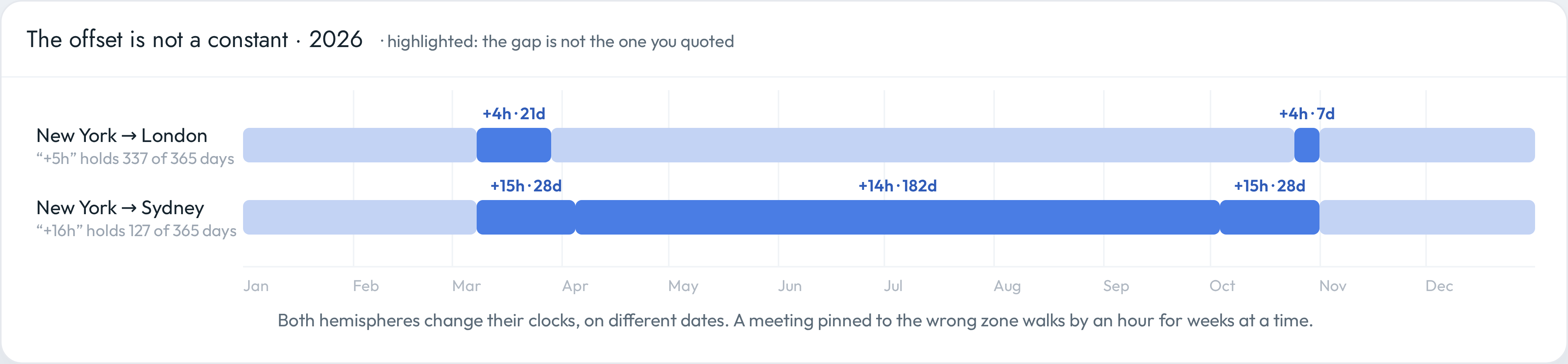
Two city pairs across 2026, read from the tz database. The offset you quote is not the offset you get.
The United States springs forward on the second Sunday in March; the European Union waits until the
last Sunday of the month. So for **21 days in March 2026** New York is four hours behind London
rather than five. In autumn it reverses — the EU falls back first — for another **seven days**.
Four weeks a year when a transatlantic invite is an hour away from what both sides assumed.
Cross the equator and the tidy picture disappears entirely. New York to Sydney takes four different
values during 2026, and the sixteen hours everybody quotes holds for **127 days out of 365**.
| Both ends | What happens in 2026 |
| --- | --- |
| New York ↔ London | +5h, except 8–29 March and 25 October–1 November, when it is +4h |
| New York ↔ Sydney | +16h, +15h, +14h, +15h, +16h — four changes in a year |
If your standing meeting is anchored to one of these places and read from the other, those are the
weeks it is wrong.
## What actually breaks
- **Recurring series.** The most common and the most expensive, because nobody re-checks a meeting
that has worked for six months.
- **Series created in a hotel.** If you set up a recurring call while travelling, your calendar may
have anchored it to wherever you were sitting. It will keep following that city forever.
- **Events synced between providers.** A series that crosses a Google–Outlook sync can be expanded
by two engines with different ideas about which zone it belongs to. The symptom is that only some
attendees see the drift.
- **All-day events.** These have no zone at all, which is correct for a birthday and wrong for a
deadline. A day that begins at midnight somewhere begins on a different date somewhere else.
## The rules are political, and they keep changing
It is tempting to treat this as a solved engineering problem. It is not, because the inputs are
legislation.
The European Union voted to end seasonal clock changes: Parliament adopted its first-reading
position in **March 2019**. The file has been sitting with the Council ever since, unresolved, and
Europe has changed its clocks every year in between. Any process that assumes the switch is about
to be abolished has been wrong for seven years running.
Meanwhile the map keeps moving. In 2026 alone, according to the maintainers of the
[IANA time zone database](https://data.iana.org/time-zones/tzdb/NEWS): British Columbia stopped
changing its clocks in March, Alberta moved to permanent standard time in June, and Morocco returns
to permanent UTC in September.
That database is the thing your calendar ultimately depends on, and it is updated irregularly —
three releases in 2025, three so far in 2026 — whenever a government decides something. Updates
reach you through your operating system, your browser and your calendar provider separately, which
means they can each be working from a different version of the rules at the same time.
> A detail that shows how rough the edges are: Alberta's move to permanent standard time legally
> took effect on 18 June 2026, but the tz database deliberately models it as happening on 1 November
> instead, as a temporary hack. The canonical source of truth knowingly disagrees with the law for
> a few months, because that is the least bad option available.
None of which is a reason for despair. It is a reason to anchor your meetings deliberately and check
them twice a year, rather than assuming a solved problem.
## Fixing a series that has already drifted
1. Open the series, not a single instance — changes to one occurrence will not fix the rest.
2. Read the time zone shown next to the start time. That is the rule the series is following.
3. Set it to the city the meeting genuinely belongs to: where the customer is, where the team that
cannot move sits, or wherever the majority actually are.
4. Save to the whole series, then check one instance either side of the next clock change before you
trust it.
If half your attendees are in another provider's calendar, ask one of them to confirm what they see
after the change rather than assuming the update propagated.
## Four habits that prevent it
- **Anchor every recurring meeting to a city.** Not to your laptop, and not to whatever zone you
were in when you created it. If you need the mechanics, they are in
[how to show multiple time zones in Google Calendar](/blog/google-calendar-multiple-time-zones/).
- **Put the zone in the title where it matters.** `Ops sync (15:00 CET)` survives every clock change
and every new joiner.
- **Do not create standing meetings while travelling.** Or if you must, fix the anchor when you get
home.
- **Prefer a zone that does not change.** Where you have the choice — with a team spread across
places that keep and drop daylight saving — anchoring to a non-observing zone removes the problem
entirely rather than managing it.
## The twice-yearly check
Put fifteen minutes in the calendar for the week after each transition. Two dates a year, and the
list is short:
1. Open next week in your calendar with a second zone displayed.
2. Walk the recurring meetings that cross a border. Does each still sit inside working hours at both
ends?
3. Fix the anchor on any that moved, at the series level.
4. Ask one person at the other end to confirm what they see.
This is the cheapest maintenance in scheduling, and it prevents the most annoying class of failure —
the meeting that is wrong for three weeks before anyone says anything, because each person assumed
they had misread their own calendar.
If the deeper question is not "why did this move" but "which hour should this have been in the first
place", that is the subject of
[how to schedule meetings across time zones](/blog/schedule-meetings-across-time-zones/).
---
Published at https://everest.ag/blog/recurring-meeting-daylight-saving-drift/ · Everest is an AI scheduling assistant — CC it on any email thread and it books the meeting across every calendar you run. Learn more at https://everest.ag/
---
# How to schedule meetings across time zones
*August 10, 2026 · Charles Brun · Playbook · Everest Blog*
> Across time zones someone always pays for the meeting. This is how to work out who, how often, and how to stop paying for meetings you did not need.
Most advice about scheduling across time zones is a converter with extra steps. Find the overlap,
be explicit about the zone, use a tool. All true, all useless the moment your team spans more than
one hop.
The thing the advice leaves out is that across time zones a meeting is not free. Someone eats
breakfast during it, or misses bedtime for it, or joins from a car. The only real questions are who
pays, how often, and whether the meeting was worth anyone paying for at all.
That reframing changes what you do. You stop hunting for a slot that works for everybody — often
there isn't one — and start deciding, deliberately, how to distribute a cost you cannot remove.
## Start from the overlap, not from the invitation
The instinct is to propose a time and let people counter. Do it the other way round: work out the
shape of the overlap first, once, and let it constrain everything after.
Take three cities, each working a civilised nine to six.
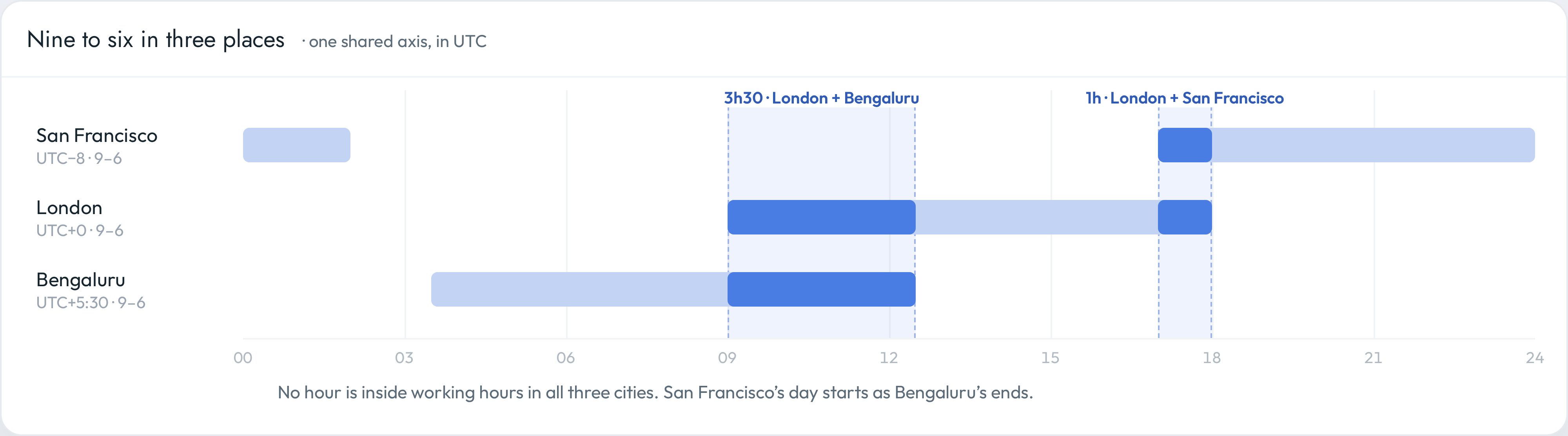
Nine to six in three places, on one axis. Two pairs overlap. All three never do.
London and Bengaluru share three and a half hours. London and San Francisco share one. San
Francisco and Bengaluru share nothing at all — the Californian day begins as the Indian day ends.
This is the ordinary case, not a pathological one. Add a third hop to any pair and the common window
tends to collapse to zero. Once you have seen that picture, the question "when shall we all meet?"
stops being a scheduling problem and becomes a design problem, and the honest answers are: meet in
pairs, meet asynchronously, or decide who is going to be uncomfortable.
Work this out once per pair of locations and write it down. It is a property of where your people
live, not of any particular week, and it only changes when someone moves or the clocks do.
## When the overlap is empty
Three options, in the order I would try them.
**Split the meeting.** Two pairwise conversations at humane hours usually beat one call where a
third of the room is asleep. You lose the shared moment; you gain two people who can think.
**Make it asynchronous.** A written brief with a deadline for comments does the work of most
status meetings, and it does it in everyone's own working day. This is the option people skip
because it feels slower — and then hold a 6 a.m. call to read a document aloud.
**Pick who pays, explicitly.** Sometimes the meeting genuinely has to happen live, with everyone
present. Then say so, name the person carrying the cost, and treat it as a cost rather than a
rounding error: "This one is 7 a.m. for Maya. We are doing it because the contract closes Friday."
The failure mode is not choosing. An unstated default is still a default, and it is nearly always
"the most junior or most distant person joins at a terrible hour, indefinitely."
## Rotate the cost on anything recurring
A one-off bad slot is a favour. The same bad slot every Tuesday for a year is a policy, and it is
the one that quietly drives people out of distributed teams.
For any standing meeting that crosses an empty overlap, alternate. Weeks one and three suit
Bengaluru; weeks two and four suit San Francisco. Nobody enjoys it, everybody sees it is even, and
the fairness is visible in the calendar rather than asserted in a handbook.
Two details make rotation stick:
- **Put the rotation in the event title.** `Ops sync (SF-friendly week)` tells a newcomer more than
any wiki page, and it survives the person who set it up leaving.
- **Anchor each variant to a city.** A rotating meeting that drifts with daylight saving stops being
fair the moment the clocks move — and they do not move on the same date in every country.
## Make the zone visible before you propose
Everything above assumes you can see the other zone while you look at your week. If you are still
converting in your head, you will keep proposing slots that look reasonable and land at 9 p.m.
Two zones beside the grid removes the arithmetic for the relationship you deal with most; a world
clock covers the rest; and events anchored to a city stay correct when you travel. The mechanics —
which setting, where, and what each one is actually for — are in
[how to show multiple time zones in Google Calendar](/blog/google-calendar-multiple-time-zones/).
The point is not the feature. It is that a zone you can see is a constraint you will respect, and a
zone you have to calculate is one you will get wrong on a busy afternoon.
## Write invitations that survive travel and daylight saving
Most cross-zone scheduling failures are not conversion errors at the moment of booking. They are
drift: an invite that was right in March and wrong in April.
- **Anchor the event to the city it belongs to**, not to wherever you happened to be sitting when
you created it. A recurring call tied to New York follows New York's clock changes; one tied to
your laptop follows you on holiday.
- **Put the zone in the title for anything that matters.** `Board prep (09:00 CET)` costs nothing
and settles every argument at a glance.
- **Expect the clocks to move on different dates.** The US, Europe and the southern hemisphere do
not switch together, so there are stretches of the year when a transatlantic meeting is an hour
off from what both parties assumed — about four weeks of 2026, for New York and London. The
mechanism, and how to pin a series against it, is in
[why your recurring meeting drifts an hour twice a year](/blog/recurring-meeting-daylight-saving-drift/).
- **Re-check standing meetings twice a year.** Put a fifteen-minute review in the calendar for the
weeks after each transition. It is the cheapest bug fix in scheduling.
## Apply the async test before you book anything
Before you spend anyone's morning, ask what the meeting is actually for. Three honest categories:
| What it is for | Does it need everyone live? |
| --- | --- |
| Sharing information — status, updates, read-outs | No. Write it. Meetings are the most expensive way to distribute text |
| Making a decision with people who disagree | Usually yes, but only the people who actually disagree |
| Building trust — new hires, hard conversations, repair | Yes, and worth an uncomfortable hour |
The middle row is where the discipline lives. A decision meeting needs the people with a position,
not the department. Cutting the invite list is often what turns an impossible slot into an easy one:
three people across two zones can nearly always find an hour, while nine people across four cannot.
If you are choosing which of your own hours to give up for the ones that survive this test, the
trade-off between focused work and coordination is the subject of
[maker's schedule vs. manager's schedule](/blog/makers-schedule-vs-managers-schedule/).
## A default policy, in five lines
Most teams do not need a philosophy. They need five defaults that stop the argument recurring:
1. **Core hours.** Name the window where live conversation is allowed at all — for a London–Bengaluru
team, 09:00–12:30 UTC. Outside it, async is the default. How to derive that window, and what the
research says about the cost of getting it wrong, is in
[core hours for a distributed team](/blog/core-hours-distributed-team/).
2. **Quiet hours.** Name the hours that are nobody's to book, and mean it.
3. **Rotation.** Any recurring meeting crossing an empty overlap alternates, and says so in its title.
4. **Anchoring.** Every recurring event is tied to a city, and reviewed after each clock change.
5. **The async default.** Information-sharing goes in writing. Meetings are for disagreement and
for people.
Five lines in a shared doc will outperform any tool, because the tool cannot decide who pays. Once
the defaults exist, the weekly work is just placing them — which is a
[weekly planning](/blog/weekly-planning-calendar-guide/) problem, not a time zone one.
## Where an assistant fits
The mechanical part of all this — checking two calendars, proposing three slots that respect both
sets of working hours, sending the invite in the right zone, re-proposing when someone counters — is
work that does not need you.
That is the part Everest takes. You CC `everest@everest.ag` on the thread, and it negotiates against
your real availability across every calendar you have connected, in the zones the participants
actually live in, until there is an invite. It will not decide whether a 7 a.m. call is worth it.
That judgement stays yours, and it is the only part of this that was ever interesting.
What you are left with is a smaller, better question than the one you started with: not "what time
works for everyone", which across enough distance has no answer, but "is this worth someone's
morning, and whose turn is it?"
---
Published at https://everest.ag/blog/schedule-meetings-across-time-zones/ · Everest is an AI scheduling assistant — CC it on any email thread and it books the meeting across every calendar you run. Learn more at https://everest.ag/
---
# How to show multiple time zones in Google Calendar
*August 7, 2026 · Charles Brun · Playbook · Everest Blog*
> Google Calendar can show a second time zone beside your grid, a world clock for the rest, and a specific zone per event. Here is how to set all three up.
The first sign that your calendar no longer matches your working life is small: you start doing
arithmetic before you accept a meeting.
Nine in the morning here. Add six. That is three in the afternoon for them, which is fine, unless
they are the ones who moved last month, in which case add seven.
You will get it right most of the time. The problem is the rest of the time — the call taken at
6 a.m. because a recurring invite drifted after a daylight-saving change, or the "quick sync"
proposed at what turns out to be someone's dinner.
Google Calendar has the tools to remove that arithmetic. They are spread across three different
places, and most people only ever find one of them.
This guide is about setting them up. If your question is the harder one behind it — which hour to
propose when no hour suits everybody — start with
[how to schedule meetings across time zones](/blog/schedule-meetings-across-time-zones/).
## The three questions a calendar has to answer
It helps to separate what you are actually asking, because Google solves each one differently:
| The question | Where it is answered |
| --- | --- |
| What does this block of my day look like for them? | A secondary time zone drawn beside the grid |
| What time is it in Lagos right now? | The world clock in the sidebar |
| What zone is this one meeting anchored to? | The time zone setting inside the event |
The first is a ruler. The second is a clock. The third is a property of a single event. Set up all
three and the arithmetic mostly disappears.
## Start with your primary time zone
Everything else is drawn relative to this one, so it is worth confirming before you change anything
else.
1. Open Google Calendar on a computer and click the gear icon in the top right.
2. Choose **Settings**.
3. In the left sidebar, click **General**, then **Time zone**.
4. Under **Primary time zone**, search for your city and select it.
5. Give it a short label — `SF`, `Paris`, `Home`. You will be reading it in a narrow column.
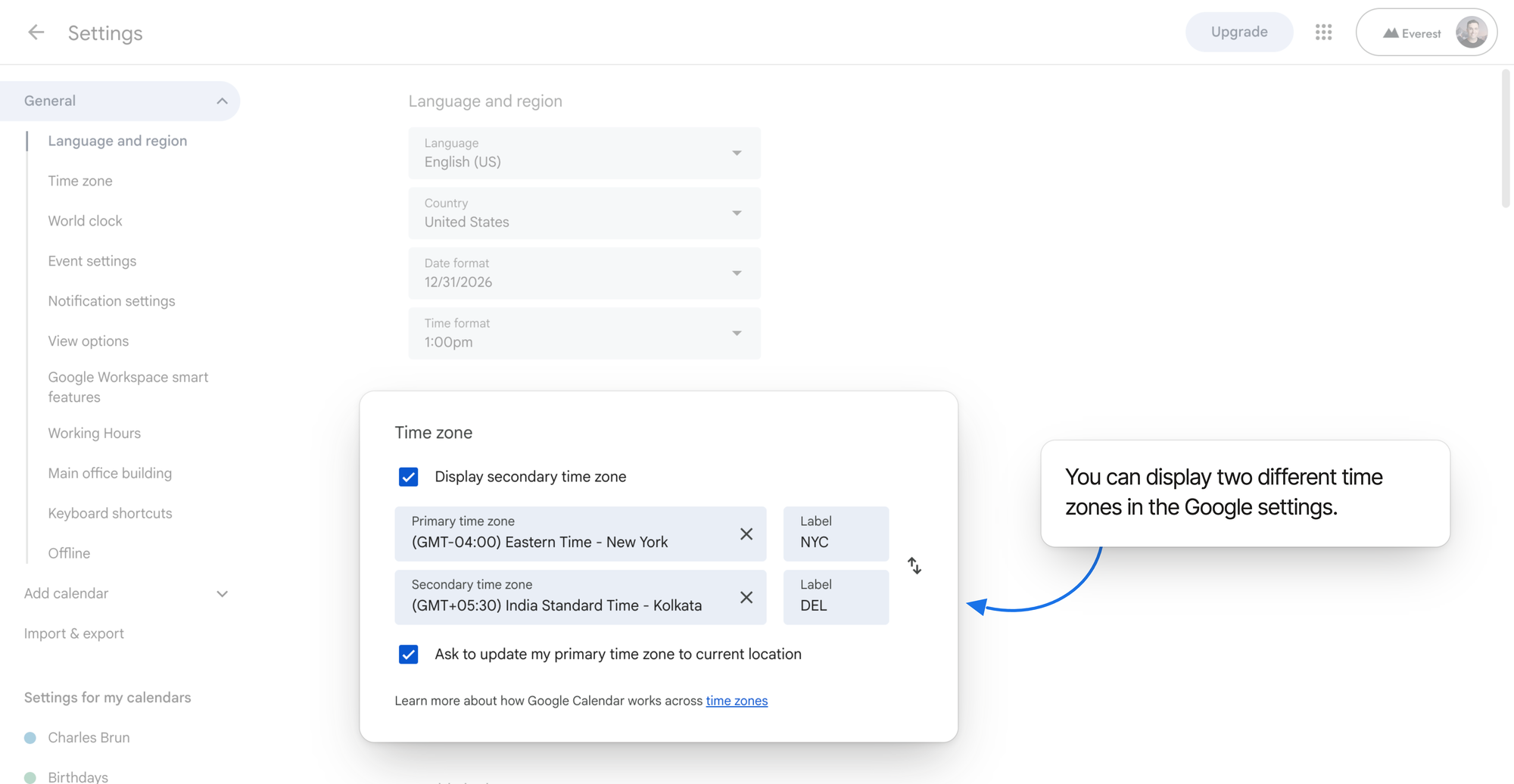
Settings › General › Time zone. Both zones live here, both take a short label — NYC and DEL — and the checkbox underneath is what asks before following you abroad.
If your calendar has ever looked shifted by a few hours after a trip, this is usually the setting
that moved.
## Add a second zone beside your grid
This is the one that removes most of the mental arithmetic, because it turns another zone into
something you read rather than calculate.
1. In the same **Time zone** panel, tick **Display secondary time zone**.
2. Search for the second city and select it.
3. Label it as tightly as you labelled the first one.
4. Click the back arrow to return to your calendar.
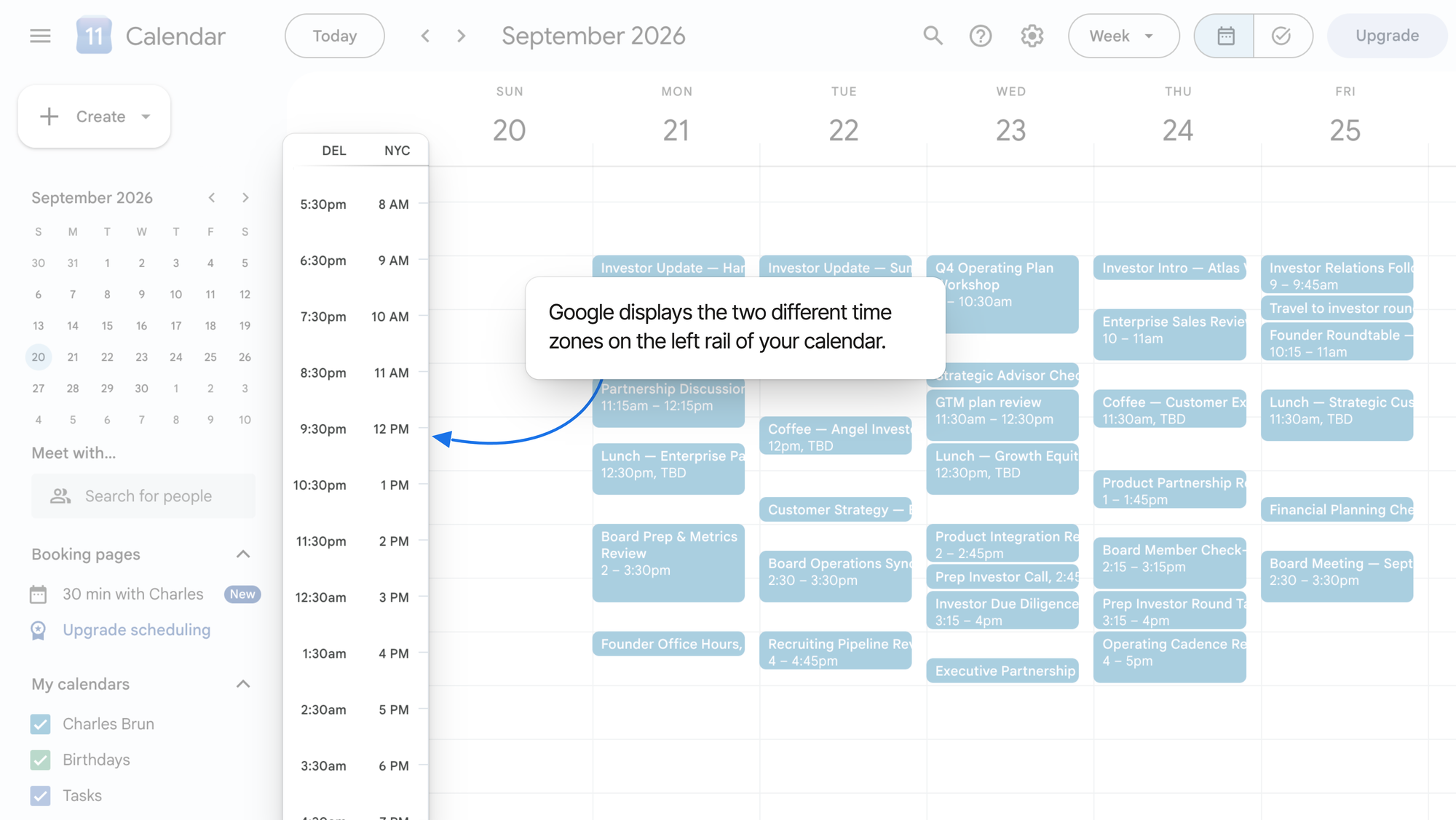
Your week now has two rulers running down the left rail. A block that starts at 09:00 in your column
is visibly a 17:00 block in theirs — no conversion, just a second row of numbers.
Two labelled rulers on the left rail. Noon in New York is visibly half past nine at night in Delhi — read across the row instead of converting.
Two is the ceiling here. Google Calendar draws your primary zone and exactly one more.
## Keep a world clock for everywhere else
The secondary zone answers "what does this block look like for them". The world clock answers a
different question: is it a reasonable hour to message someone right now?
1. Go to **Settings** › **General** › **World clock**.
2. Tick **Show world clock**.
3. Click **Add time zone** and search for each city you want to track.
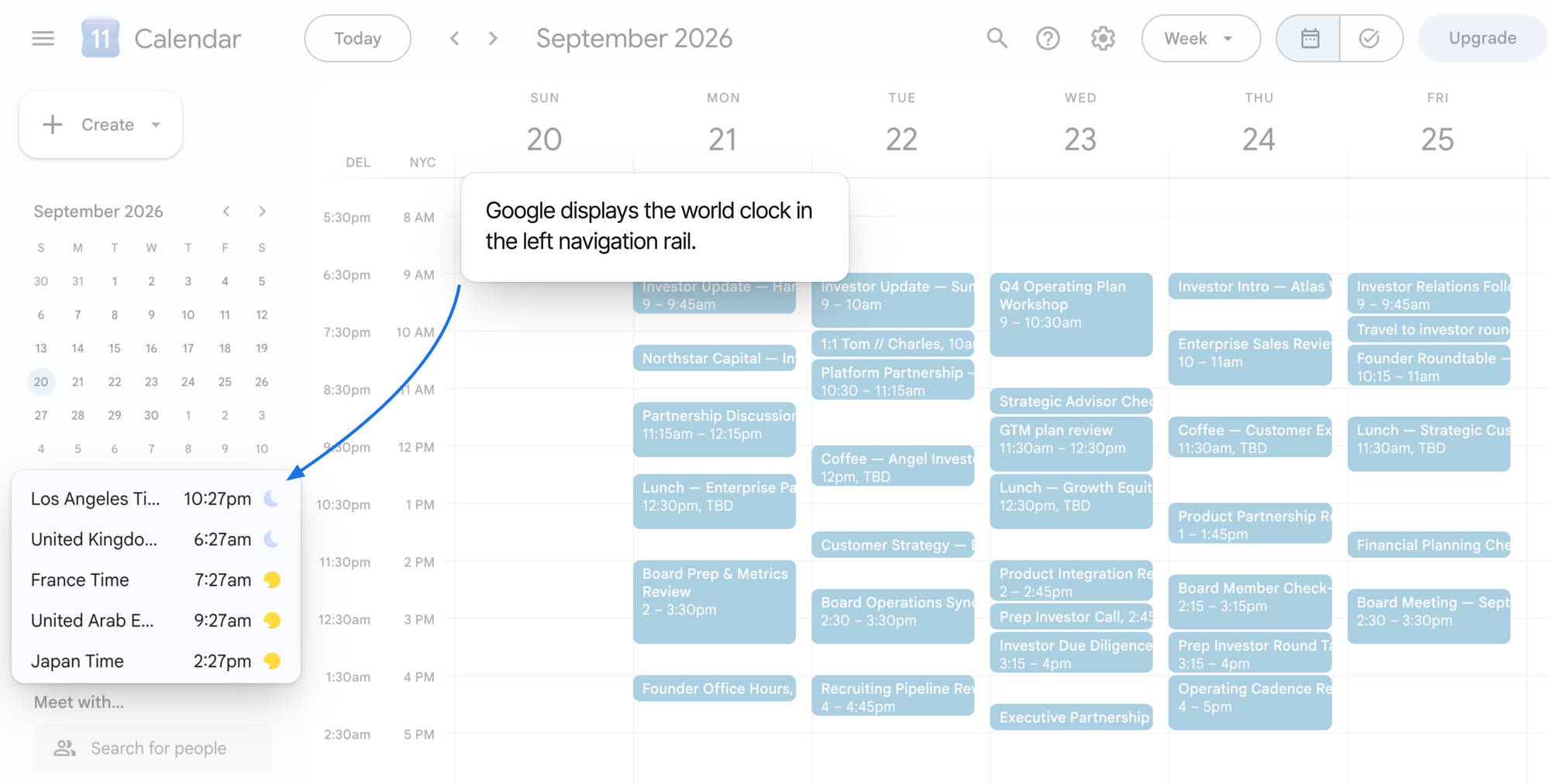
Unlike the grid, this list is not capped at one extra zone — add as many cities as you actually work
with. Each one shows its current time and a sun or moon, so "is it the middle of their night" is a
glance rather than a calculation.
What the clocks cannot do is tell you what next Tuesday at 14:00 looks like in Singapore. They are
pinned to the left rail, not to your grid — right for "can I call them now", useless for planning.
The world clock, in the left navigation rail. Five zones here, each with a sun or moon — current time only, never tied to a date on your grid.
## Anchor an individual event to its own zone
Some meetings belong to a place. A market open, a standup that follows the Berlin office, a client
call that must stay at 9 a.m. their time whatever happens to your own schedule.
1. Click **Create**, or click an empty slot and choose **More options**.
2. Click the **time zone** link next to the event's start time.
3. Search for the city the meeting belongs to and select it.
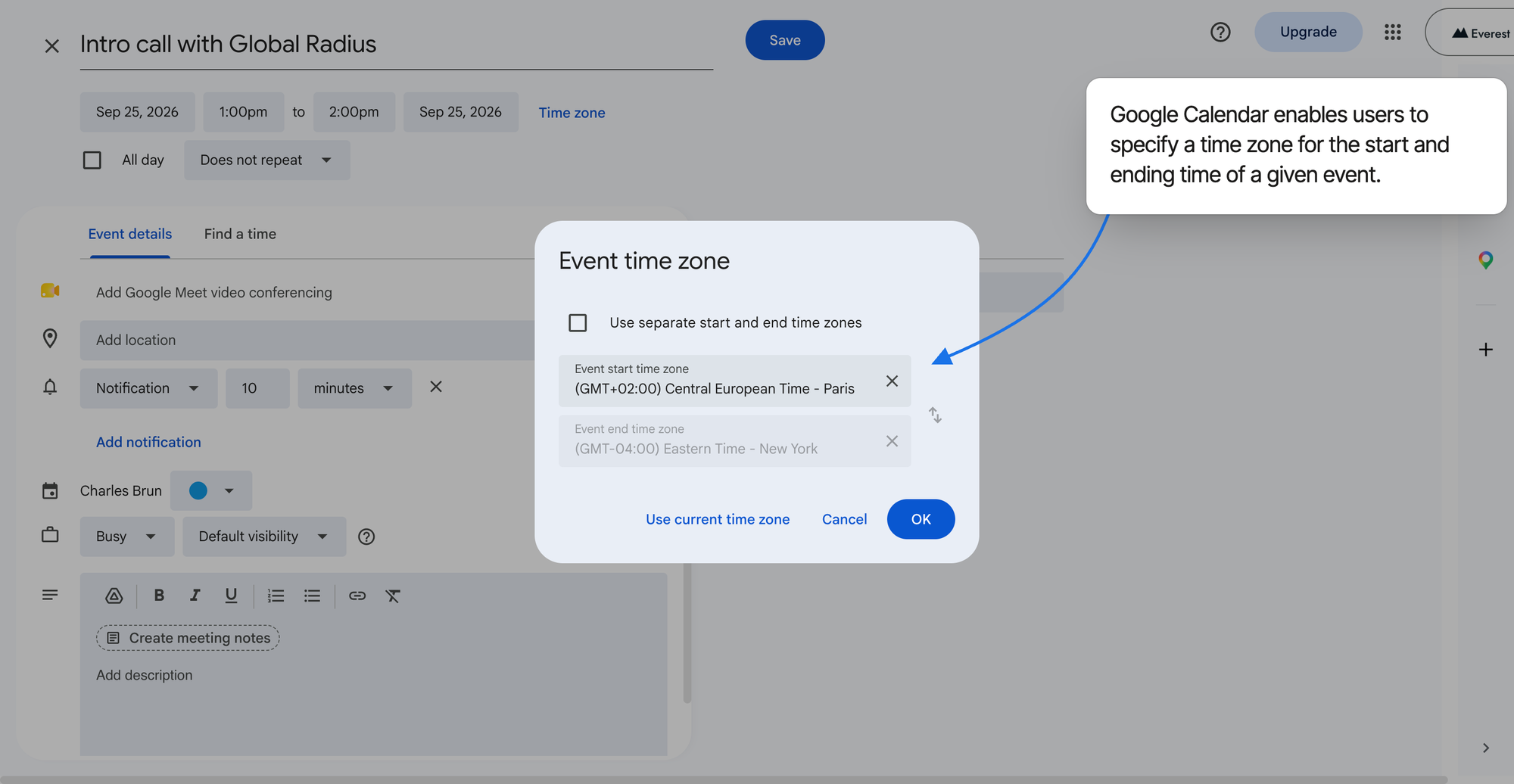
4. If the event starts in one zone and ends in another — a flight, most obviously — turn on separate
start and end zones.
The event editor. Anchoring an event to a city keeps it correct when you or your guests move — and a flight can start in Paris and land in New York.
This matters most for recurring meetings. An event anchored to a zone follows that zone's
daylight-saving rules, so a weekly call stays at 9 a.m. for the people it was scheduled around
instead of quietly sliding an hour twice a year.
## Let the guest list do the arithmetic
Once other people are involved, stop guessing at their availability and let Google show it.
1. Open the event in the full editor (**More options**).
2. Add your guests' email addresses.
3. Open the **Find a time** tab.
Each guest's day is drawn in their own zone, with their working hours marked. You are choosing a
slot from a picture rather than proposing a time and waiting to learn it was 7 p.m. for someone.
Which slots you are willing to offer at all is a separate decision — and worth making deliberately,
because a call placed to suit another zone can quietly cut your own morning in half. That trade-off
is the subject of [maker's schedule vs. manager's schedule](/blog/makers-schedule-vs-managers-schedule/).
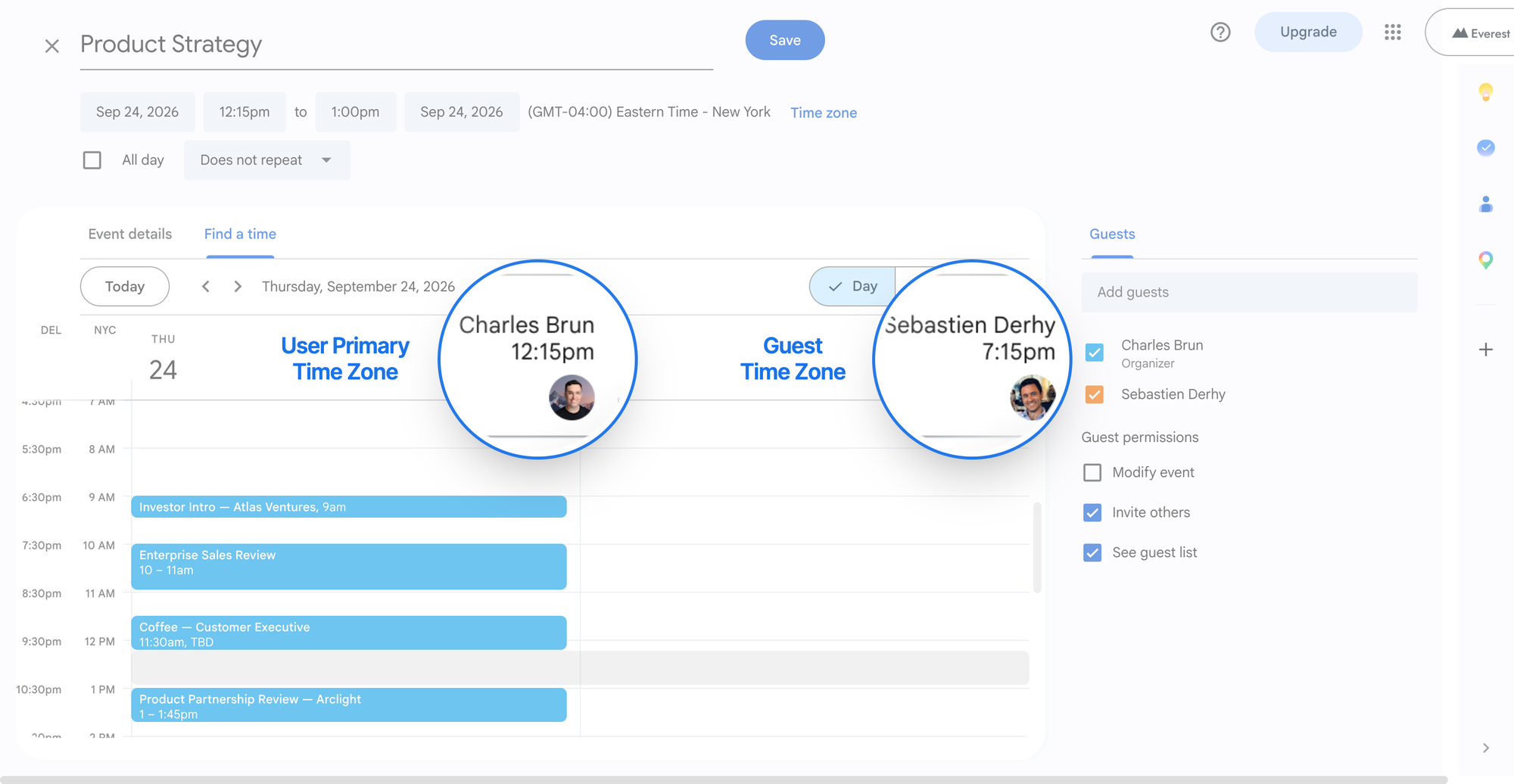
Find a time. The same slot is a post-lunch 12:15 for the organiser and a quarter past seven in the evening for the guest — visible before you propose it, not after.
## What to do when you travel
Google Calendar will not move your calendar under you without asking. In the same **Time zone**
panel, **Ask to update my primary time zone to current location** decides what happens when you
land somewhere else: leave it ticked and you get a prompt, untick it and your calendar stays exactly
where you put it.
Two habits make the rest of it easy:
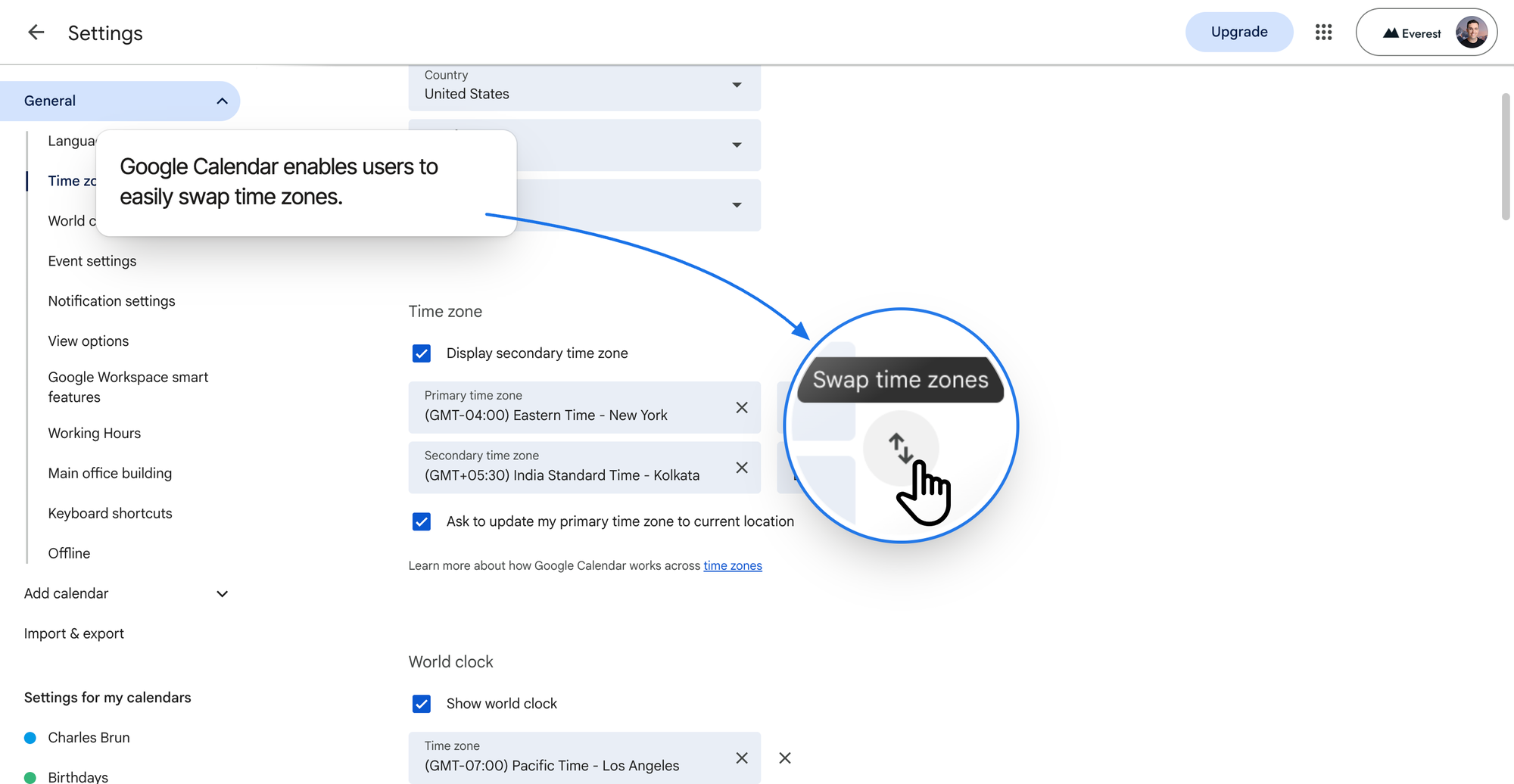
- **Use the swap arrow.** The small arrow between the two zone fields exchanges your primary and
secondary zones. Landing in the zone you already track as secondary makes the switch one click.
- **Decide before you fly, not after.** If you want your calendar to stay on home time for a short
trip, decline the prompt and read the secondary column. If you are staying long enough to work
local hours, swap properly so new events are created in the right zone.
The swap arrow trades your primary and secondary zones in one click — one move on landing, rather than re-picking both cities.
## When the times still look wrong
| What you see | Why | What to do |
| --- | --- | --- |
| An event sits an hour or two off | It was created in, or anchored to, another zone | Open the event and read the zone label next to the time |
| No second ruler on the grid | The secondary zone is off, or was never set | Settings › General › Time zone › **Display secondary time zone** |
| The world clock is missing | Not enabled, or the window is too narrow to draw the sidebar | Enable it under **World clock** and widen the browser window |
| A guest says they see a different time | They are in another zone, and Google converted for them | Nothing — this is the system working. Confirm in **Find a time** |
| Everything shifted after a trip | The "update my primary time zone" prompt was accepted, here or on your phone | Settings › Time zone, set your primary zone back — or untick the prompt |
| A recurring call drifted by an hour in spring | The series is anchored to a zone whose clocks changed | Reopen the series and set the zone it should actually follow |
## Habits that prevent the mistakes
- **Label zones like a human.** `NYC` reads faster than `Eastern Time (US & Canada)` in a narrow
column, and speed is the entire point.
- **Anchor recurring meetings to a place.** Standing meetings survive daylight saving only if they
are tied to the zone the people are in. They are also the fixed points the rest of your week gets
built around — see [planning your week and managing your calendar](/blog/weekly-planning-calendar-guide/).
- **Check `Find a time` before you propose.** One glance is cheaper than a round of email.
- **Collect availability first for anything above four people.** Manual comparison stops working
before the group does.
- **Write the zone in the invite title when it matters.** `Board prep (9:00 CET)` costs nothing and
removes all doubt at a glance.
## When two zones are not enough
The setup above works well for one relationship — you and one other place. It starts to strain when
your week has three.
A founder with engineering in Warsaw, a design partner in Lisbon and investors in New York cannot
put all three beside the grid. You get one secondary column and a sidebar of clocks that are not
aligned to anything, so the third zone goes back to being arithmetic.
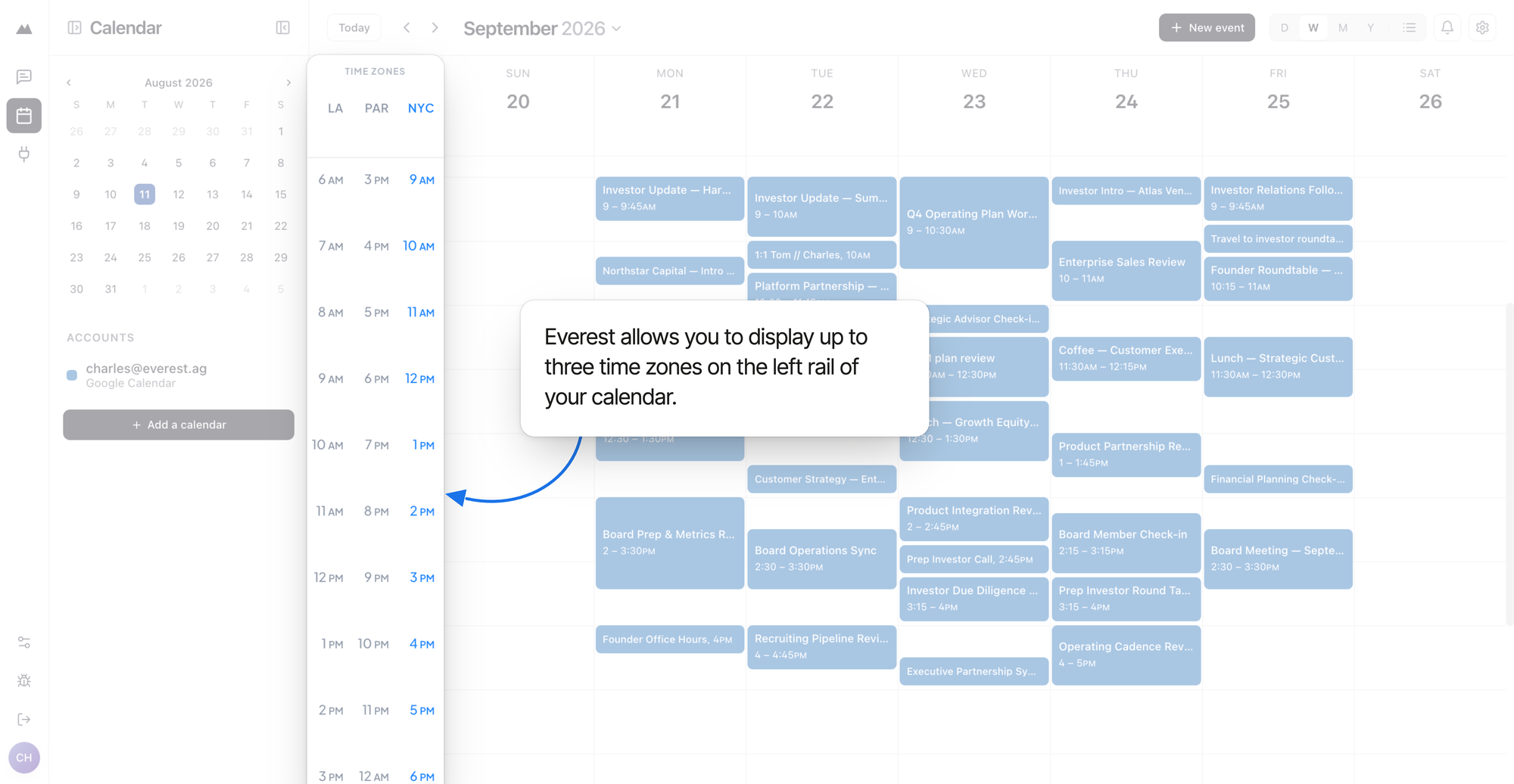
That gap is what pushed us to build the time zone display in Everest differently. Everest puts your
main zone plus two more on the left rail as full columns, so three zones read across the same hour
rows rather than living in separate widgets. You pick each one by searching for a city, and each
column carries a short label — `LA`, `PAR`, `NYC`, or whatever you type — so a narrow strip stays
legible. Your main zone stays highlighted, because that is the one new events are created in.
Everest: three zones on the left rail, drawn against the same hour rows. 9 a.m. in New York is 3 p.m. in Paris and 6 a.m. in Los Angeles, read straight down the column.
Two other things follow from that design:
- **One grid, every account.** Everest reads your connected Google and Outlook calendars into a
single view, so the zone columns sit beside all of your commitments rather than one account's.
- **Travel is an offer, not a surprise.** When your device moves to another zone, Everest asks
whether to switch your main zone instead of silently redrawing your week. Decline it and it stays
quiet for a week.
If Google Calendar's second zone covers your working life, use it — it is free, it is already there,
and the setup above takes five minutes. If you spend your week reading across three places at once,
you should not have to keep the third one in your head.
---
Published at https://everest.ag/blog/google-calendar-multiple-time-zones/ · Everest is an AI scheduling assistant — CC it on any email thread and it books the meeting across every calendar you run. Learn more at https://everest.ag/
---
# How to time-block your calendar without overplanning your day
*July 28, 2026 · Charles Brun · Playbook · Everest Blog*
> Time blocking turns priorities into real calendar time — but overplanning leaves you behind by 10:30 a.m. How to combine structure, visibility, and slack.
Time blocking is one of the simplest ways to turn your priorities into actual time.
Instead of beginning the day with a long list of tasks and hoping you eventually get to the important ones, you reserve specific periods on your calendar for the work you intend to complete.
The principle is straightforward:
**Decide what matters, estimate how long it will take, and give it a place on your calendar.**
But time blocking also has an obvious failure mode.
Many people fill nearly every available minute of the day, leaving no room for work to run long, meetings to move, urgent requests to appear, or their energy to fluctuate. Others create a thoughtful plan on one calendar, only to have meetings added through another calendar they forgot to account for.
The result is not a more productive calendar. It is a calendar that is already behind schedule by 10:30 a.m.
The solution is not to abandon time blocking. It is to create a system that combines structure with flexibility—and to use an AI scheduling assistant like Everest to help maintain that system as your schedule changes.
## What is time blocking?
Time blocking is the practice of dividing your day into periods reserved for specific activities or categories of work.
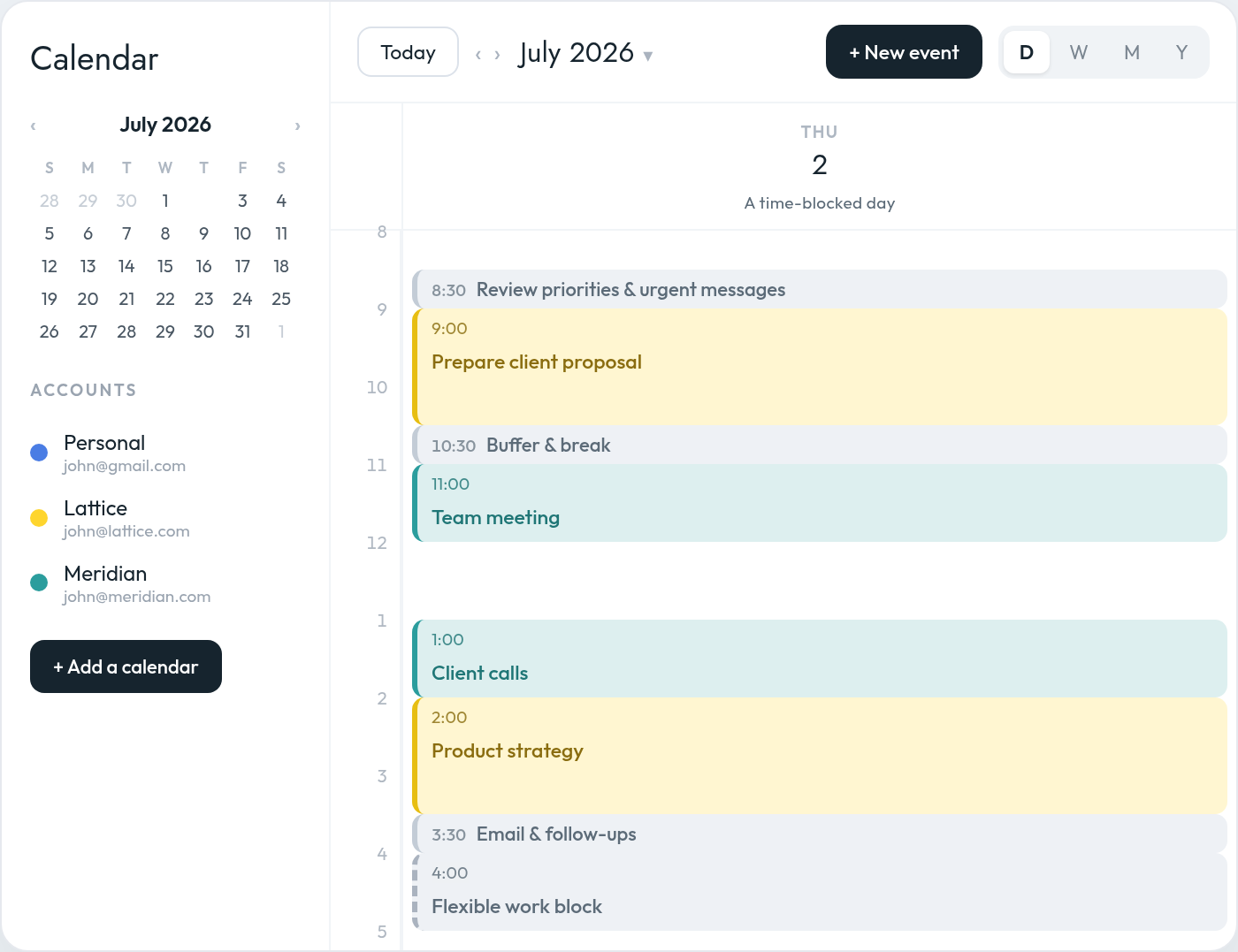
A time-blocked calendar might look like this:
Priorities become blocks with a place on the calendar — deep work, meetings, buffers, and a flexible block, color-coded across your calendars.
Unlike a task list, a time-blocked calendar forces you to confront the fact that your time is limited.
You may have 20 items on your task list, but only five hours of unscheduled time. Time blocking makes that constraint visible before the day begins.
It also reduces the number of decisions you need to make during the day. Rather than repeatedly asking yourself what to work on next, you have already made that decision.
The difficulty is that your day rarely stays exactly as you planned it.
Meetings are added. Clients ask for time. A task takes longer than expected. Travel is required. A focus block on one calendar is unknowingly booked over because the person scheduling the meeting can only see another.
Effective time blocking is therefore not just about creating a plan. It is about protecting and continuously adapting that plan.
An AI scheduling assistant can help by applying your preferences consistently, checking your availability across calendars, protecting focus time, creating recurring work blocks, adding buffers, and adjusting your schedule when circumstances change.
## Why overly detailed time blocking fails
A perfectly optimized calendar can look impressive in the morning and become useless by lunchtime.
There are several reasons for this.
### We underestimate how long work will take
People have a tendency to underestimate the time required to complete future tasks. We imagine an optimistic version of how the work will unfold and overlook delays, interruptions, research, revisions, and follow-up work.
A presentation you expect to finish in one hour may require two. A supposedly quick email may lead to a discussion or another decision. A 30-minute meeting may create 20 minutes of notes and follow-ups.
When every block is based on the best-case scenario, the entire day becomes fragile.
### Work does not happen in isolation
Your calendar is affected by other people.
A client may ask for an urgent revision. A colleague may need help. A call may begin late. A child may need to be picked up. A supposedly free afternoon may suddenly contain two meetings.
A calendar that assumes nothing unexpected will happen is not a realistic plan. It is an idealized one.
### Your availability may be split across multiple calendars
Many busy professionals do not operate from a single calendar.
A consultant may have a personal calendar, a company calendar, and separate calendars for several clients. A founder may manage multiple businesses. A fractional executive may be invited to meetings through several different Google Workspace or Microsoft accounts. If several companies or clients compete for the same hours, [calendar theming for founders](/blog/calendar-theming-for-founders/) shows how to give each one a protected place in the week.
The problem is not simply that these calendars are difficult to review. It is that the people requesting your time may not see your complete availability.
A focus block may exist on your personal calendar while a client sees that same time as open on your work calendar. A family commitment may not appear in the workspace where a colleague is scheduling a meeting. Two clients may independently book the same time through different accounts.
A time-blocking system cannot work reliably if it considers only one version of your schedule.
An AI calendar assistant like Everest can treat all your connected calendars as part of one availability model, even when the events remain on separate accounts. It can also apply different precedence rules depending on how you want each calendar to affect your availability.
For example, you might tell it:
> “Treat events on my personal calendar as non-blocking, so availability on my work calendars takes precedence.”
That means your personal events can remain visible to you without automatically preventing work meetings from being scheduled during those times.
### External scheduling requests can gradually consume your plan
You may begin the week with several well-protected focus blocks. But each external scheduling request creates pressure to surrender one of them.
Someone asks whether you are free Tuesday morning. Another person proposes Wednesday afternoon. A client wants “just 30 minutes” during the only open period between two larger projects.
Individually, each request appears reasonable. Collectively, they can dismantle the structure of your week.
The challenge is that the person asking for time does not see what that open space is intended for. To them, an empty calendar slot looks available. To you, it may be the only time reserved for completing your most important work.
An AI scheduling assistant like Everest can evaluate the request against your complete schedule before proposing times. It can avoid your focus blocks, respect your preferred meeting windows, apply precedence rules across calendars, and negotiate alternatives without requiring you to manually compare calendars.
### Switching tasks takes mental effort
Moving directly from a demanding project into a meeting, and then immediately into another piece of focused work, does not mean your attention transitions instantly.
Part of your attention can remain attached to the previous task, particularly when you switch away before reaching a natural stopping point. This makes it more difficult to fully engage with what comes next.
That is one reason back-to-back blocks often feel more exhausting than they appear on the calendar.
### A full calendar leaves no room for recovery
You cannot control every interruption around you. But you can avoid designing a calendar that makes every interruption catastrophic.
A useful time-blocking system needs enough margin to absorb changes without forcing you to rebuild the entire day every time a meeting runs 15 minutes long.
## The goal is not to account for every minute
The purpose of time blocking is not to predict your day perfectly.
It is to make deliberate choices about how you want to use your time while preserving enough flexibility to respond to reality.
A useful time-blocked calendar should answer four questions:
1. What is the most important work I need to move forward?
2. When am I most likely to do that work well?
3. What commitments exist across all my calendars?
4. Where is the flexibility if the day changes?
The strongest calendars combine **structure, visibility, and slack**.
Structure protects your priorities.
Visibility prevents conflicts across calendars.
Slack protects the structure when reality changes.
## How to time-block your day without overplanning it
### 1. Start with a complete view of your availability
Before creating focus blocks, make sure you can see the commitments that already exist across every calendar you use.
This may include:
- Your primary work calendar
- A personal calendar
- Client calendars
- Calendars from other companies or workspaces
Without a unified view, you may create a technically perfect plan that is built on incomplete information.
This is especially important for consultants, founders, executives, and agency leaders who regularly switch between organizations.
An AI calendar assistant like Everest can help by treating all your calendars as part of a single availability model. Instead of manually comparing several calendar tabs, you can ask:
> “Check all my calendars before offering any meeting times.”
You could also set a standing rule such as:
> “Treat events on my personal calendar as non-blocking, so availability on my work calendars takes precedence.”
The assistant can then apply different scheduling priorities across your calendars while still checking them together before proposing times.
This is especially useful when some calendars should block your availability and others should only provide context.
### 2. Begin with outcomes, not tasks
Before adding blocks to your calendar, decide what would make the day successful.
Choose one to three meaningful outcomes rather than beginning with every task you could possibly complete.
For example:
- Finish and send the client proposal
- Decide on the new pricing structure
- Prepare for tomorrow’s board meeting
These are outcomes. They describe progress you want to create.
By contrast, “check email,” “update slides,” “message Sarah,” and “review notes” are activities. They may be necessary, but they should not determine the architecture of your entire day.
Once the important outcomes are clear, give them calendar space first.
An AI scheduling assistant like Everest can help translate those outcomes into protected time. You might say:
> “My top priority tomorrow is finishing the client proposal. Find a two-hour focus block before 1:00 p.m. across all my calendars.”
Or:
> “I need three hours this week to prepare for the board meeting. Split it into one 90-minute research block and one 90-minute writing block.”
The final priorities remain yours, but the assistant can find realistic places for them in your schedule.
### 3. Block important work before filling in small work
The most valuable work is often the easiest to postpone because it rarely feels as urgent as an incoming message or meeting request.
Place priority work on the calendar before assigning time to email, administration, and routine follow-ups.
A useful order is:
1. Fixed commitments
2. High-priority focused work
3. Meetings and collaboration
4. Administrative work
5. Flexible and unallocated time
Your calendar should reflect your priorities, not simply the order in which requests arrived.
An AI scheduling assistant like Everest can also help defend these priorities when people ask to meet.
You could tell it:
> “Protect my focus blocks unless a meeting is marked urgent.”
Or:
> “Do not offer external meetings during my morning focus time. Suggest afternoon availability instead.”
Rather than offering every theoretically open slot, the assistant can treat your priority blocks as protected and negotiate around them.
### 4. Estimate from experience, not optimism
When deciding how long a task deserves, ask:
**How long has similar work taken me in the past?**
Do not estimate based only on how long you believe the task should take.
If writing a detailed proposal typically takes two and a half hours, do not give it a 60-minute block because you hope to work faster today.
You can also separate the work into stages:
Breaking a 2.5-hour task into stages makes the estimate concrete — and gives you natural stopping points.
Breaking larger work into stages makes estimates more concrete and gives you natural stopping points.
An AI scheduling assistant can make this easier by asking clarifying questions before placing the work.
For example:
> “How long does it normally take you to prepare this type of proposal?”
If you are unsure, you might ask:
> “Schedule 90 minutes for the first draft and leave another flexible hour later in the week in case I need more time.”
Over time, an AI calendar assistant may also help you recognize recurring estimation patterns. If you consistently move or extend the same type of block, it can recommend allocating more time in the future.
### 5. Leave part of the day deliberately unplanned
One of the most effective ways to make a time-blocked calendar realistic is to avoid blocking all of it.
Depending on the unpredictability of your work, consider planning only around 60% to 80% of your available working time.
That does not mean the remaining time will be wasted. It means you are acknowledging that the day will contain transitions, overruns, unexpected work, and basic human needs.
Someone with a highly predictable individual-contributor role may be able to plan most of the day.
A founder, consultant, or executive responsible for multiple teams and clients may need considerably more open space.
The more people who can change your priorities, the more margin your calendar needs.
An AI scheduling assistant like Everest can help you enforce this constraint.
You might say:
> “Do not schedule more than six hours of meetings and planned work on any weekday.”
Or:
> “Keep at least one hour unplanned every afternoon for urgent requests and overflow.”
Instead of continuing to fill every opening, the assistant can recognize when a day has reached your preferred capacity and begin offering availability on another date.
An empty space on a calendar does not always mean that more work should be added to it.
### 6. Add buffers where disruption is most likely
Most people do not naturally think about buffers when building their calendars.
They schedule the meeting itself, but not the preparation before it, the recovery afterward, or the travel required to attend it.
This is where an AI scheduling assistant can play an especially strong role.
Suppose you have an important 90-minute strategy meeting. Even if the meeting finishes on time, you may not be ready to begin deep analytical work one minute later.
You may need time to:
- Write down decisions
- Send follow-ups
- Process what was discussed
- Take a break
- Switch mental context
- Prepare for the next activity
You could ask your AI scheduling assistant:
> “Add a 30-minute buffer after every meeting that lasts 90 minutes or longer.”
Or:
> “After important client meetings, block 20 minutes for notes and follow-ups.”
Location should also affect the plan.
If the meeting is on-site, the calendar should account for travel time before and after it. A 2:00 p.m. meeting that ends at 3:30 p.m. may actually occupy the period from 1:30 to 4:00 once transportation is included.
You could create a standing instruction such as:
> “For every on-site meeting on my calendar, add a 30-minute travel buffer before and after it.”
You might also make that rule location-specific:
> “For meetings at our downtown office, add 45 minutes of travel time each way. For meetings within my neighborhood, add 15 minutes.”
An AI calendar assistant like Everest can automatically apply those rules whenever a relevant event appears on your calendar.
Buffers are especially useful:
- After important or emotionally demanding meetings
- Between meetings and focused work
- After long concentration blocks
- Before hard deadlines
- Between calls with different clients
- Around travel or on-site appointments
- At the end of a meeting-heavy afternoon
If nothing runs late, the time is still useful. You can start the next priority early, complete a small task, or recover before the next demanding activity.
### 7. Group similar tasks together
Every switch between writing, meetings, email, analysis, and administrative work creates friction.
Where possible, group similar activities into shared blocks:
- Client calls
- Internal meetings
- Email and messages
- Reviews and approvals
- Writing
- Financial administration
- Recruiting conversations
This is often called **task batching**.
Email is a simple example.
Nearly everyone needs time to process email, but many people never explicitly reserve time for it. Instead, they check the inbox repeatedly throughout the day and allow it to interrupt other work.
An AI scheduling assistant could ask:
> “How much time do you typically spend processing email each day?”
If the answer is one hour, it might recommend two recurring 30-minute blocks:
- One in the morning
- One near the end of the day
You could simply instruct it:
> “Block 30 minutes for email at 9:00 every morning and another 30 minutes at the end of my workday.”
Or, for a more flexible approach:
> “Find two 30-minute windows for email each day—one before noon and one after 4:00 p.m.—without moving my priority blocks.”
The assistant can place those blocks around existing commitments and adjust them when the day changes.
The same approach could be applied to:
- Slack or Microsoft Teams
- Expense reports
- Candidate reviews
- CRM updates
- Client follow-ups
- Document approvals
- Scheduling administration
For example:
> “Group all candidate interviews on Tuesday and Thursday afternoons.”
> “Reserve one hour every Friday for expenses and CRM updates.”
> “Keep my internal meetings together whenever possible instead of spreading them across the week.”
The value is not merely that an AI scheduling assistant can create a calendar event. It can identify recurring work that currently has no dedicated place on your calendar and help you create a more intentional structure for it.
### 8. Match the block to your energy
Not every hour of the day has equal value.
Pay attention to when you tend to think most clearly, when your energy drops, and when you are better suited to collaborative or administrative work. Reserving your sharpest hours for deep work and pushing coordination to the rest is the essence of balancing a [maker’s and a manager’s schedule](/blog/makers-schedule-vs-managers-schedule/).
Then align your calendar accordingly.
You might reserve your highest-energy period for:
- Writing
- Strategy
- Analysis
- Problem-solving
- Product decisions
- Creative work
Lower-energy periods may be better for:
- Email
- Routine follow-ups
- Expense reports
- Scheduling
- Document organization
- Status updates
An AI scheduling assistant like Everest can help translate these preferences into recurring rules.
You might tell it:
> “Protect my mornings for focused work.”
> “Avoid scheduling external meetings before 10:30 a.m.”
> “Put administrative work after lunch whenever possible.”
> “Keep Friday afternoons flexible.”
> “Do not schedule a focus block immediately after a long client workshop.”
The goal of an AI scheduling assistant is to hold those preferences for you when proposing times, creating blocks, and responding to external scheduling requests.
This matters because knowing your preferred working rhythm is only the first step. The harder part is enforcing it every day.
### 9. Use broader blocks when the work is unpredictable
Not every block needs to contain a precisely defined task.
For complicated or fast-moving roles, category-based blocks may be more realistic:
- Client work
- Product
- Team support
- Business development
- Focus time
- Administrative work
A consultant might reserve Tuesday morning for a particular client without deciding in advance exactly which deliverable will require attention.
A CEO might reserve Friday afternoon for strategy rather than assigning a specific strategic question weeks ahead.
Broader blocks preserve intention without creating false precision.
An AI scheduling assistant like Everest can help refine those blocks closer to the time.
For example, a Tuesday morning “Client A” block might initially remain broad. On Monday afternoon, you could ask:
> “Review my upcoming Client A deadlines and assign the most urgent work to tomorrow morning’s Client A block.”
Or:
> “Turn Friday’s strategy block into two specific sessions based on the decisions I need to make next week.”
This allows the weekly plan to stay flexible while the daily plan becomes more specific as new information appears.
### 10. Distinguish hard blocks from flexible blocks
Not every calendar entry should have the same level of commitment.
It can help to think of blocks in three categories.
**Hard blocks**
These cannot easily move: external meetings, appointments, travel, and deadlines.
**Priority blocks**
These protect important work but may move if necessary.
**Flexible blocks**
These absorb overflow, lower-priority work, and unexpected demands.
For example:
Not every block carries the same commitment: hard blocks are fixed, priority blocks are protected but can move, and flexible blocks absorb overflow.
This distinction prevents you from treating your original plan as sacred. You know which pieces must remain fixed and which can be adjusted.
It also gives an AI scheduling assistant clearer instructions.
You might say:
> “Never move events marked hard.”
> “You may move flexible blocks freely, but ask me before moving a priority block.”
> “When a new scheduling request arrives, use open time first, then flexible blocks, and only move focus time as a last resort.”
Without this hierarchy, every calendar entry appears equally movable—or equally immovable.
### 11. Protect focus time from external scheduling requests
Creating a focus block is only useful if it remains protected.
This becomes difficult when other people are trying to schedule time with you, particularly across several email threads, scheduling links, and workspaces.
An external requester should not need to understand your entire productivity system. But your scheduling assistant should.
When someone asks to meet, an AI scheduling assistant like Everest can consider:
- Commitments across all your calendars
- Calendar-precedence rules
- Existing focus blocks
- Your preferred meeting hours
- Your energy patterns
- Required travel time
- Buffers around important meetings
- Time-zone differences
- The urgency of the request
- Whether flexible blocks can safely move
You can provide explicit instructions such as:
> “When someone asks to meet, check every connected calendar and protect all focus blocks.”
> “Offer no more than three meeting options, prioritizing Tuesday and Thursday afternoons.”
> “Do not schedule external calls on Wednesday unless the request is urgent.”
> “When someone requests time during a focus block, offer the nearest available alternative rather than moving the block.”
You can also decide which calendars should take precedence:
> “Treat my personal calendar as non-blocking and prioritize availability on my work calendars.”
An AI scheduling assistant can then propose times that work without requiring you to manually compare several calendars or dismantle the structure of your week.
This changes the role of the calendar from a passive record of meetings into an active system for protecting your time.
### 12. Plan at the weekly level before planning each day
Daily time blocking becomes easier when you already understand the shape of the week — the focus of our guide to [planning your week and managing your calendar](/blog/weekly-planning-calendar-guide/).
During your weekly planning session, identify:
- The week’s most important outcomes
- Fixed meetings and deadlines
- Commitments across every calendar
- Which calendars should take precedence
- The best windows for focused work
- Heavy and light days
- Areas of likely disruption
- Time that should remain protected
- External meetings that still need to be scheduled
You do not need to plan every hour of the coming week.
Reserve the large blocks first. Then refine each day as it approaches and more information becomes available.
This creates a rolling planning system:
- Plan the broad structure weekly
- Confirm the next day each afternoon or evening
- Adjust the current day when reality changes
An AI scheduling assistant like Everest can support each stage.
At the beginning of the week, you might ask:
> “Review all my calendars and find three two-hour focus blocks for my most important work.”
The day before, you could ask:
> “Review tomorrow’s schedule, add any missing buffers, and make sure I still have at least two hours of focus time.”
During the day, you might say:
> “My last meeting ran 45 minutes late. Reorganize the rest of the afternoon without moving my 4:00 p.m. client call.”
The assistant can then move flexible work, shorten lower-priority blocks, or carry nonessential tasks into another day.
## A realistic time-blocked day
Consider a consultant managing several clients across multiple calendars.
Compare an overly planned day with a more resilient version of the same day:
Left: every minute has a job, with no room for a late meeting, an urgent message, context switching, or travel. Right: fewer commitments, protected focus, buffers, and travel time — more likely to survive contact with reality.
In the overly planned version, every minute has a job — but there is no allowance for a late meeting, an urgent client message, context switching, or travel.
There may also be a personal event on another calendar. Depending on the user’s preferences, that event might need to block the time—or it might be deliberately treated as non-blocking so that work commitments take precedence.
An AI scheduling assistant like Everest could help create and maintain this structure by:
- Checking every connected calendar
- Applying the user’s calendar-precedence rules
- Protecting the morning focus block
- Adding travel time around the on-site meeting
- Reserving a recovery buffer afterward
- Creating recurring email-processing windows
- Offering external meeting times that do not consume protected work periods
- Replanning the afternoon if the meeting runs late
Instead of making each adjustment manually, the consultant would want to express the week in plain language, along the lines of:
> “Treat my personal calendar as non-blocking, so my work calendars take precedence.”
> “Protect 8:30 to 10:30 every morning for focused work.”
> “Add 30 minutes of travel time before and after every on-site meeting.”
> “Schedule email twice a day in 30-minute blocks.”
> “Keep one flexible hour available every afternoon.”
> “When a client asks to meet, offer afternoon availability before using a morning focus block.”
The second calendar contains fewer commitments, but it is more likely to produce meaningful progress.
That is the paradox of effective time blocking: planning less of the day can help you accomplish more of what matters.
## What to do when the plan falls apart
No planning system prevents unexpected events.
The skill is not following the original calendar perfectly. The skill is **replanning deliberately**.
When your schedule changes, do not spend the rest of the day trying to catch up with a plan that no longer exists.
Instead:
1. Stop and look at the remaining time.
2. Review commitments across every calendar.
3. Apply the correct precedence rules.
4. Identify which events are still fixed.
5. Choose the most important unfinished outcome.
6. Move, shorten, or remove lower-priority blocks.
7. Rebuild the calendar from the present moment forward.
This is a natural use case for an AI scheduling assistant.
If a meeting runs 45 minutes late, you could say:
> “Replan the rest of my day. Keep all hard commitments, preserve the proposal block if possible, and move anything flexible to tomorrow.”
Your AI scheduling assistant can assess the remaining availability across your calendars, apply your scheduling rules, shorten an email block, move a flexible task, and protect the most important remaining focus period.
It can make those changes based on priorities you have already established rather than forcing you to manually rearrange several calendars while under pressure.
Some work should be rescheduled. Some should be delegated. Some may no longer need to happen at all.
A useful calendar is a decision-making tool, not a record of everything you once hoped to accomplish.
## Signs that you are overplanning your calendar
Your time-blocking system may be too rigid if:
- You regularly fall behind before midday
- Every block begins immediately after another one
- Tasks frequently require twice the time allocated
- You have nowhere to place urgent work
- You skip breaks to stay on schedule
- One delayed meeting disrupts the entire day
- You constantly move unfinished blocks into tomorrow
- Focus blocks are repeatedly replaced by external meetings
- Your calendars use inconsistent availability rules
- Events on lower-priority calendars unnecessarily block work time
- Travel time is missing from on-site appointments
- Your calendar feels more stressful than your task list
- You interpret every change as a failure
Time blocking should create clarity. It should not make you feel guilty every time reality differs from your forecast.
## A simple time-blocking template
### Step 1: Combine your availability
Review the commitments across every work, client, and personal calendar you use.
Ask your AI scheduling assistant:
> “Check all my connected calendars before creating or proposing new events.”
Then define the precedence rules:
> “Treat events on my personal calendar as non-blocking, so availability on my work calendars takes precedence.”
### Step 2: Choose your daily outcomes
Write down the one to three results that would make the day successful.
Then ask:
> “Find realistic focus blocks for these priorities without creating conflicts.”
### Step 3: Add fixed commitments
Place meetings, appointments, deadlines, and travel on the calendar.
You can instruct your assistant:
> “Automatically add travel time around every on-site meeting.”
### Step 4: Protect focused work
Reserve one or two meaningful blocks for your most important outcomes.
For example:
> “Protect two hours every morning for focused work and do not offer that time for external meetings.”
### Step 5: Batch recurring work
Create defined windows for email, messages, follow-ups, and routine administration.
For example:
> “Schedule two 30-minute email blocks each weekday—one in the morning and one at the end of the day.”
### Step 6: Add buffers
Place margin around demanding work, important meetings, transitions, and travel.
For example:
> “Add a 30-minute recovery buffer after meetings lasting 90 minutes or longer.”
### Step 7: Leave open capacity
Keep at least one flexible area for overruns and unexpected priorities.
For example:
> “Leave one hour unplanned each afternoon.”
### Step 8: Define what can move
Distinguish hard commitments from priority and flexible blocks.
For example:
> “You may move flexible blocks automatically, but ask before moving priority work.”
### Step 9: Protect the plan from new requests
When people ask to meet, offer times that preserve your most valuable work whenever possible.
For example:
> “Schedule external meetings on Tuesday and Thursday afternoons before considering any other time.”
### Step 10: Review and adjust
At the end of the day, examine what took longer than expected and use that information to improve tomorrow’s plan.
You might ask:
> “Review which blocks were moved or extended today and suggest a more realistic plan for tomorrow.”
## An AI scheduling assistant should make the calendar more human, not more crowded
The promise of an AI scheduling assistant is not that every free minute can be automatically filled.
It is the opposite.
An AI scheduling assistant like Everest can help create a calendar that more accurately reflects how people actually work.
It can reserve time for email. It can notice that a 90-minute meeting deserves a buffer. It can add travel time to an on-site appointment. It can protect focus blocks when someone requests a meeting. It can compare availability across multiple calendars, apply precedence rules, and rebuild the plan when the day changes.
More importantly, you can express those preferences in ordinary language:
> “Treat my personal calendar as non-blocking.”
> “Protect my mornings for focused work.”
> “Keep one hour free each afternoon.”
> “Add travel time around on-site meetings.”
> “Schedule email twice a day.”
> “Do not let external meeting requests replace my priority blocks.”
> “Replan the rest of my day without moving my client calls.”
These are small scheduling decisions, but they happen constantly. Managing them manually requires attention that could be spent on more meaningful work.
The goal is not to automate your judgment or surrender control of your day.
It is to have an AI calendar assistant that understands your priorities, preferences, calendar hierarchy, and constraints well enough to help you protect them.
## Your calendar should guide the day, not control it
Time blocking is most effective when it helps you make intentional decisions before urgency takes over.
The objective is not to create a flawless minute-by-minute forecast. It is to ensure that important work has a realistic chance of happening.
That requires seeing your full availability, defining which calendars take precedence, protecting focus time, estimating honestly, grouping similar work, accounting for travel, and leaving sufficient room for the unpredictable.
This is the direction Everest is built toward: turning those principles into rules you state once, in plain language, rather than re-applying them by hand every week.
A good calendar gives your priorities structure.
A great calendar actively helps you preserve them.
---
Published at https://everest.ag/blog/time-block-your-calendar-without-overplanning/ · Everest is an AI scheduling assistant — CC it on any email thread and it books the meeting across every calendar you run. Learn more at https://everest.ag/
---
# Calendar theming for founders managing multiple companies or clients
*July 21, 2026 · Charles Brun · Playbook · Everest Blog*
> When you run several companies, your calendar fragments into context switches. Calendar theming assigns recurring focus to days and blocks so each venture gets coherent, protected time.
When you manage one company, your calendar has one center of gravity.
When you manage three companies, advise several clients, or divide your time between operating, consulting, investing, and business development, every day can feel like a succession of context switches.
At 9:00, you are reviewing the product roadmap for one company. At 10:00, you are discussing pipeline with a consulting client. At 11:00, you are interviewing a candidate for another venture. By the afternoon, you may have attended six meetings without spending enough uninterrupted time inside any one business to move it meaningfully forward.
The problem is not necessarily that you have too much work. It is that your attention is being divided into pieces too small to use well.
Calendar theming is a way to reduce that fragmentation. Instead of allowing every company, client, and type of work to compete for every open hour, you assign recurring themes to particular days or parts of the week.
The theme becomes the default answer to a simple question:
**What kind of work belongs here?**
For a founder managing multiple businesses, Tuesday might belong primarily to Company A. Wednesday afternoon might be reserved for client meetings. Thursday morning might be dedicated to product and strategy across all ventures.
The goal is not to create a rigid calendar that reality can never disturb. It is to establish a clear operating rhythm so that you spend less time deciding what to work on, switch contexts less frequently, and give important work enough uninterrupted space to progress.
## What is calendar theming?
Calendar theming means assigning a recurring focus to a day, half-day, or smaller repeating block of time.
A theme is broader than an individual task. You are not deciding that you will write a specific proposal from 9:00 to 10:30. You are deciding that Tuesday morning is reserved for focused client delivery, or that Thursday is primarily devoted to one of your companies.
Once the theme is established, individual tasks can be scheduled within it.
For example:
The theme sets the day's direction; individual time blocks fill it in. Tuesday morning belongs to Company A; Wednesday afternoon is for external meetings.
Calendar theming, time-blocking, and task batching are related, but they solve different problems:
| Technique | What it decides | Example |
|---|---|---|
| Calendar theming | What category of work belongs in a period | Wednesday is for client delivery |
| Time-blocking | When a specific activity will happen | Prepare Client A’s strategy from 9:00–10:30 |
| Task batching | Which similar activities should be grouped | Hold all client calls during one meeting window |
| Time-boxing | How long you will allow a task to consume | Spend 45 minutes reviewing the proposal, then stop |
These methods work best together. The theme gives the day direction. [Time-blocking](/blog/time-block-your-calendar-without-overplanning/) turns that direction into a schedule. Batching reduces unnecessary switching, while time-boxing prevents individual tasks from expanding indefinitely.
For a broader system covering weekly reviews, prioritization, time-blocking, energy management, meetings, and calendar buffers, see our guide to **[planning your week and managing your calendar](/blog/weekly-planning-calendar-guide/)**.
## Why theming is especially useful when you manage multiple companies
Calendar theming can help almost anyone, but it becomes particularly valuable when your responsibilities span several independent organizations.
Without themes, your calendar tends to be organized according to other people’s availability. A client finds an open slot on Tuesday morning. A manager from another business schedules over Wednesday afternoon. A sales prospect takes the only remaining opening on Thursday.
Each meeting may be reasonable in isolation. Collectively, however, they leave you with a week that has no coherent structure.
### 1. It reduces context switching
Sophie Leroy’s research on “attention residue” found that people do not always transfer their full attention when moving from one unfinished task to another. Part of their attention remains attached to the previous task, making it harder to perform well on the next one.
For a multi-company founder, the context switch is often larger than changing tasks. You may be changing:
- Teams
- Products
- Customers
- Financial models
- Communication styles
- Strategic priorities
- Levels of authority
Moving from a product problem at one company directly into a sales discussion for another requires your mind to reload an entirely different operating environment.
Theming cannot eliminate every switch, but it can reduce how often they happen. Three consecutive hours for one company usually produce more usable attention than three one-hour blocks scattered across three different businesses.
### 2. It protects maker time from manager work
Founders often work simultaneously as makers and managers.
As managers, they attend meetings, make decisions, coordinate people, review work, and respond to problems. As makers, they write, design, analyze, build, research, or think through difficult strategic questions.
Paul Graham describes these as [two fundamentally different schedules](/blog/makers-schedule-vs-managers-schedule/). A manager’s day can be divided into hourly appointments, while makers often need much larger blocks of uninterrupted time. A single meeting in the middle of a focus period can divide it into pieces too small for demanding work.
Theming allows you to separate these modes.
You might designate:
- Monday afternoon for internal management
- Tuesday morning for product thinking
- Wednesday afternoon for external meetings
- Thursday morning for writing and strategy
That is often more effective than alternating between maker and manager mode every hour.
### 3. It reduces recurring scheduling decisions
Managing several calendars creates a constant stream of small decisions:
- Can this client meet on Tuesday?
- Where should the product review go?
- Which company gets Thursday morning?
- Can I fit a sales call between two internal meetings?
- When should I work on the proposal?
A themed calendar creates defaults.
Instead of reconsidering the entire week whenever a meeting request arrives, you can apply standing rules:
- Client calls go on Wednesday and Friday afternoons.
- Company A meetings go on Monday.
- Company B receives Thursday.
- Focused strategy work happens before noon.
- Internal one-on-ones are grouped into the same window.
The theme does not make every decision for you. It substantially narrows the decision.
## Three ways to theme a multi-company calendar
There is no universal model. The best structure depends on whether your work is primarily divided by company, by function, or by working mode.
### Model 1: Theme by company or client
In this model, each company or major client receives a dedicated day or half-day.
A fractional executive might use:
| Day | Primary theme |
|---|---|
| Monday | Client A |
| Tuesday | Client B |
| Wednesday | Client C |
| Thursday | Business development and new clients |
| Friday | Administration, review, and planning |
This is the cleanest approach when each engagement requires deep immersion and has relatively predictable demands.
It also makes availability easier to communicate. Client A knows that Monday is generally its primary day. Client B knows that important working sessions should usually happen on Tuesday.
The risk is that companies rarely cooperate perfectly with the schedule. Emergencies, customer meetings, launches, and executive availability can force work across thematic boundaries. For that reason, it is often better to theme half-days rather than assigning every company an entire day.
### Model 2: Theme by function
Instead of dedicating days to individual businesses, you group similar types of work across all of them.
For example:
| Day | Primary theme |
|---|---|
| Monday | Operations and team management |
| Tuesday | Product and delivery |
| Wednesday | Sales, marketing, and partnerships |
| Thursday | Product and deep work |
| Friday | People, finance, and weekly planning |
Functional theming works well when the same mental mode applies across several ventures. Reviewing growth strategy for two businesses in succession may require less cognitive adjustment than jumping from growth strategy in one business to a technical product review in another.
Its main disadvantage is that you may touch several companies on the same day. You reduce functional switching, but not necessarily company switching.
### Model 3: Theme by working mode
A third option is to organize the week around the kind of attention the work requires.
For example:
| Period | Working mode |
|---|---|
| Monday morning | Weekly planning and strategic decisions |
| Monday afternoon | Internal meetings |
| Tuesday | Deep work and production |
| Wednesday | External meetings and client calls |
| Thursday | Deep work and production |
| Friday morning | One-on-ones and relationship management |
| Friday afternoon | Administration and weekly review |
This model is particularly useful for founders whose responsibilities are too unpredictable to assign cleanly by company.
It acknowledges that writing a strategy document for Company A and analyzing acquisition data for Company B may fit comfortably within the same deep-work day. Both require sustained concentration and benefit from the same environmental conditions.
## Vertical and horizontal themes
Not every theme has to consume an entire day.
A useful distinction is between **vertical themes** and **horizontal themes**.
A vertical theme occupies a substantial portion of one day:
- Tuesday is Client A day.
- Thursday is product day.
- Friday afternoon is weekly review time.
Vertical themes give a whole day (or half-day) to one theme — Tuesday belongs to Client A, Thursday to Product, Friday afternoon to review.
A horizontal theme repeats at the same time across multiple days:
- Every morning from 9:00 to 11:00 is protected focus time.
- Every afternoon from 1:30 to 4:00 is available for meetings.
- Email is processed at 12:30 and 4:30.
- The last 20 minutes of each day are reserved for reviewing and adjusting the calendar.
Horizontal themes repeat the same block at the same time every day — a protected time block for Client A and another fixed time block for Client B.
For a busy founder, the most practical system is often a hybrid:
- Theme half-days by company or function.
- Protect the same deep-work window each morning.
- Group meetings into recurring afternoon windows.
- Reserve Friday afternoon for review and planning.
## An example themed week for a multi-company founder
Suppose a founder operates one primary company, advises two other businesses, and continues to handle fundraising, partnerships, and personal administration.
A realistic week might look like this:
Each day has a recognizable center of gravity — one company or mode — while still leaving room to handle reality. Colour-coded across the founder's connected calendars.
### Monday: Primary company and leadership
**Morning:** Weekly priorities, strategic decisions, focused work
**Afternoon:** Leadership meeting, one-on-ones, operational reviews
Monday establishes direction for the primary company before the week becomes reactive.
### Tuesday: Product and deep work
**Morning:** Product strategy, writing, analysis
**Afternoon:** Product reviews and working sessions
**Meeting policy:** No external meetings
This creates at least one day on which demanding work is not broken apart by unrelated appointments.
### Wednesday: Advisory clients and external meetings
**Morning:** Client preparation and deliverables
**Afternoon:** Client calls, partnership meetings, sales conversations
External obligations are clustered rather than distributed across the entire week.
### Thursday: Secondary company or venture
**Morning:** Focused work for the secondary business
**Afternoon:** Team and stakeholder meetings for that business
The founder can spend several consecutive hours operating inside the same company context.
### Friday: Relationships, administration, and planning
**Morning:** Recruiting, one-on-ones, investor updates
**Early afternoon:** Finance, expenses, email, loose ends
**Late afternoon:** Weekly review and next-week planning
The week ends by closing open loops and designing the next one.
This is not a template that must be followed exactly. Its purpose is to show what a coherent week looks like. Each day has a recognizable center of gravity, but still contains enough space to handle reality.
## How to build your own themed calendar
### Step 1: List your major contexts
Start by naming the environments between which you regularly switch.
These might include:
- Primary company
- Secondary company
- Client A
- Client B
- Product
- Sales and partnerships
- Team management
- Content and thought leadership
- Finance and administration
- Personal and family responsibilities
Do not begin by assigning time. First identify the contexts that consume it.
### Step 2: Review your last three weeks
Look at your recent calendar and ask:
- Which meetings could have been grouped?
- Which company interrupted the others most frequently?
- Where did isolated meetings destroy otherwise usable focus periods?
- Which work repeatedly got postponed because it had no protected space?
- Which responsibilities require deep immersion?
- Which responsibilities are mostly calls or short decisions?
Your existing calendar reveals the operating system you are already using, even when that system was created accidentally.
### Step 3: Choose the main organizing dimension
Decide whether your calendar should primarily be themed by:
- Company or client
- Business function
- Working mode
- A hybrid of the three
Avoid creating so many themes that the system becomes another source of complexity. Most people need only three to five major themes.
### Step 4: Place the least flexible commitments first
Some commitments cannot easily move:
- Leadership meetings
- Customer calls
- School pickup
- Investor meetings
- Team meetings across time zones
- Client working sessions
Place those first and design themes around the constraints that are genuinely fixed. When some of
those commitments sit in another country, it helps to see both clocks while you place them — [how to
show multiple time zones in Google Calendar](/blog/google-calendar-multiple-time-zones/) covers the
setup.
Do not confuse habitual timing with fixed timing. A meeting that has occurred every Tuesday for a year may still be movable.
### Step 5: Protect your highest-value focus periods
For most people, the calendar should protect demanding work before it accommodates low-value flexibility.
Reserve your strongest cognitive hours for activities such as:
- Strategic thinking
- Writing
- Product decisions
- Financial modeling
- Important client deliverables
- Complex problem-solving
Then place meetings, email, approvals, and routine administration around those periods.
### Step 6: Create meeting windows
A themed week becomes difficult to maintain when other people can schedule meetings anywhere.
Establish narrow meeting windows such as:
- Monday, 1:30–4:30
- Wednesday, 1:00–5:00
- Friday, 9:30–12:00
You do not need to eliminate meetings. You need to reduce how widely they are distributed.
An AI scheduling assistant like Everest can help enforce these preferences by offering times inside your preferred windows, protecting meeting-free blocks, selecting the appropriate calendar, and preserving buffers between appointments.
For example, you could give your AI scheduling assistant standing instructions such as:
> Schedule client meetings on Wednesday or Friday afternoons whenever possible. Protect Tuesday and Thursday mornings for focused work. Add a 15-minute buffer between external meetings.
This turns calendar theming from a plan you must manually defend into a scheduling policy that can be applied consistently.
### Step 7: Leave meaningful slack
A themed calendar should not be a calendar in which every minute has been pre-assigned.
Founders deal with overruns, urgent decisions, customer problems, delayed meetings, and opportunities that cannot be anticipated on Friday afternoon.
A useful default is to leave:
- Transition buffers between meetings
- At least one open block most days
- Several uncommitted hours during the week
- A recurring period for re-planning
Slack is not wasted capacity. It is what prevents one unexpected event from collapsing the rest of the schedule.
## Common calendar-theming mistakes
### Making every day too pure
A themed day does not mean you are forbidden from touching another company.
A better interpretation is that the theme receives priority. Aim for 60–80% alignment, not perfection.
### Creating too many themes
If every two-hour period has a different label, you have rebuilt a fragmented calendar with better color coding.
Themes should reduce the number of contexts, not merely name them.
### Theming the calendar without controlling availability
A beautifully themed private calendar will not survive if clients and colleagues can book any empty space they see.
Your scheduling links, availability settings, and AI scheduling assistant should reflect the same rules as your calendar.
### Assigning themes without assigning outcomes
“Company A day” is not a plan by itself.
During your weekly review, identify the specific outcome that should move forward inside each theme:
- Complete the positioning document
- Review the product roadmap
- Prepare the board update
- Finish the client’s acquisition plan
The theme determines where the work belongs. The weekly plan determines what must be accomplished.
### Refusing to re-theme a changing week
The plan will sometimes break by Monday afternoon.
When that happens, do not abandon the entire system. Re-theme the remaining days.
If Thursday’s product day must be consumed by an urgent client situation, move the most important product block to Friday morning or the following Tuesday. Calendar theming is a decision-making tool, not a rulebook.
## A simple starting point
You do not need to redesign your entire week immediately.
Start with three rules:
1. Protect two recurring half-days for deep work.
2. Place most external meetings into two or three recurring windows.
3. Give each major company or client at least one predictable block during the week.
Run the experiment for three weeks. Then review:
- Did you complete more meaningful work?
- Did fewer meetings divide your focus periods?
- Did clients and teams adapt to the cadence?
- Which theme repeatedly overflowed?
- Which theme did not need as much time as expected?
Adjust based on evidence from your own calendar.
## Your calendar should reveal your priorities
For founders managing multiple companies or clients, the calendar is more than a record of appointments. It is the mechanism through which attention is allocated.
Without a deliberate structure, the loudest company, most persistent client, or easiest-to-schedule meeting gradually receives the most time.
Calendar theming reverses that dynamic.
It gives each important area of work a place before the week begins. It creates longer periods of coherent attention. It separates focus work from meeting-heavy work. And it provides a scheduling framework that your team, your clients, and an AI scheduling assistant can understand and help maintain.
The objective is not to make every Tuesday identical or prevent urgent work from crossing a thematic boundary.
The objective is to stop rebuilding your week from scratch every morning.
Choose the few contexts that matter most. Give each one a reliable place. Protect the hours in which you do your best work. Then revise the schedule as reality changes.
Your calendar does not need to predict the week perfectly.
It needs to express what you intend to prioritize.
---
Published at https://everest.ag/blog/calendar-theming-for-founders/ · Everest is an AI scheduling assistant — CC it on any email thread and it books the meeting across every calendar you run. Learn more at https://everest.ag/
---
# Maker's schedule vs. manager's schedule: how to balance both
*July 14, 2026 · Charles Brun · Playbook · Everest Blog*
> Founders juggle deep work and meetings. Here's how to separate maker time from manager time across every calendar, so a single meeting stops breaking your morning.
Founders, independent consultants, and fractional executives rarely have one kind of work.
You may need to spend the morning developing a strategy, the afternoon on client calls, and the evening reviewing hiring plans or financials. You are expected to create, decide, communicate, sell, and coordinate—often across multiple companies, clients, and calendars.
Those responsibilities require two different ways of organizing time:
- **Maker time** for writing, analysis, strategy, product work, and other tasks that require sustained concentration.
- **Manager time** for meetings, decisions, communication, reviews, and coordination.
The challenge is not choosing one schedule over the other. You need both.
The challenge is preventing them from constantly interfering with each other.
## What is the maker’s schedule?
The distinction comes from Paul Graham’s essay, *Maker’s Schedule, Manager’s Schedule*.
Managers often divide their days into hourly increments. Meetings, reviews, interviews, and calls can be arranged one after another.
Makers work differently.
Writers, strategists, designers, developers, researchers, and analysts often need longer, uninterrupted blocks. Complex work takes time to load into the mind, explore, and develop.
For a founder, consultant, or fractional executive, maker work might include:
- Writing a client strategy
- Designing a product workflow
- Preparing a board or investor narrative
- Analyzing customer research
- Building a financial model
- Developing a proposal
- Producing a major presentation
- Solving a difficult operational problem
These tasks are difficult to complete in scattered 30-minute gaps.
A two-hour block is not merely four times as useful as four separate 30-minute blocks. In many cases, the uninterrupted block is the only one that produces meaningful progress.
## What is the manager’s schedule?
Manager time is organized around coordination.
It includes:
- Client calls
- Team meetings
- One-on-ones
- Candidate interviews
- Sales conversations
- Project reviews
- Partnership discussions
- Approvals and decisions
- Investor or advisor meetings
These activities fit naturally into calendar slots. One call can end at 2:00 and another can begin immediately afterward.
That is why a meeting that looks harmless on a manager’s calendar can be highly disruptive to someone doing maker work.
Distance sharpens this. When a team spans several time zones, the only slots that overlap are often the edges of somebody’s day — precisely the hours a maker was relying on. [Scheduling meetings across time zones](/blog/schedule-meetings-across-time-zones/) covers how to distribute that cost deliberately instead of letting it always land on the same person.
## Why a single meeting can break a morning
Imagine that you have an open morning from 8:30 a.m. until noon.
That gives you three and a half hours to prepare a client strategy, write a proposal, or work through a difficult product decision.
Now place a 30-minute meeting at 10:00 a.m.
You technically still have three hours available, but you no longer have one continuous block. You have:
- 8:30–10:00
- 10:30–12:00
The meeting may require preparation beforehand and follow-up afterward. You may also avoid starting your most demanding task because another commitment is approaching.
This is why calendar fragmentation is so expensive. A meeting does not consume only the time displayed on the invitation. It affects the usable time around it.
For someone managing several calendars, the problem becomes even worse. A personal commitment on one calendar, a client call on another, and an internal team meeting on a third can quietly divide the entire day into unusable fragments.
## Most founders and consultants are both makers and managers
The distinction is useful, but most people do not belong permanently in one category.
A founder operates as a maker while:
- Developing strategy
- Designing the product
- Writing a fundraising narrative
- Reviewing customer research
- Thinking through a major decision
The same founder becomes a manager while:
- Running a leadership meeting
- Interviewing candidates
- Meeting investors
- Reviewing performance
- Coordinating across teams
Independent consultants and fractional executives face the same tension.
Producing client work requires maker time. Managing stakeholders, selling engagements, handling email, and attending calls requires manager time.
When you work across several companies, each client may assume your availability is flexible. Without clear scheduling boundaries, your week can become a collection of isolated meetings with no room left to do the work those meetings create.
The goal is not to eliminate one mode. It is to separate them deliberately.
## The worst approach: mixing both modes all day
A fragmented calendar can feel productive because it is full.
You answer email at 8:30, work on a proposal at 9:00, take a call at 9:30, return to the proposal at 10:15, review a document at 11:00, join another meeting at 11:30, and try to restart the proposal after lunch.
You remain busy all day but rarely stay with one important problem long enough to finish it.
This creates three costs.
### Repeated context switching
Each transition requires you to reconstruct what you were doing, what you had decided, and what should happen next.
### Anticipatory distraction
An upcoming meeting can make the preceding block less useful. Even with 45 minutes available, you may hesitate to begin something difficult because you know you will soon need to stop.
### Shallow work expands
When the calendar is fragmented, email, Slack, quick reviews, and administrative tasks become the easiest ways to fill the gaps.
These activities may be necessary, but they can consume the day while the most valuable work remains untouched.
## A better model: separate maker time from manager time
Instead of switching continuously, assign different parts of your week to different modes.
During maker time, you produce, analyze, write, design, or solve.
During manager time, you communicate, coordinate, review, and decide.
This separation can happen at several levels.
## Option 1: Maker mornings, manager afternoons
For many people, the simplest structure is:
- **Morning: maker schedule**
- **Afternoon: manager schedule**
For example:
Maker work owns the morning; meetings and decisions are clustered into the afternoon, with email left for the end of the day.
This works well for people whose concentration is strongest in the morning.
A night owl might reverse the pattern. The exact hours matter less than protecting your best cognitive window from meetings.
## Option 2: Maker days and manager days
Some work needs half a day or more.
In that case, separate the modes by day.
Whole days carry one mode — maker days protect long focus blocks, manager days cluster the meetings, and Friday closes the week.
This structure is especially useful when you serve several clients.
For example:
- Monday for internal company work
- Tuesday for Client A delivery
- Wednesday for calls across all clients
- Thursday for Client B delivery
- Friday for sales, administration, and weekly planning
The important point is that each client or company should not be allowed to claim random pieces of every day.
## Option 3: Half-day themes
A full meeting-free day may be unrealistic. Half-day themes offer more flexibility. When several companies compete for the week, [calendar theming for founders](/blog/calendar-theming-for-founders/) develops this into a full system.
For example:
Each day splits into a maker morning and a manager afternoon — preserving focus blocks while still giving meetings a predictable home.
This preserves meaningful maker blocks while still providing several meeting windows.
It also makes scheduling easier because you can direct each type of meeting toward a predefined part of the week.
## Schedule maker time before meetings
If maker time is added only after everyone else has chosen their meeting slots, it will rarely survive. For how to block it without overfilling the day, see [how to time-block your calendar without overplanning](/blog/time-block-your-calendar-without-overplanning/).
During your weekly planning process:
1. Identify the two or three most important outcomes for the week.
2. Decide which ones require sustained concentration.
3. Schedule those blocks first.
4. Open the remaining windows for meetings.
5. Leave some uncommitted time for overruns and unexpected work.
Do not block “deep work” without defining the outcome.
Use specific calendar titles such as:
- Draft Client A growth strategy
- Finalize investor update
- Review customer research
- Build Q3 financial model
- Write product requirements
- Prepare leadership offsite
A broader system for prioritizing work, time-blocking it, matching tasks to energy, and leaving sufficient calendar slack is covered in [Planning Your Week and Managing Your Calendar: A Research-Grounded Field Guide](/blog/weekly-planning-calendar-guide/).
## Batch meetings instead of scattering them
Three consecutive meetings from 1:00 to 3:30 are usually less disruptive than the same meetings spread across the day.
Batching meetings:
- Preserves larger blocks elsewhere
- Reduces context switching
- Concentrates preparation and follow-up
- Creates predictable availability
- Makes meeting-heavy days easier to plan
You might create recurring windows such as:
- Monday and Wednesday, 1:00–4:00 p.m.
- Tuesday and Thursday after 3:00 p.m.
- Friday morning for one-on-ones
- Two weekly blocks for external calls
The narrower the windows, the more likely meetings are to cluster.
## Manage precedence across multiple calendars
For people with several workspaces, one of the hardest problems is deciding which commitments should take precedence.
You may have:
- A personal calendar
- A company calendar
- One calendar for each client
- A separate scheduling calendar
- Calendars shared by assistants or team members
Without clear rules, every calendar may appear equally available, leading to conflicts or excessive blocking.
Define explicit precedence rules.
For example:
- Company leadership meetings override optional personal events.
- Client delivery blocks cannot be booked over without approval.
- Personal events remain visible but are marked as free when work calendars should take precedence.
- One calendar acts as the primary source of availability.
- Travel time and on-site meetings block all calendars.
- Tentative events do not block external scheduling.
These rules reduce the amount of manual calendar management required each week.
## Use an AI scheduling assistant to enforce the structure
An AI scheduling assistant like Everest is built to help maintain these boundaries across multiple calendars.
The key is to think in concrete rules rather than asking it to “protect focus time” in general.
For example:
> Keep every Tuesday and Thursday morning from 8:30 a.m. to noon free from meetings for client delivery work.
> Only offer external meeting times on Monday, Wednesday, and Friday afternoons.
> Cluster all calls into consecutive blocks whenever possible. Do not place an isolated 30-minute meeting in the middle of an otherwise open morning.
> Leave at least two uninterrupted two-hour blocks on my calendar each week for strategic work.
> Do not schedule meetings between two maker blocks if doing so would divide them into fragments shorter than 90 minutes.
> For every on-site meeting, add a 30-minute buffer before and after the event.
> Treat Client A’s calendar as unavailable on Tuesdays and Client B’s calendar as unavailable on Thursdays.
> Mark personal calendar events as free so that my work calendars take precedence, except for events labeled Family, Medical, or Travel.
> Schedule internal meetings before external meetings when both compete for the same window.
> Do not offer a meeting time unless it is available across my personal calendar, company calendar, and the calendar associated with that client.
> When moving a meeting, preserve the maker block around it rather than choosing the first available gap.
> If my week has fewer than six hours of uninterrupted maker time remaining, do not accept new optional meetings without asking me.
The important point is that the assistant should not simply locate empty slots.
It should understand the intended architecture of your week.
An open space is not necessarily available. It may be the only period in which the work created by all those meetings can actually get done.
## Protect the edges of maker blocks
A two-hour focus block surrounded by calls may not provide two useful hours.
Add a short buffer before the block to prepare, gather materials, and close communication tools. Add another afterward to capture next steps before changing modes.
For example:
A short buffer before and after the maker block — time to load in, and time to capture next steps before switching modes.
This is particularly useful when moving between different clients or companies. The buffer gives you time to unload one context before entering another.
## Reduce unnecessary manager work
Balancing the two schedules becomes easier when fewer meetings are required.
Before accepting a meeting, ask:
- Does this require a conversation?
- Could the information be shared asynchronously?
- Is a decision actually needed?
- Who truly needs to attend?
- Could this be added to an existing meeting?
- Can it be shortened to 25 or 50 minutes?
- Does it need to recur?
The objective is not to eliminate meetings. It is to reserve them for work that benefits from synchronous interaction.
## What to do when the schedule breaks
A client emergency, investor request, or urgent team issue may displace a maker block.
The goal is not perfect adherence. It is rapid recovery.
When a block is lost:
1. Decide whether the work remains important.
2. Move it immediately instead of deleting it.
3. Find another continuous block, not several small gaps.
4. Identify which lower-priority commitment must move.
5. Re-plan the rest of the week from the present moment forward.
Your calendar is a statement of intent, not a prediction. Replanning is part of the system.
## A practical weekly template
A balanced week for a founder, independent consultant, or fractional executive might look like this:
### Monday: Manager-heavy
- Morning: Weekly priorities and operational review
- Afternoon: Team meetings and one-on-ones
- End of day: Decisions and follow-ups
### Tuesday: Maker-heavy
- Morning: Client delivery or strategic work
- Early afternoon: Continue the primary project
- Late afternoon: Limited meeting window
### Wednesday: Manager-heavy
- Morning: Client collaboration
- Afternoon: Sales, partnerships, and external meetings
- End of day: Email and administration
### Thursday: Maker-heavy
- Morning: Strategy, writing, analysis, or product work
- Early afternoon: Second deep-work block
- Late afternoon: Reviews and feedback
### Friday: Mixed
- Morning: One-on-ones and unresolved conversations
- Early afternoon: Administrative cleanup
- Late afternoon: Weekly review and planning
The exact pattern should reflect your workload, clients, energy levels, and responsibilities.
## The real goal: fewer accidental switches
Balancing maker and manager schedules does not mean dividing the week perfectly in half.
It means knowing which mode you are in and protecting it accordingly.
When you are operating as a maker, preserve enough uninterrupted time to do difficult work properly.
When you are operating as a manager, cluster communication and decisions so they do not fragment the rest of the week.
For founders, consultants, and fractional executives, the greatest productivity loss often comes from letting several companies and calendars compete for every hour.
A well-designed calendar does more than record your obligations. It creates the conditions required for different kinds of work.
Protect the periods in which you make things. Consolidate the periods in which you manage them. Then give your AI scheduling assistant enough specific rules to defend that structure across every calendar you use.
---
Published at https://everest.ag/blog/makers-schedule-vs-managers-schedule/ · Everest is an AI scheduling assistant — CC it on any email thread and it books the meeting across every calendar you run. Learn more at https://everest.ag/